A visual time planner that displays daily events in a 12-hour pie chart
![Sectograph Planner & Time manager on clock widget 5.22 [unlocked/Mod Money] MOD](https://i1.wp.com/apk2go.com/wp-content/uploads/2026/02/img-3458-bg-866x320.png)

| Name | Sectograph Planner & Time manager on clock widget |
|---|---|
| Publisher | Laboratory 27 |
| Genre | Productivity |
| Size | 6.77 MB |
| Version | |
| Update | February 16, 2026 |
| MOD | unlocked/Mod Money |
| Get it On | Play Store |
Preview


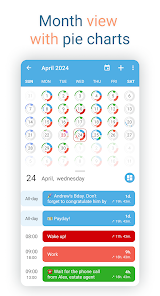


🎯 Sectograph is a new, intuitive way to view your calendar and daily schedule.
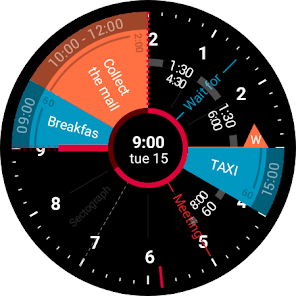
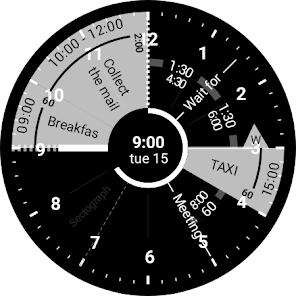
It shows your day as a circular planner — a 12-hour clock face — with events and free time between them.
A visual time planner for time blocking, time management, and a clearer sense of time.
⚙️ HOW IT WORKS
Sectograph is lightweight, privacy-friendly, and works with your existing calendars on the device.
It overlays your day planner (routine, local calendar, Google Calendar) onto a clock-face timeline and automatically calculates:
• upcoming events
• time blocks and durations
• gaps between events and your real free time
Everything updates as time passes, keeping your schedule always current.
Not a to-do list — it’s a calendar-based schedule planner that visualizes what’s already on your calendar.
👀 HOW IT LOOKS
Like an analog clock your brain already understands — but with your day mapped onto it as sectors.
• Events appear exactly in the hours they happen (a radial / circular calendar view)
• Each sector width matches the event duration (a true pie-chart schedule)
• See gaps and the time from “now” to the next event at a glance
A clock planner / visual planner that helps you read your day instantly.
🎯 USE CASES & IDEAS
Use Sectograph as a day planner, daily planner, time planner, or routine planner for time management and daily schedule planning.
Great for time blocking (deep work, meetings, breaks), work/shift schedules, class schedules, travel itineraries, and Pomodoro planning (place focus sessions as time blocks).
If you like Chronodex, you’ll feel right at home.
🔄 SYNC & CALENDARS
Reads events from Google Calendar and your local device calendar; Microsoft Outlook calendar: beta.
📱 HOME SCREEN CALENDAR WIDGET
Keep your schedule always visible with a calendar widget / home screen widget.
• Automatic updates (including a clock refresh once a minute)
• Tap a sector to open details and quick actions
• Flexible visual settings + free widget themes: Dark / White / Gray
• Optional: light/dark app theme, 24-hour mode & extra zoom (1–12h), month/day grid views
⌚ WEAR OS (SMARTWATCH SUPPORT)
A true Wear OS calendar / smartwatch calendar at a glance:
• Watch app with an interactive widget
• Tile for quick access to the circular planner
• Watch face for continuous schedule awareness (installed separately)
• Large complication to enhance some third-party watch faces
🧠 HELPFUL FOR ADHD & “TIME BLINDNESS”
Designed to make time easier to grasp — especially if you struggle with time blindness, which is common for people with ADHD.
(Sectograph is not a medical app.)
✅ Install Sectograph and get a calm, visual overview of your day.
Report

What's New
- Added support for new smartwatches: Galaxy Watch 7+, Google Pixel Watch 3+ and many others.
- New smartwatches received a Tile, watch face, and a functional widget app opened by tapping the Tile or watch face.
- Improved strings that display event waiting time.
- Added widget preview.
- Improved day indicator graphics.
- More exciting things ahead, stay with us ♡
- New smartwatches received a Tile, watch face, and a functional widget app opened by tapping the Tile or watch face.
- Improved strings that display event waiting time.
- Added widget preview.
- Improved day indicator graphics.
- More exciting things ahead, stay with us ♡
Download Sectograph Planner & Time manager on clock widget 5.22 [unlocked/Mod Money] MOD
You are now ready to download Sectograph Planner & Time manager on clock widget for free. Here are some notes:
- Please check our installation guide.
- To check the CPU and GPU of Android device, please use CPU-Z app