
SceneDeck APK Download v0.1.4 (Latest Version) for Android
⬇ Download APK v0.1.4The latest version of SceneDeck APK (v0.1.4) is available to download. Control OBS scenes, audio, streaming and recording from your Android device This app works on Android phones and tablets.
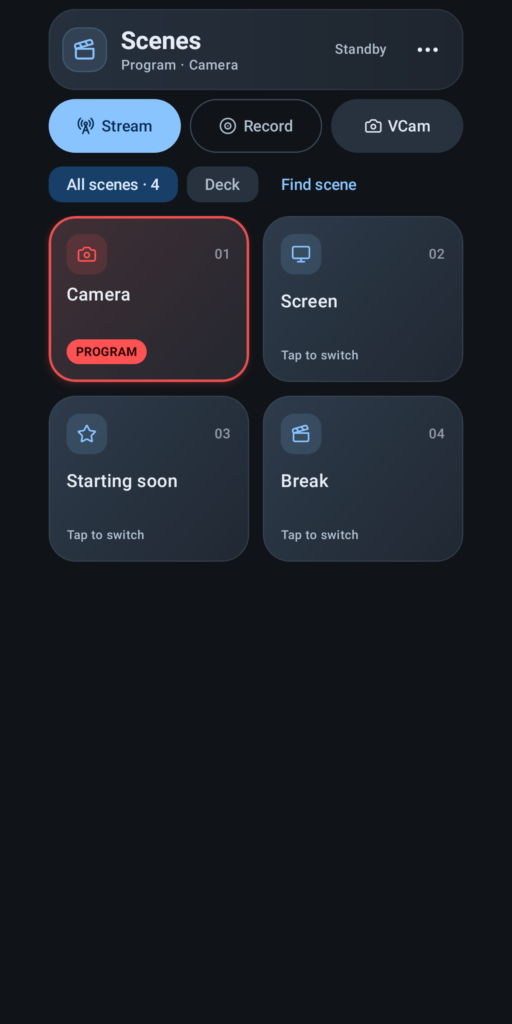
About SceneDeck APK
Turn your Android phone or tablet into an OBS Studio remote control deck. SCENES Switch scenes from a numbered grid, search your scene collection, and curate a personal Deck. Use Studio Mode to choose a preview scene and control transitions. MIXER Adjust audio levels, watch live meters, mute channels, and lock controls to prevent accidental changes. OUTPUTS AND STATS Control streaming, recording and the virtual camera. See live output timers and monitor FPS, bitrate, dropped frames, CPU usage and render time. YOUR SETUP Save connection profiles, choose light or dark themes, and adjust motion and confirmation settings. The standard Play/GitHub build also supports OBS connection QR codes; the F-Droid build uses manual connection entry. Optional widgets and background connection support keep useful controls close at hand. Scene curation stays on your device and does not modify the OBS scene collection. REQUIREMENTS Android 9 or later and OBS Studio 28 or later on your computer. Enable the OBS WebSocket server and…
SceneDeck APK was developed by Oleksandr Balyshyn and is available under the MIT open-source license. This means the source code is public and anyone can inspect it. If you like Remote Controller apps, you can also browse more apps in this category.
SceneDeck APK Information
| App Name | SceneDeck |
| Package | com.worxbend.scenedeck |
| Version | 0.1.4 |
| Size | 7 MB |
| Requires | Android 9 and up |
| Category | Remote Controller |
| Developer | Oleksandr Balyshyn |
| License | MIT |
| Source | F-Droid |
| Last Updated | October 27, 2026 |
How to Install SceneDeck APK on Android
- Download the SceneDeck APK file using the button above.
- Open your phone Settings and allow “Install unknown apps” for your browser or file manager.
- Tap the downloaded APK file and press Install.
- After installation, open SceneDeck from your app drawer.
Why Download SceneDeck APK from Here?
We link SceneDeck APK directly from F-Droid, so the file is original and we make no changes to it. Whenever a new version is released, this page is updated automatically, so you always get the latest SceneDeck APK.
Frequently Asked Questions
Is SceneDeck APK free?
Yes, SceneDeck APK is free and available under the MIT open-source license.
Is SceneDeck APK safe?
This file comes from the official F-Droid repository, where apps are open source and their source code is public. Still, always check an app’s permissions before installing it.
Which Android version does SceneDeck APK need?
SceneDeck APK requires Android 9 and up to run.
What is the latest version of SceneDeck APK?
The latest version is 0.1.4, updated on October 27, 2026.
Official page: SceneDeck official website / source