
Pixel Gallery APK Download v4.1.8 (Latest Version) for Android
⬇ Download APK v4.1.8Pixel Gallery APK is an innovative application designed with user privacy in mind. It combines a modern look with robust performance, making it a fantastic option for anyone looking to enhance their photo management experience seamlessly.
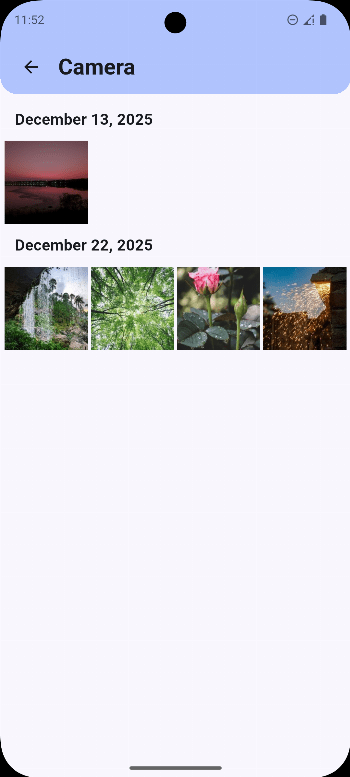
Table of Contents
About Pixel Gallery APK
Pixel Gallery serves as a sophisticated gallery application that emphasizes user privacy while delivering a premium experience. The app's design is rooted in the principles of Material You, allowing it to modify its theme to match the wallpaper of your device, creating a cohesive look for your photo collection. This personalization is not just visually appealing but also functional, as it makes navigating through your memories more enjoyable.
With an array of features designed to enhance photo management, Pixel Gallery allows users to easily organize their albums, view motion photos, and even locate images on a map. This level of detail ensures that not only are your photos stored securely, but they are also easily accessible and manageable. The app places user convenience at the forefront, ensuring that all your precious memories are just a click away.
As a gallery focused on privacy, Pixel Gallery ensures that all data and image processing occur directly on your device, eliminating concerns about online data storage. This aspect is particularly crucial for individuals who prioritize security and seek efficient ways to store and view their personal images. By combining high performance with user-centric features, it stands out in the realm of photo gallery applications.
Key Features of Pixel Gallery APK
- The app prioritizes user privacy by ensuring that all data management and processing happens locally on your device, keeping your memories safe from third-party access.
- With Material 3 design, it offers a sleek, modern interface that is visually appealing and responsive, adapting to your preferences and device settings.
- Pixel Gallery fully supports motion photos, allowing users to view and manage these dynamic visuals seamlessly within the app.
- The integration of map functionality offers users the ability to view the locations where their photos were taken, providing context and memories connected to those places.
- Organizing favorite photos is made easy with designated features that help users quickly access their best shots, while the recovery option in the recycle bin helps in retrieving deleted items.
- Its performance is characterized by rapid image loading and fluid transitions, contributing to a smooth user experience while navigating through your photo library.
Pixel Gallery APK Information
| App Name | Pixel Gallery |
| Package | com.pixel.gallery |
| Version | 4.1.8 |
| Size | 20 MB |
| Requires | Android 8.0 and up |
| Category | Graphics |
| Developer | Bhargava K K |
| License | GPL-3.0-only |
| Source | IzzyOnDroid |
| Last Updated | August 27, 2026 |
Download Pixel Gallery APK v4.1.8
How to Install Pixel Gallery APK on Android
- Download the Pixel Gallery APK from a reliable source.
- Allow installations from unknown sources in your device settings.
- Once downloaded, tap on the APK file to begin the installation.
- Follow the prompts to complete the installation process.
- Open the app after installation to start organizing and viewing your photos.
Pros and Cons
Pros
- Offers a user-friendly design that enhances the photo viewing and management experience.
- Prioritizes user privacy by keeping all data processing localized.
- Integrates advanced features like motion photo support and map integration, adding versatility.
- Highly responsive and fast, providing a seamless user experience without lag.
Limitations
- As an APK, it may require manual updates since it is not available on traditional app stores.
- Users need to sideload the app, which could be a barrier for those unfamiliar with this process.
Who Is This App For?
This app is ideal for users who value privacy in their photo management and prefer a highly customizable gallery experience. It suits those who enjoy modern design and want to organize their images effortlessly.
Looking for similar apps? Browse more Graphics apps or see all Android apps on APK2GO.
Frequently Asked Questions
What is Pixel Gallery?
Pixel Gallery is a privacy-focused photo management application that offers features like album organization, motion photo support, and map integration for a tailored user experience.
Is the app free?
Yes, Pixel Gallery is available for free, making it accessible to users who want to enhance their photo organization without financial commitment.
Where can I download the app safely?
You can download Pixel Gallery APK from reputable sources like GitHub, ensuring that you receive a secure and up-to-date version of the app.
Does it require an internet connection?
Pixel Gallery does not require an ongoing internet connection since all data processing occurs locally. However, some features may need connectivity for features like map integration.
Can I retrieve deleted photos?
Yes, the app includes a recycle bin feature that allows users to recover deleted items easily, ensuring that you don't lose your precious memories accidentally.
Official page: Pixel Gallery official website / source