
Plexus APK Download v2.2.1 (Latest Version) for Android
⬇ Download APK v2.2.1The Plexus APK offers a unique solution to check app compatibility with de-Googled devices, ensuring that users can navigate the complexities of using custom ROMs. With many users opting for alternatives to standard Android operating systems, this app proves invaluable for those looking to maintain functionality across their favorite applications.
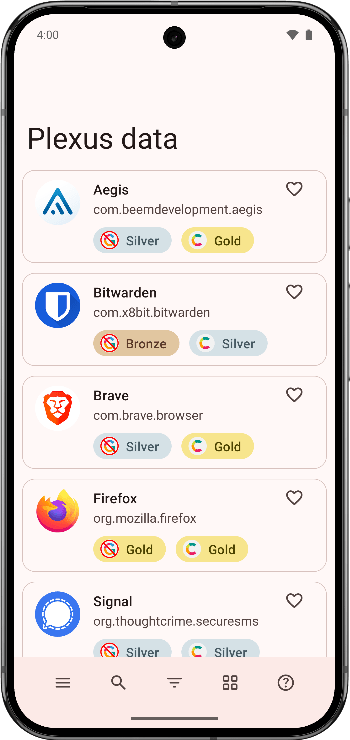
Table of Contents
About Plexus APK
Plexus is designed to assist users who have chosen to install custom ROMs on their Android devices that do not include Google Play Services. Many popular Android apps rely on Google’s framework, which can lead to compatibility issues when these services are absent.
The app provides a straightforward platform for users to find detailed information about app compatibility with various de-Googled ROMs. Users can easily learn which applications will function properly or which may have limitations based on community-generated data.
By tapping into a crowdsourced model, Plexus keeps its database current and relevant, as real users submit their experiences with app functionality across different systems. This shared knowledge helps others avoid frustrating pitfalls when seeking to use their preferred apps without traditional Google support.
Key Features of Plexus APK
- The app offers crowdsourced compatibility data, allowing users to see which apps work well on de-Googled devices, providing a community-driven approach to app functionality.
- Plexus supports various custom ROMs, including those running without Google Play Services, and ensures users can access critical insights tailored to their setup.
- It provides clear indications on which applications are fully functional, face restrictions, or are completely incompatible, making app selection simpler for those using modified Android versions.
- The data presented is consistently updated, allowing users to benefit from the latest information gathered from a community dedicated to navigating de-Googled Android experiences.
- The design of the app emphasizes user-friendliness, making it easy for users to navigate through app compatibility reports without unnecessary complications.
- Plexus serves as a valuable tool for both newcomers and experienced users in the realm of custom ROMs, helping enhance their overall Android experience.
Plexus APK Information
| App Name | Plexus |
| Package | tech.techlore.plexus |
| Version | 2.2.1 |
| Size | 8 MB |
| Requires | Android 8.0 and up |
| Category | System |
| Developer | Techlore |
| License | GPL-3.0-only |
| Source | IzzyOnDroid |
| Last Updated | July 29, 2026 |
How to Install Plexus APK on Android
- Download the Plexus APK file from a trustworthy source, such as the project’s GitHub repository.
- Allow installations from unknown sources in your device's settings to proceed with the installation.
- Locate the downloaded APK file in your device's storage and tap on it to initiate the installation process.
- Follow the on-screen prompts to complete the installation, and then open the app to start checking your app compatibility.
Pros and Cons
Pros
- Plexus is a community-driven app that keeps compatibility data current and relevant through user contributions.
- It eliminates the uncertainty associated with app functionality on de-Googled devices, providing clear guidance on user experiences.
- The app is designed to be user-friendly, which makes it accessible for those unfamiliar with custom ROMs and the concept of de-Googled Android devices.
Limitations
- Since the app relies on crowd-sourced data, there may be gaps in information or outdated details that don't reflect the most recent app updates.
- Sideloading the app can be a barrier for some users, as it requires adjusting device security settings that may not be intuitive.
- Compatibility checks are limited to community-reported data, which can vary in reliability and may not cover all available apps.
Who Is This App For?
Plexus is ideal for users who utilize custom ROMs or opt for de-Googled Android systems and are looking for ways to ensure their apps remain functional. It's particularly suited for tech-savvy individuals and developers who want comprehensive compatibility information.
Looking for similar apps? Browse more System apps or see all Android apps on APK2GO.
Frequently Asked Questions
What does Plexus do?
Plexus helps users check which apps are compatible with their de-Googled Android devices, particularly when using custom ROMs that don't include Google Play Services.
Is Plexus free to use?
Yes, Plexus is free to download and use. It operates as an open-source project under the GPL-3.0 license, ensuring users have unrestricted access.
Where does the app's data come from?
The app's compatibility data is crowdsourced from the user community, ensuring that the information is both reliable and up to date based on real experiences.
Is it safe to install Plexus?
As long as you download the Plexus APK from a reputable source, the app is considered safe to use. However, always ensure your device is protected against unknown threats.
How can Plexus help me with app selection?
Plexus assists in selecting compatible applications for your device by providing insights into which apps work with various custom ROMs and informing you of any limitations.
Official page: Plexus official website / source