
droidVNC-NG APK Download v2.22.2 (Latest Version) for Android
⬇ Download APK v2.22.2The droidVNC-NG APK offers users an efficient way to transform their Android devices into remote control workstations. As an open-source VNC server app, it allows for seamless interaction with your device over a local network without requiring root privileges.
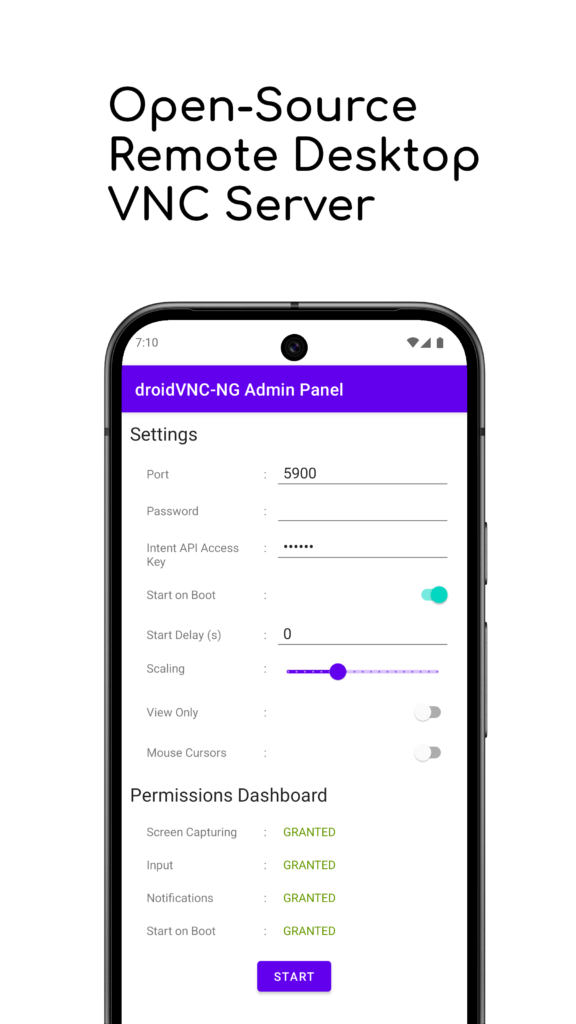
Table of Contents
About droidVNC-NG APK
droidVNC-NG is a versatile remote access application that enables users to operate their Android devices from a different location using a VNC client. It is particularly useful for people who need to control their devices without being physically present, making it a great tool for tech support, remote work, or personal organization. With its straightforward setup on local networks, it ensures that users can maintain accessibility efficiently.
The app excels in screen sharing, allowing you to view and operate your device’s display remotely. Users can share their Android screens with different clients connected to the same network which provides an interactive experience. You can use mouse and keyboard inputs to control the device, giving you comprehensive control without needing to be right next to it.
One standout aspect of droidVNC-NG is its convenience in managing tasks. Users can remotely access functionality such as the recent apps menu, home screen, and volume controls, enhancing the user experience. Additionally, the app supports text copying and pasting between devices, so you can easily transfer information without any hassle.
Key Features of droidVNC-NG APK
- The app allows users to share their Android device's screen with others over the network, providing a versatile solution for tasks such as presentations or tech support.
- It enables remote control using a VNC client, incorporating easy mouse and keyboard interactions to navigate your device effectively without physical access.
- Through its special key functions, users can simulate pressing various buttons like home or volume, enhancing overall device control remotely.
- Text copy and paste functionality is included, allowing users to transfer text seamlessly from the device to the VNC client, streamlining workflows.
- droidVNC-NG supports multiple mouse pointers, enabling various connected clients to have unique cursors, improving clarity and coordination during remote sessions.
- Accessing shared screens via a web browser is another highlight, eliminating the need for a dedicated VNC client and simplifying the remote access experience.
droidVNC-NG APK Information
| App Name | droidVNC-NG |
| Package | net.christianbeier.droidvnc_ng |
| Version | 2.22.2 |
| Size | 6 MB |
| Requires | Android 7.0 and up |
| Category | Connectivity |
| Developer | Christian Beier |
| License | GPL-2.0-only |
| Source | F-Droid |
| Last Updated | November 1, 2026 |
Download droidVNC-NG APK v2.22.2
How to Install droidVNC-NG APK on Android
- Download the droidVNC-NG APK from a trusted source like F-Droid.
- Before installing, go to your device's settings and enable installations from unknown sources.
- Tap the downloaded APK file to start the installation process.
- Once installed, open the app and follow the on-screen instructions to configure your remote access settings.
Pros and Cons
Pros
- It does not require root access, making it accessible to a wider range of devices.
- The option for remote control via web browsers allows for greater flexibility without needing additional software.
- Text copy and paste functionality enhances productivity by simplifying information transfer between devices.
Limitations
- Users may need to provide accessibility permissions, which could present privacy concerns for some.
- It requires manual updates by downloading the latest APK from the source, rather than receiving automatic updates.
- Being a sideloaded app, there may be limitations in official support or user guidance available.
Who Is This App For?
This app is ideal for users who regularly need remote access to their Android devices, particularly those involved in technical support or who work remotely. It's also beneficial for educators or presenters sharing their screen with an audience.
Looking for similar apps? Browse more Connectivity apps or see all Android apps on APK2GO.
Frequently Asked Questions
What does droidVNC-NG do?
droidVNC-NG transforms your Android device into a VNC server, allowing you to access and control it remotely from another device over a local network.
Is droidVNC-NG safe to use?
Yes, it is considered safe as it is open-source. However, always download the app from reputable sources to avoid malicious versions.
Where can I get the droidVNC-NG APK?
You can find the droidVNC-NG APK on F-Droid or its GitHub repository, which ensures that you get the latest version directly from the source.
Can I use droidVNC-NG on a public network?
While it is primarily designed for local network use, you can technically use it on public networks, but be cautious about security risks.
Do I need to root my device for this app?
No, one of the main advantages of droidVNC-NG is that it operates without requiring root access, making it widely accessible.
Official page: droidVNC-NG official website / source