
Slate APK Download v1.2 (Latest Version) for Android
⬇ Download APK v1.2Slate APK provides a refreshing approach to launching applications on your Android device. This minimal launcher prioritizes simplicity and customization, allowing users to create a home screen that meets their unique preferences and styles. With its innovative freescreen mode, it redefines how you interact with app icons, offering a truly customizable experience.
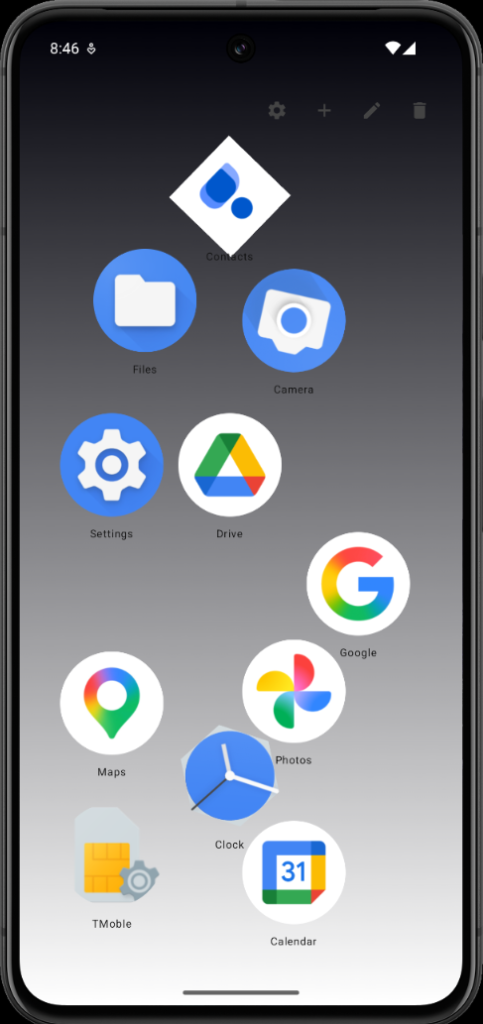
Table of Contents
About Slate APK
Slate is designed for those who want a straightforward, uncluttered launcher without the distractions often found in other apps. It emphasizes efficient app launch and organization, enabling users to arrange their applications freely on a blank canvas instead of adhering to a traditional grid layout. This innovative approach allows users to create a personalized home screen that reflects their lifestyle and preferences.
The app's focal point is the freescreen mode, which allows you to drag icons anywhere on the screen, giving you the freedom to position your apps precisely as you like. For users who prefer some structure, it also provides guide lines to align icons neatly. If you enjoy a more ordered approach, the list mode can help, offering vertical or horizontal scrolling options alongside drag-and-drop reordering.
Slate caters to a wide range of users through its support for work profiles, allowing easy integration with apps from alternative profiles. Additionally, the app offers various customization options for wallpapers and icon styles which enhance both aesthetics and usability. Whether you want a simple minimalistic look or a more vibrant, personalized setup, it can adapt to your needs.
Key Features of Slate APK
- The freescreen feature of the app lets you drag icons to any position on the screen, liberating you from the constraints of a traditional app grid.
- Guide lines can be pulled from the screen edges, allowing for optional structure when aligning icons, ensuring a neat arrangement if desired.
- With the list mode available, users can opt for a vertically or horizontally scrolling list of apps, enhancing accessibility and organization.
- An optional swipe-up search simplifies app launching, allowing you to type part of an app's name and automatically open it once it becomes the only match.
- The app supports extensive per-app customization; you can adjust icon sizes, shapes, and labels according to your personal preferences.
- Support for various icon packs enables seamless integration with popular formats, enhancing your experience by allowing you to further stylize your home screen.
Slate APK Information
| App Name | Slate |
| Package | com.braniik.slate |
| Version | 1.2 |
| Size | 3 MB |
| Requires | Android 10 and up |
| Category | Launcher |
| Developer | braniik |
| License | MIT |
| Source | F-Droid |
| Last Updated | November 1, 2026 |
How to Install Slate APK on Android
- Download the Slate APK from a trusted source like F-Droid.
- Before installing, navigate to your device settings and enable installations from unknown sources.
- Once downloaded, tap the APK file to begin the installation process.
- Open the app to start customizing your home screen and enjoy a tailored app-launching experience.
Pros and Cons
Pros
- Slate offers a highly customizable experience, allowing users to design their home screen exactly as they envision it.
- The absence of unnecessary features or bloat makes it lightweight and easy to navigate.
- Its innovative layout options, including the unique freescreen mode, set it apart from typical launchers, providing unparalleled flexibility.
- Support for work profiles makes it practical for users who need to separate personal and professional apps seamlessly.
Limitations
- The need to sideload the app may deter less tech-savvy users who prefer downloading from the Google Play Store.
- Occasional manual updates might be necessary since the app does not automatically update through conventional channels.
- Detailed information about user experiences and general app behavior may be limited as its user base is less mainstream.
Who Is This App For?
Slate is suitable for minimalist users who appreciate simplicity and customization. It's especially helpful for those who wish to declutter their home screens or prioritize efficiency in app launching.
Looking for similar apps? Browse more Launcher apps or see all Android apps on APK2GO.
Frequently Asked Questions
What does Slate do?
Slate is a minimal launcher that allows users to organize their apps on a blank screen without the constraints of a grid. It offers customizable layouts and features to facilitate easy app launching.
Is Slate free?
Yes, the app is free to download and use, making it accessible for anyone looking to enhance their Android experience.
Is it safe to install Slate?
The app is shared through reputable channels like F-Droid, which ensures that the APK is secure and regularly maintained. Users should still take care to download from trustworthy sources.
How do I customize my home screen?
Customizing your home screen in Slate involves dragging app icons to any position you prefer, using guide lines for alignment, or switching to list mode for organization.
Can I use my own wallpapers?
Absolutely! The app supports various wallpaper options, including solid colors, gradients, and personal images, so you can personalize your experience further.
Official page: Slate official website / source