
Turn the Page APK Download v1.7.1 (Latest Version) for Android
⬇ Download APK v1.7.1The Turn the Page APK offers a unique reading experience designed for fans of digital books who prefer a tactile approach. This app sets itself apart by emulating the feeling of reading from a physical book while maintaining an offline presence for optimal usability.
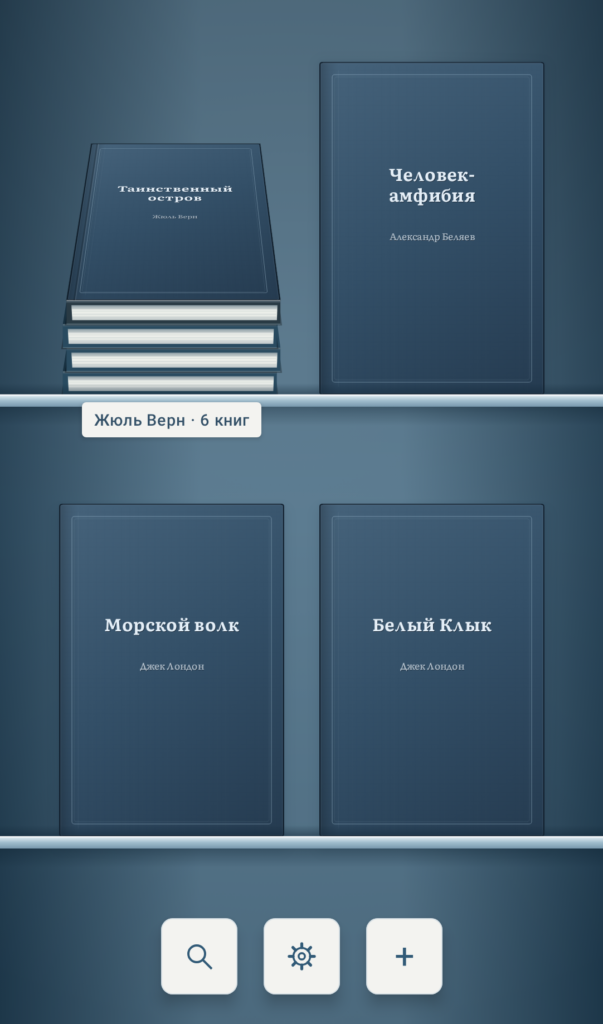
Table of Contents
About Turn the Page APK
Turn the Page is an innovative ebook reader tailored for Android devices, enabling users to enjoy various formats such as FB2, EPUB, and PDF. It focuses on providing an interface that mimics the experience of flipping through actual pages, making it appealing to those who love the feel of a traditional book.
With the app, users can easily import multiple files, including entire folders with subfolders. It's designed for efficient organization and navigation, allowing readers to create stacks of books based on genre, author, or series, facilitating quick access to their favorite titles.
The reader is versatile in its display options, adapting seamlessly from phone screens to larger foldable devices where two-page spreads can be viewed. Its user-friendly search function enables readers to locate books swiftly within their library, enhancing their reading experience.
Key Features of Turn the Page APK
- The app supports a variety of ebook formats, including FB2, FB2.ZIP, EPUB 2/3, and PDF, catering to diverse reading preferences.
- Users can manage their libraries by dragging book covers to reorder them or create personalized stacks, making organization simple and efficient.
- It offers a distinct physical page-turning experience, allowing readers to navigate through their books as they would with a traditional paper book.
- The library interface allows for zoom adjustments, letting users choose from three different zoom levels according to their preferences.
- Readers can take advantage of multiple language options, including English, Spanish, and French, providing a broader usability for diverse audiences.
- It also features a dedicated viewer for PDFs that maintains the original layout, although certain interactive features like text search and font changes are not supported.
Turn the Page APK Information
| App Name | Turn the Page |
| Package | com.avstaim.listai |
| Version | 1.7.1 |
| Size | 14 MB |
| Requires | Android 8.0 and up |
| Category | Ebook Reader |
| Developer | Алексей Щербинин |
| License | Apache-2.0 |
| Source | F-Droid |
| Last Updated | November 1, 2026 |
Download Turn the Page APK v1.7.1
How to Install Turn the Page APK on Android
- Download the Turn the Page APK file from a trusted source.
- Go to your device's settings to allow installations from unknown sources.
- Locate the downloaded file in your file manager and tap on it to begin the installation.
- Once installed, open the app and start enjoying your reading experience with ease.
Pros and Cons
Pros
- Emulates the experience of reading a physical book, which many users find comforting and engaging.
- Offers support for multiple ebook formats, making it a versatile option for readers with varying library collections.
- Features a highly customizable interface with various themes, typography adjustments, and intuitive navigation options.
Limitations
- Manual updates may be required since the app is not available on mainstream app stores like Google Play.
- Limited support for PDF interactivity reduces usability for those who rely heavily on features like text searching and font customization.
Who Is This App For?
Turn the Page is ideal for avid readers who prefer a tactile, offline reading experience. It's particularly suited for those who have a large collection of digital books and appreciate customizable interfaces.
Looking for similar apps? Browse more Ebook Reader apps or see all Android apps on APK2GO.
Frequently Asked Questions
What formats can I read with Turn the Page?
You can read FB2, EPUB, and PDF formats with this app, making it a versatile choice for various ebook collections.
Is Turn the Page free to use?
Yes, Turn the Page is free to use, allowing readers to enjoy its features without any cost involved.
Is it safe to install Turn the Page?
Yes, as long as you download it from a reputable source, Turn the Page is considered safe for installation on Android devices.
Can I search for books in my library using the app?
Absolutely! The app includes a search function that allows users to quickly find books by title or author within their library.
Does it support reading in different languages?
Yes, the app supports multiple languages, including Russian, English, Spanish, German, French, Italian, and Brazilian Portuguese, catering to a global audience.
Official page: Turn the Page official website / source