
Arcade APK Download v1.2 (Latest Version) for Android
⬇ Download APK v1.2The Arcade APK is a unique game management tool designed for users seeking a minimal yet functional launcher. This app introduces a fresh approach to organizing and controlling access to your games, enhancing your gaming experience while prioritizing your privacy.
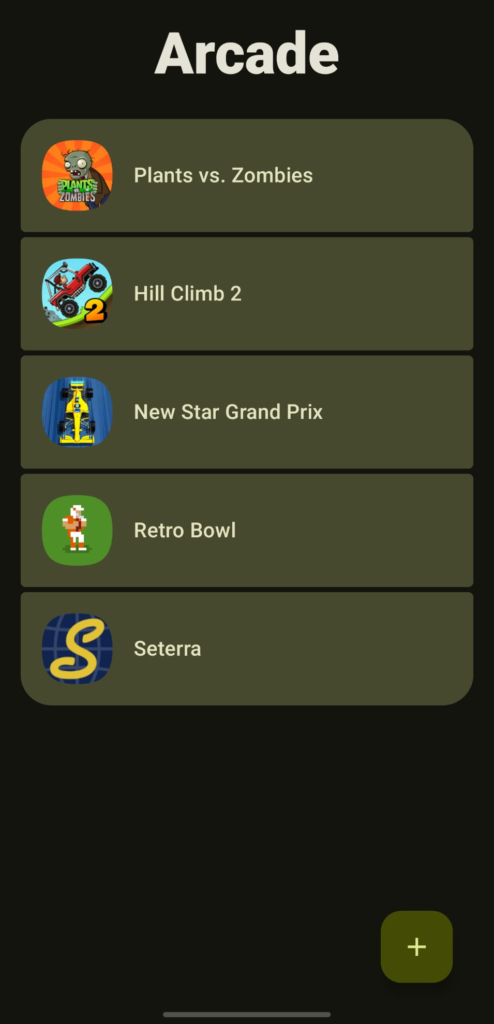
Table of Contents
About Arcade APK
Arcade is an innovative game launcher that employs a Material You aesthetic to enhance your user interface. This minimalistic approach allows gamers to focus on their library without any distractions, promoting a clean and organized environment. Users can easily access their favorite offline games while managing their internet connectivity, ensuring a more enjoyable experience.
One of the key uses of the app is its ability to block selected offline games from accessing the internet. By utilizing either Shizuku or a VPN, users can effectively save battery life, reduce ad interruptions, and bolster their privacy when gaming. This feature makes it an invaluable tool for users who are conscious about their data usage and online safety.
In addition to its network management capabilities, the app also offers numerous organizational features. You can rename games for easier identification and automatically toggle Do Not Disturb mode for specific titles, allowing for immersive gameplay without unnecessary notifications. This combination of utility and customization makes Arcade highly appealing to dedicated gamers.
Key Features of Arcade APK
- The app provides a distraction-free launcher that centers attention solely on your gaming library, utilizing a clean and modern Material design.
- It allows users to block internet access for selected offline games, which can enhance performance and decrease battery drain.
- Gamers can rename their titles for better organization and personal preference, making them easier to navigate in the launcher.
- The app can automatically enable or disable Do Not Disturb mode based on the game being played, minimizing interruptions during intense gaming sessions.
- Users have the ability to sort their game library into groups, enabling easier access and management of their gaming collection.
- Arcade acts as a firewall, protecting user privacy by preventing unwanted network access to specific applications.
Arcade APK Information
| App Name | Arcade |
| Package | com.arthur.arcade |
| Version | 1.2 |
| Size | 3 MB |
| Requires | Android 13 and up |
| Category | App Manager |
| Developer | Arthur |
| License | GPL-3.0-only |
| Source | F-Droid |
| Last Updated | October 31, 2026 |
How to Install Arcade APK on Android
- Download the Arcade APK from the F-Droid repository or the project's GitHub page.
- Allow installations from unknown sources in your device settings to enable the app installation.
- Locate the downloaded APK file and tap on it to begin the installation process.
- Once installed, open the app from your app drawer to start managing your games.
Pros and Cons
Pros
- The minimalistic design promotes a focused gaming experience, reducing clutter in your app launcher.
- Offers potent features like network banning and organization tools to enhance performance and convenience.
- It helps conserve battery life and safeguard privacy by preventing unauthorized network access for games.
Limitations
- The app needs to be sideloaded, which may be a barrier for some users unfamiliar with this process.
- There's a possibility of manual updates, which can result in users missing out on the latest features and improvements.
- Limited to managing offline games only, which may not address the needs of every gamer.
Who Is This App For?
This app is ideal for gamers who prioritize managing their game library while maximizing battery life and privacy during gameplay. It suits anyone looking for a streamlined gaming experience with added security features.
Looking for similar apps? Browse more App Manager apps or see all Android apps on APK2GO.
Frequently Asked Questions
What is the main purpose of the Arcade app?
Arcade serves as a minimalistic game launcher that helps manage your offline games while blocking their internet access to save battery and enhance privacy.
Is the Arcade APK free to use?
Yes, the Arcade app is free to download and use, making it accessible for all Android users without any hidden costs.
Where can I download the Arcade APK?
You can find the Arcade APK on F-Droid or the project's official GitHub page, ensuring you get a safe and up-to-date version.
Is it safe to use Arcade on my device?
Arcade prioritizes user security and privacy by blocking unwanted internet access for games, providing a safe option for managing your gaming library.
How do I make the most of the app?
To maximize your use of Arcade, take advantage of its organizational features like grouping games and renaming titles while ensuring your Do Not Disturb settings are appropriately adjusted for your gaming sessions.
Official page: Arcade official website / source