
Haven APK Download v0.1.5 (Latest Version) for Android
⬇ Download APK v0.1.5The Haven APK provides users with a unique opportunity to isolate and run multiple instances of their favorite applications through Android's Work Profile feature. This app is particularly useful for individuals who want to maintain a separation between their personal and professional applications.
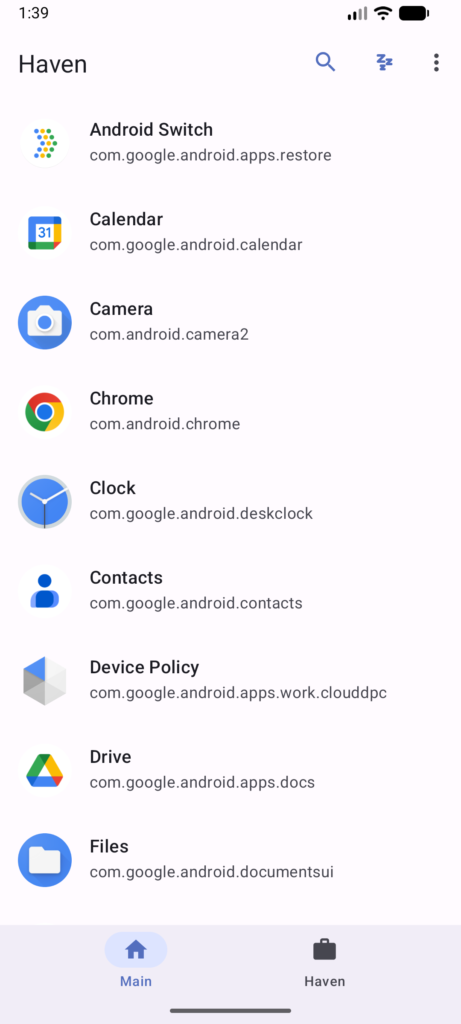
Table of Contents
About Haven APK
Haven is a free and open-source application designed specifically for Android devices. It takes advantage of the Work Profile feature to create a distinct space where users can install or clone applications without interfering with their primary app installations. This isolation helps users manage their apps better, especially in scenarios where they want to segregate their work and personal environments on the same device.
The primary function of Haven revolves around the concept of app segregation. Users can not only install two instances of the same application but also freeze certain apps within the work profile. Freezing an app prevents it from running in the background when it's not in use, thus saving battery and securing user data. This feature is particularly beneficial for users who want to control which apps are active and when.
Developed by Kenneth-Cho-InfoSec, Haven operates under the GPL-3.0-only open-source license, ensuring that its source code remains available to the public. This encourages transparency while allowing users to have confidence in the security measures implemented within the app. However, potential users should be aware that the app depends on the stability of the Android Work Profile feature in their devices, indicating that any issues with this feature might also affect their experience with Haven.
Key Features of Haven APK
- Users can isolate applications by installing them within a dedicated work profile, ensuring that their personal and professional apps remain separate.
- Haven allows for the freezing of apps in the work profile, preventing them from running in the background and thereby conserving system resources.
- The application creates unique app instances, enabling users to run multiple copies of the same app simultaneously on a single device.
- As an open-source project, Haven encourages developers to contribute to its improvement and offers transparency regarding its functionality.
- Haven functions independently of existing app installations, meaning users can try out the app without disrupting their current setup.
- The application is compatible with both Android phones and tablets, providing flexibility for various device users.
Haven APK Information
| App Name | Haven |
| Package | io.github.kennethchoinfosec.haven |
| Version | 0.1.5 |
| Size | 3 MB |
| Requires | Android 7.0 and up |
| Category | App Manager |
| Developer | Kenneth-Cho-InfoSec |
| License | GPL-3.0-only |
| Source | F-Droid |
| Last Updated | October 31, 2026 |
How to Install Haven APK on Android
- Download the Haven APK file from a trusted source like the F-Droid repository.
- Before installing, ensure that your device allows installations from unknown sources in the security settings.
- Once you've downloaded the file, locate it in your device's file manager and tap to start the installation process.
- After the installation completes, open the app from your app drawer to begin configuration.
Pros and Cons
Pros
- Haven provides a straightforward solution for users who need to manage multiple instances of applications efficiently.
- The freezing feature aids in enhancing device performance by reducing unnecessary background processes.
- As an open-source app, it allows users to further customize their experience and promote community-driven development.
- The app is lightweight, making it easy to install and operate without consuming significant resources on your device.
Limitations
- The application may be subject to bugs or limitations based on the performance of Android's Work Profile feature.
- Users need to manually keep the application updated, as it does not automatically receive updates from the Play Store.
- Haven must be sideloaded, which may be a barrier for some users who are uncomfortable with installing apps outside of the official store.
Who Is This App For?
Haven is best suited for users who want to maintain distinct environments for work and personal tasks on their Android devices, particularly those who frequently use the same apps for different purposes.
Looking for similar apps? Browse more App Manager apps or see all Android apps on APK2GO.
Frequently Asked Questions
What does Haven APK do?
Haven APK allows users to create isolated instances of applications on their Android devices using the Work Profile feature, which helps separate personal and professional apps.
Is Haven free to use?
Yes, Haven is completely free to download and use, as it is an open-source application licensed under GPL-3.0-only.
Is Haven safe to use?
The safety of Haven largely depends on the implementation of the Work Profile feature in your Android system. Since it is open-source, users can review the code to ensure its security.
Where can I download the Haven APK?
You can download the Haven APK from reputable sources such as the F-Droid repository or the project's GitHub page.
How do I use Haven with my existing apps?
Once installed, you can use Haven to clone existing applications or install new ones within the work profile, effectively managing your app usage by keeping them separate.
Official page: Haven official website / source