
Cobalt APK Download v2.2.2 (Latest Version) for Android
⬇ Download APK v2.2.2Cobalt APK offers a versatile solution for those seeking to capture notes and organize personal knowledge effortlessly. This app stands out with its offline-first capabilities, allowing users to create a local archive of their thoughts and ideas without the need for an internet connection.
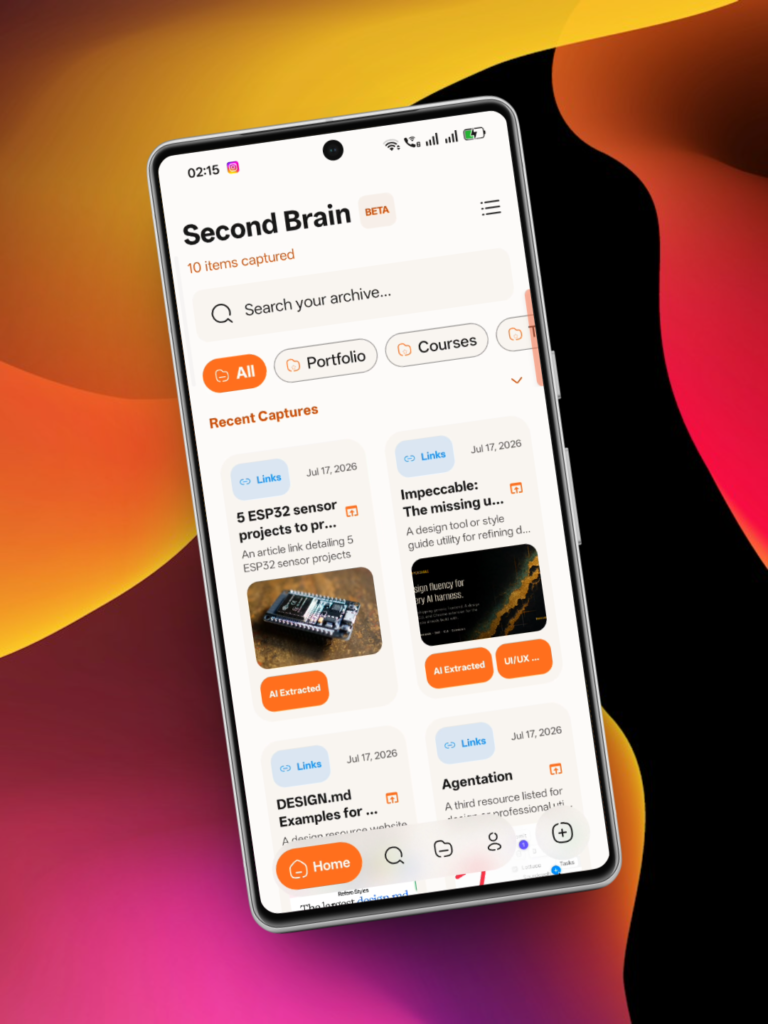
Table of Contents
About Cobalt APK
Cobalt serves as a personal archive and capture tool for Android users, facilitating the storage of various types of content including text notes, links, images, and audio clips. Users can easily keep track of their thoughts, tasks, and creative ideas in a structured manner. The offline-first approach ensures accessibility without relying on an account or internet connection, making it a convenient option for individuals who often find themselves on the go.
With its intuitive design, Cobalt allows for quick and seamless capturing of information. Users can effortlessly store movie and anime watchlists alongside their notes, enhancing their overall organizational experience. The app's capability to interact with shared content from other applications simplifies the task of collecting information for later use, thus streamlining the note-taking process.
Cobalt also enables users to maintain a personal knowledge archive through effective organization features like custom folders and an archiving system. Its ability to house various item types, from Markdown text to audio recordings and more, offers flexibility for different note-taking or project management styles. The app proves beneficial for creative professionals, students, and anyone interested in maintaining a structured collection of ideas and references.
Key Features of Cobalt APK
- The app allows integration with other applications, enabling users to save text, URLs, images, and videos directly from the system share sheet, enhancing document retrieval.
- Cobalt features a floating overlay panel that helps users jot down quick notes and capture links without interrupting their current app session, enhancing workflow.
- Its screen region OCR capability allows users to take screenshots or crop specific areas of the screen to extract text and links, thus making information capture effortless.
- Users can access a Quick Settings tile that permits direct OCR capture, allowing for rapid note-taking right from the system settings panel.
- For audio documentation, the app supports voice notes that display real-time waveforms, with all recordings stored locally for easy playback and management.
- Home screen widgets provide users with convenient access, allowing them to view recent captures and perform capture actions directly from their device's main screen.
Cobalt APK Information
| App Name | Cobalt |
| Package | com.hanan_bhatti.cobalt |
| Version | 2.2.2 |
| Size | 5 MB |
| Requires | Android 7.0 and up |
| Category | Bookmark |
| Developer | Hanan Bhatti |
| License | AGPL-3.0-or-later |
| Source | F-Droid |
| Last Updated | October 29, 2026 |
How to Install Cobalt APK on Android
- Download the Cobalt APK from a trusted source like F-Droid.
- Allow your device to install apps from unknown sources in the security settings.
- Locate the downloaded file in your device’s file manager and tap on it to begin installation.
- Once installed, open the app from your app drawer and start capturing your notes.
Pros and Cons
Pros
- The app functions offline, giving users the flexibility to capture information anytime and anywhere without needing an internet connection.
- It supports a diverse range of content types, making it easy to store links, notes, images, and even audio files in one organized place.
- Cobalt's intuitive features, such as quick note capture and OCR capabilities, enhance usability and streamline the note-taking process.
Limitations
- As an open-source app, it requires manual updates, which may pose a challenge for less tech-savvy users.
- The app needs to be sideloaded, as it is not available on conventional app stores, limiting accessibility for some users.
Who Is This App For?
Cobalt is ideal for individuals who value organization and need a reliable way to capture thoughts, references, and creative ideas on the go. Its versatility suits students, professionals, and anyone looking to enhance their personal knowledge management.
Looking for similar apps? Browse more Bookmark apps or see all Android apps on APK2GO.
Frequently Asked Questions
What does Cobalt do?
Cobalt is a note-taking and personal knowledge archive app that allows users to capture various types of content like text notes, links, images, and audio clips. It excels in storing information offline without requiring an online account.
Is Cobalt free to use?
Yes, Cobalt is completely free to use, as it is licensed under the AGPL-3.0-or-later, giving users access to all features without any payment.
Is Cobalt APK safe to install?
While Cobalt itself is safe, it's important to download the APK from reputable sources to ensure file integrity. Open-source apps are generally considered secure as they can be audited by the community.
How do I use Cobalt for capturing notes?
You can use various methods within the app to capture notes, such as sharing text or links from other apps, using the floating overlay, or utilizing the voice recording feature for audio memos. It supports diverse item types for flexibility.
Can I organize my notes in Cobalt?
Absolutely! Cobalt allows you to create custom folders and archive items, enabling effective organization of your notes and capturing documents in a way that suits your workflow.
Official page: Cobalt official website / source