
Last Launcher APK Download v1.4.0 (Latest Version) for Android
⬇ Download APK v1.4.0For users seeking simplicity and speed in their Android experience, the Last Launcher APK stands out as a minimal text-only launcher. Designed for streamlining access to your favorite applications, it eliminates distractions and clutter, giving users a neat interface that showcases apps simply as text labels.
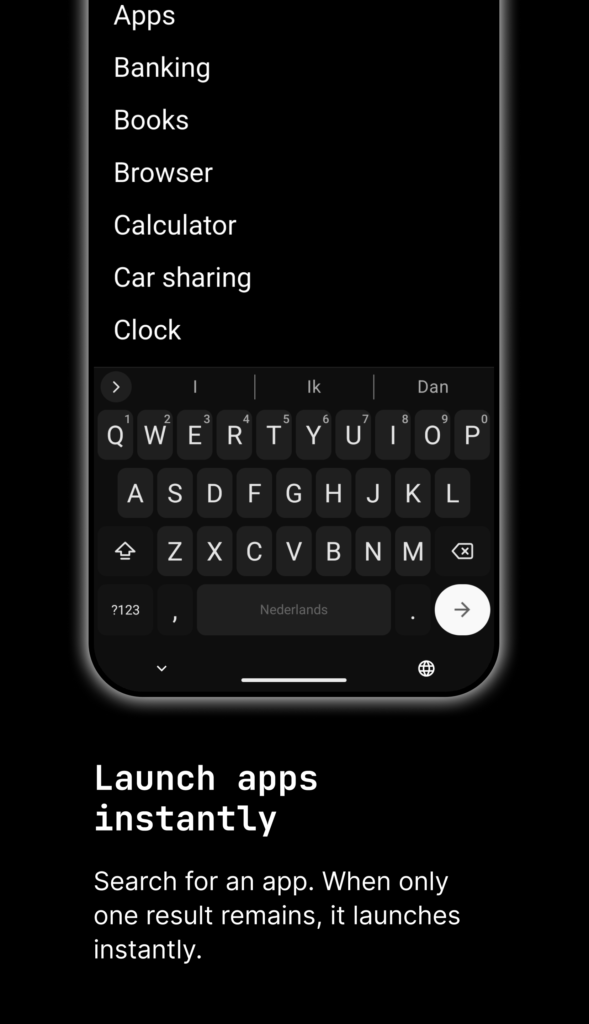
Table of Contents
About Last Launcher APK
Last Launcher is an innovative Android launcher focused on delivering a decluttered, user-friendly interface. By emphasizing speed and simplicity, it offers a text-only homepage, allowing users to manage their apps efficiently without the distraction of icons and widgets. This app appeals to those who appreciate straightforward navigation over visual complexity.
With its clean aesthetic, the app enables a fast app drawer accompanied by instant search functionality. Users can swiftly locate their applications through simple text inputs. Additionally, the launcher supports task lists, making it easier to organize and prioritize daily tasks within a streamlined environment, which is particularly useful for users looking to boost their productivity.
Security and user control are paramount in Last Launcher, as it is ad-free, open source, and does not track user data. Users have total control over their data, ensuring it remains on their device. Overall, this launcher is perfect for users who prefer a no-frills approach to their home screen experience while retaining the ability to customize their launcher in a minimalistic way.
Key Features of Last Launcher APK
- The app offers a text-only home screen where users can pin app shortcuts, allowing for quick access without the visual clutter of traditional launchers.
- Users can enjoy a fast app drawer with an instant search feature, making it easy to find apps by typing their names without unnecessary delays.
- A task list is integrated, providing functions to search, reorder tasks, and swipe to remove them, which helps in managing day-to-day responsibilities effectively.
- The long press feature enables inline actions, including options to rename, pin, or hide applications, enhancing user flexibility within the interface.
- For those who favor a keyboard-first approach, the app provides a search-only mode, promoting efficient launching and navigation throughout the app.
- It features various themes, including system, light, and dark modes, along with a special theme that showcases retro CRT scanlines for a unique visual touch.
Last Launcher APK Information
| App Name | Last Launcher |
| Package | nl.bw20.last_launcher |
| Version | 1.4.0 |
| Size | 20 MB |
| Requires | Android 7.0 and up |
| Category | Launcher |
| Developer | BW20 |
| License | EUPL-1.2 |
| Source | F-Droid |
| Last Updated | October 29, 2026 |
Download Last Launcher APK v1.4.0
How to Install Last Launcher APK on Android
- Download the Last Launcher APK from a trusted source like F-Droid or its project URL.
- Go to your device settings and enable installs from unknown sources to allow the app installation.
- Locate the downloaded file and tap on it to initiate the installation process.
- Once installed, open the app to customize your new launcher experience.
Pros and Cons
Pros
- The app's minimalistic design promotes a distraction-free environment that can significantly enhance productivity.
- Being open source means users can trust that there are no hidden features or data tracking.
- The customization options allow users to tailor the interface to their personal preferences, making it versatile for various needs.
Limitations
- As an open source app, users might need to seek manual updates and support from the community.
- Due to its unique text-only approach, users accustomed to traditional icon-based launchers may face a learning curve.
- The last launcher needs to be sideloaded, requiring users to handle APK files and adjust device settings for installation.
Who Is This App For?
Last Launcher is perfect for Android users who value minimalism in their digital environment and prefer a straightforward approach to managing apps without unnecessary bells and whistles.
Looking for similar apps? Browse more Launcher apps or see all Android apps on APK2GO.
Frequently Asked Questions
What does Last Launcher do?
Last Launcher is a minimal, text-only launcher for Android devices that allows users to manage and access their apps swiftly and efficiently without visual clutter.
Is Last Launcher free to use?
Yes, Last Launcher is completely free and open source, ensuring that users can enjoy its features without any hidden charges or subscriptions.
Is my data safe with Last Launcher?
Absolutely! The app does not collect, store, or transmit any personal information. Your data remains securely on your device unless you choose to sync through another app.
Where can I download Last Launcher?
You can download Last Launcher APK from reliable sources like F-Droid or its official project URL, ensuring you get the authentic version without malware.
How can I customize the app's interface?
Customization options include changing themes and managing how apps are displayed, which allows you to personalize your home screen and task lists to your preference.
Official page: Last Launcher official website / source