
Pitak APK Download v1.8.0 (Latest Version) for Android
⬇ Download APK v1.8.0Pitak APK is an innovative tool designed for those who want a privacy-focused solution for managing their personal library. This offline library cataloging app not only helps users organize their books efficiently but also enables secure lending and borrowing through encryption.
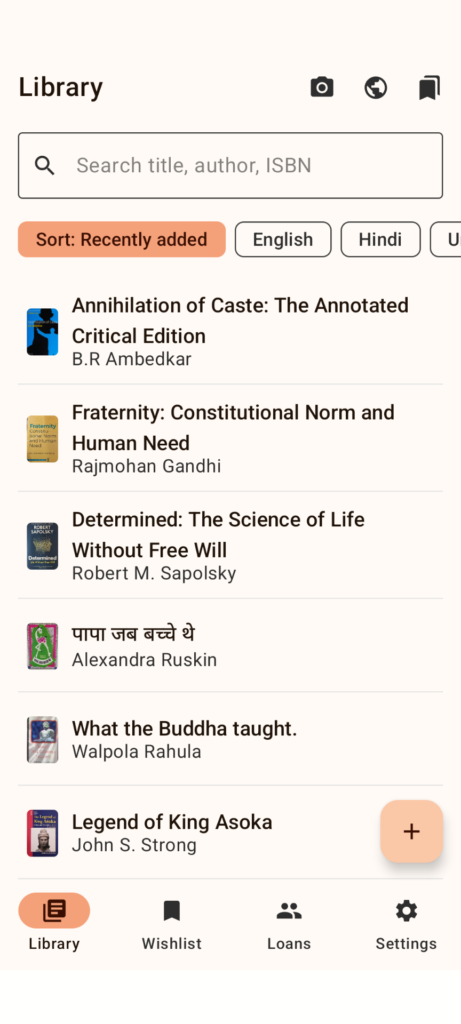
Table of Contents
About Pitak APK
Pitak serves as a comprehensive offline library cataloging tool that prioritizes user privacy. It allows you to manage your collection without needing an online connection, which is ideal for maintaining your data securely. Users can add and edit book details, and even search and filter their catalog efficiently, making it easier to keep track of what they own.
Additionally, this app features a unique lending vault that encrypts borrower information, ensuring only authorized individuals have access. With tools for tracking loans and borrowers, you can confidently share your books without the fear of losing track of who has what. This app combines practicality with privacy, addressing various user needs in a simple interface.
For those looking to expand their collection, Pitak offers a wishlist feature that allows users to note down books they wish to acquire. Once purchased, these titles can easily be added to the main catalog. Furthermore, the app provides options to import and export data in multiple formats to enhance user flexibility, supporting everything from additions to creating portable backups.
Key Features of Pitak APK
- Users can add, edit, search, and filter book details effortlessly, with an added capability to soft-delete entries and restore them if necessary, ensuring data management is smooth.
- The app's encryption feature protects borrower and loan information using AES-256-GCM encryption, and it comes with a passphrase unlock system, reinforcing security during use.
- A wishlist is included, allowing users to track potential acquisitions; this feature directly integrates with the library for a seamless transition of desired books once purchased.
- Pitak supports import and export options, enabling users to manage their data in formats like JSON and CSV, including integration options from platforms like Goodreads.
- Portable backups can be created using .pitabak archives, ensuring that users can restore their library information whenever necessary or when switching devices.
- An optional feature lets users create a read-only library viewer that can be pushed to GitHub Pages, making it easy to share their collections while maintaining privacy through PII redaction.
Pitak APK Information
| App Name | Pitak |
| Package | dev.khoj.pitaka.fdroid |
| Version | 1.8.0 |
| Size | 36 MB |
| Requires | Android 7.0 and up |
| Category | Reading |
| Developer | Parallel Line Foundation |
| License | GPL-3.0-or-later |
| Source | F-Droid |
| Last Updated | October 29, 2026 |
How to Install Pitak APK on Android
- Download the Pitak APK from the designated source repository.
- Go to your device settings and allow installations from unknown sources to install the app.
- Locate the downloaded APK file and tap on it to begin the installation process.
- Once installed, open the app from your app drawer and set it up to start managing your library.
Pros and Cons
Pros
- The app prioritizes user privacy, ensuring that personal data remains secure while managing a library.
- A user-friendly interface simplifies navigating extensive book collections, making it easier to organize and maintain.
- Pitak's ability to create backups provides peace of mind, allowing users to safeguard their collection against data loss.
Limitations
- The necessity to sideload the app may be inconvenient for some users who prefer downloading from the Google Play Store.
- Manual updates are required since the app does not provide automatic updating features, which might lead to outdated functionality.
Who Is This App For?
Pitak is ideal for bibliophiles and those who appreciate privacy while managing their book collections. It's particularly suited for individuals who frequently lend books and require efficient organization systems.
Looking for similar apps? Browse more Reading apps or see all Android apps on APK2GO.
Frequently Asked Questions
What does Pitak do?
Pitak is a personal library catalog app designed to help users organize their books offline while maintaining privacy. It includes features for lending, borrowing, and managing wishlist items.
Is Pitak free to use?
Yes, Pitak is a free application, allowing users to leverage its library management features without any associated costs.
How safe is Pitak?
Pitak prioritizes user privacy by incorporating strong encryption features, like AES-256-GCM, ensuring that your data remains secure and only accessible by authorized individuals.
Where can I download Pitak?
The app can be downloaded from the F-Droid repository or directly from its project page on GitHub, ensuring you obtain the latest version securely.
How do I track borrowed books?
Pitak comes with a dedicated borrowing vault that securely tracks borrowers and loans. This feature, protected through encryption, helps you manage your lending history effortlessly.
Official page: Pitak official website / source