
SambaLite APK Download v3.0.0 (Latest Version) for Android
⬇ Download APK v3.0.0The SambaLite APK is a minimalist and open-source application designed for Android users who need to access SMB/CIFS shares efficiently. This tool stands out for its lightweight design, offering a clear and ad-free experience tailored for privacy-conscious individuals.
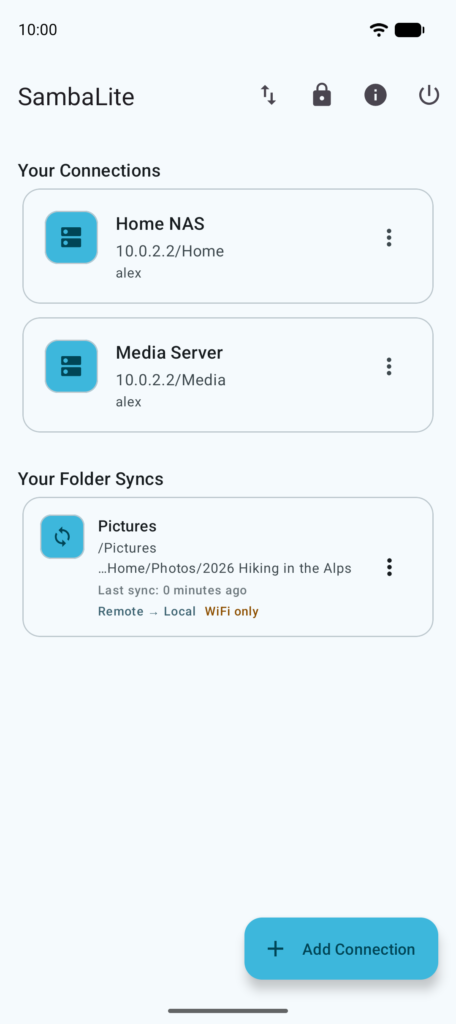
Table of Contents
About SambaLite APK
SambaLite serves as a modern client for accessing SMB shares on local networks, specifically optimized for those who prioritize a streamlined experience. Unlike traditional file system applications, it functions primarily for file transfer, focusing on download and upload tasks without cluttering the interface with unnecessary features.
This application is particularly beneficial for tech-savvy users who value both security and functionality within their network operations. SambaLite's dedication to remaining ad-free and transparent is appealing for anyone looking to manage files securely and privately. It does not retain user data, which ultimately reinforces its position as a trustworthy choice.
Being an open-source project, SambaLite invites contributions and adjustments, allowing users to adapt the software to meet their unique needs. This flexibility, combined with its focus on essential functionalities, makes it a suitable partner for managing multiple connections and accessing files efficiently without compromise.
Key Features of SambaLite APK
- Users can effortlessly manage multiple SMB connections, specifying server names, paths, and credentials, which enhances usability.
- The app includes a robust file browser that displays essential file details such as name, type, size, and the date modified, allowing for efficient file management.
- SambaLite features secure credential storage using the Android Keystore, ensuring users' sensitive information is safely encrypted and not stored unprotected.
- With options for dark or light themes based on system preferences, it offers a customizable visual experience that caters to user comfort.
- The application supports pull-to-refresh functionality, making it easy to update file listings and ensuring users access the most current files available.
- It enables essential file operations including upload, download, delete, and rename, which grants users complete control over their file management tasks.
SambaLite APK Information
| App Name | SambaLite |
| Package | de.schliweb.sambalite |
| Version | 3.0.0 |
| Size | 11 MB |
| Requires | Android 9 and up |
| Category | Cloud Storage & File Sync |
| Developer | egdels |
| License | Apache-2.0 |
| Source | F-Droid |
| Last Updated | November 9, 2026 |
How to Install SambaLite APK on Android
- Download SambaLite APK from the source repository or trusted site.
- Before installation, navigate to settings and allow installations from unknown sources.
- Locate the downloaded APK file and tap on it to initiate the installation process.
- Once installed, open the app and configure your connections to start accessing your SMB shares.
Pros and Cons
Pros
- The lightweight design ensures fast performance without draining device resources.
- Its open-source nature allows for transparency, meaning users can verify code for security and contribute to its development.
- The absence of ads creates an uninterrupted user experience, making file access more pleasant.
- The focus on security features, such as encrypted credential storage, enhances user confidence in managing sensitive information.
Limitations
- Users may have to manually update the app since it is not available on mainstream app stores.
- The app's limited scope means it is not a fully-fledged file system, which might not satisfy some users looking for comprehensive functionalities.
- Since it needs to be sideloaded, there is a potential for encountering issues if users are unfamiliar with the installation process.
Who Is This App For?
SambaLite is ideally suited for tech-savvy individuals or professionals who require a straightforward tool for network file access without unnecessary overhead.
Looking for similar apps? Browse more Cloud Storage & File Sync apps or see all Android apps on APK2GO.
Frequently Asked Questions
What does SambaLite do?
SambaLite is an Android application designed for managing and accessing SMB shares on local networks. It focuses on file transfer functions, allowing users to download, upload, and manage files securely.
Is SambaLite free to use?
Yes, SambaLite is free to use as it is an open-source application, licensed under the Apache 2.0 license, ensuring no cost for users to access its features.
Is it safe to use SambaLite?
The app prioritizes security, with no invasive telemetry or unencrypted storage of user data. Users can feel safe as it maintains a privacy-focused environment.
Where can I download SambaLite?
You can download SambaLite from the official F-Droid repository or its GitHub project page, ensuring that you're getting the legitimate version directly from trusted sources.
How do I connect to an SMB server using SambaLite?
Simply input the hostname or IP address of the SMB server, along with the share path, username, and password into the app's connection manager to start accessing your files.
Official page: SambaLite official website / source