
PaperCript APK Download v1.3.3 (Latest Version) for Android
⬇ Download APK v1.3.3The PaperCript APK is a unique solution for securely storing and managing passwords using a physical medium. By turning your passwords into encrypted QR cards, this app ensures that your sensitive information remains safe and easily accessible when you need it.
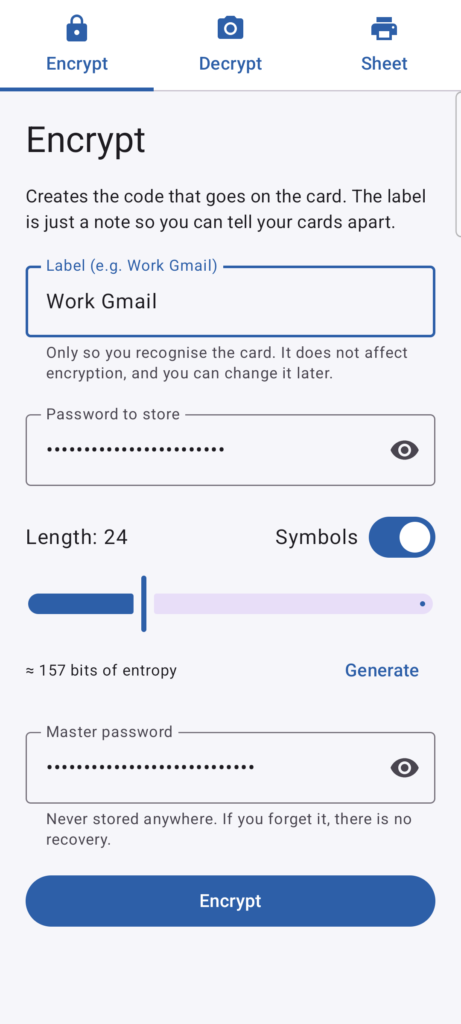
Table of Contents
About PaperCript APK
PaperCript is an innovative application designed for those who value security in their digital lives. By utilizing encryption methods, it converts your passwords into QR codes printed on cards, which can be stored securely without connecting to any network. This means your passwords remain under your control, completely stored in physical form rather than digitally.
The app employs robust encryption techniques to safeguard your data. Users input their master password to encrypt each password, transforming it into a QR code. This QR code can then be printed out, allowing users to create a tangible, secure method for password storage. It’s a perfect solution for individuals who prefer not relying on password managers that store information online.
With no data retention capabilities, the app does not keep any of your passwords or master password on any servers, keeping your information private. This feature allows users to comfortably keep physical copies in selected locations, like drawers or at a friend’s. It's particularly useful for those concerned about data breaches associated with cloud storage.
Key Features of PaperCript APK
- One of the standout features is its encryption mechanism, which combines AES-256 and HMAC-SHA256 technologies to ensure your data remains secure and untouchable without the master password.
- The application eliminates the risk of unauthorized access by not having any network permission, thus cannot connect to the internet or store your passwords on any cloud, enhancing overall security.
- A built-in password generator is integrated into the app, enabling users to create strong and unique passwords effortlessly, enhancing password security across various online services.
- The app supports multiple languages, including English, Spanish, French, and several others, making it accessible to a global audience.
- Users can enjoy the convenience of QR code technology since the app utilizes ZXing to read and generate QR codes, ensuring compatibility with standard scanning technology.
- To enhance security, the application is designed not to allow screenshots and automatically clears any sensitive information from the clipboard after use, thus protecting your data from unauthorized viewing.
PaperCript APK Information
| App Name | PaperCript |
| Package | com.javimetallab.papercript |
| Version | 1.3.3 |
| Size | 3 MB |
| Requires | Android 8.0 and up |
| Category | Password & 2FA |
| Developer | javimentallab |
| License | MIT |
| Source | F-Droid |
| Last Updated | November 6, 2026 |
Download PaperCript APK v1.3.3
How to Install PaperCript APK on Android
- Download the PaperCript APK file from a trusted source.
- Before installation, enable 'Install from Unknown Sources' in your device's settings.
- Find and tap the downloaded APK file to begin the installation process.
- Once installed, open the app from your app drawer to start using it.
Pros and Cons
Pros
- Offers an entirely offline password management solution, ensuring no data is ever stored online or accessible remotely.
- Creates a physical representation of passwords, making it easy for users who prefer tangible backups.
- Employs advanced encryption standards that help in keeping information secure from unauthorized access.
- User-friendly and straightforward interface allows quick access to features without overwhelming complexity.
Limitations
- Because the app does not store passwords digitally, losing the printed cards without the master password can result in complete access loss.
- It requires manual updates as it lacks an automatic update feature, meaning users must track new versions independently.
- Being an APK file, it necessitates sideloading, which may be a drawback for users unfamiliar with these processes.
Who Is This App For?
This app is ideal for security-conscious users who prefer a physical method of storing passwords, such as those wary of online data storage risks and frequent data breaches.
Looking for similar apps? Browse more Password & 2FA apps or see all Android apps on APK2GO.
Frequently Asked Questions
What does PaperCript do?
PaperCript is designed to securely store passwords by converting them into encrypted QR codes, which are then printed on physical cards for easy access.
Is PaperCript free to use?
Yes, PaperCript is available for free under the MIT license, allowing users to access and utilize its features without any cost.
Is it safe to use PaperCript?
Absolutely. Since all data is stored offline on physical cards and not on the cloud, the risk of breaches typically associated with online password managers is significantly reduced.
Where does the PaperCript APK file come from?
The PaperCript APK can be downloaded from trusted sources, primarily through platforms like F-Droid, ensuring you receive secure and authentic files.
How do you recover a password using PaperCript?
To retrieve a password, scan the QR code from your printed card, then input your master password to decrypt and view the password quickly.
Official page: PaperCript official website / source