
Auto Sleep APK Download v3.2 (Latest Version) for Android
⬇ Download APK v3.2The Auto Sleep APK is a utility for Android that prioritizes battery conservation during sleep hours, ensuring you stay undisturbed when resting. This app is particularly useful for those who want to manage their device's connectivity effectively while enjoying uninterrupted sleep.
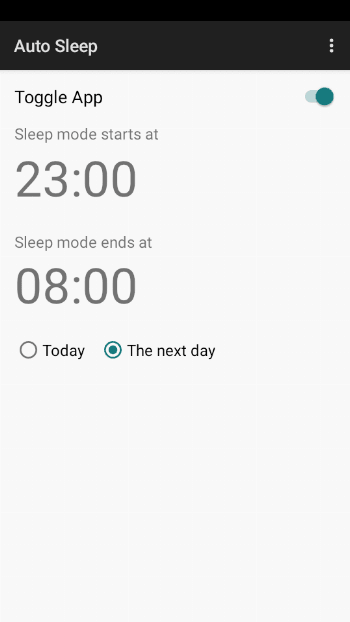
Table of Contents
About Auto Sleep APK
Auto Sleep is specifically designed for users who wish to avoid disruptions from their devices while they rest, whether they are sleeping at night or taking a nap during the day. This app offers an automated solution to toggle Airplane Mode according to a user-defined schedule, ensuring that incoming notifications or calls do not interfere with sleep. Knowing its diverse usability, the app is suitable for anyone, including shift workers who may need different sleep patterns.
The application cleverly utilizes root access, allowing it to make modifications to system-level settings that are typically restricted on standard setups. By doing so, it can efficiently manage the Do Not Disturb features without compromising privacy or functionality. This helpful tool automatically reactivates sleep schedules post-device reboot, ensuring that there is minimal disruption in your configured settings after a power cycle.
With precise alarm scheduling capabilities, Auto Sleep guarantees that it performs its tasks exactly at the times you have designated. This level of accuracy is critical for users reliant on personal routines for sleeping and waking. The app also notifies you when sleep mode is activated, keeping you informed without requiring manual checks.
Key Features of Auto Sleep APK
- The application automatically turns Airplane Mode on or off based on a schedule you set, minimizing distractions during your rest.
- It requires root access to unlock system-level configuration changes, allowing it to manage Do Not Disturb settings more effectively.
- Auto Sleep utilizes exact alarm scheduling to ensure your device enters sleep mode precisely when intended, which helps maintain a consistent routine.
- After a reboot, the app automatically reactivates and recalculates your sleep schedule, providing convenience by eliminating the need for manual intervention.
- The app sends you notifications when sleep mode is activated, ensuring you are aware of your device's status without having to check manually.
- Compounded by its focus on privacy, Auto Sleep operates securely while implementing these efficient system-level functions.
Auto Sleep APK Information
| App Name | Auto Sleep |
| Package | com.mine.autosleep |
| Version | 3.2 |
| Size | 904 KB |
| Requires | Android 7.0 and up |
| Category | System |
| Developer | The-First-King |
| License | GPL-3.0-or-later |
| Source | IzzyOnDroid |
| Last Updated | November 5, 2026 |
How to Install Auto Sleep APK on Android
- Download the Auto Sleep APK from a trusted source, ensuring to check for any available updates.
- Go to your device's settings and enable installations from unknown sources.
- Tap the downloaded file to begin the installation process.
- Once installed, open the app to set and customize your sleep schedule.
- Follow any prompts within the app to enable root access for full functionality.
Pros and Cons
Pros
- Automates Airplane Mode based on user-defined schedules, enhancing sleep quality.
- Highly customizable with notification features that keep users informed of changes.
- Supports seamless integration with device reboot processes, ensuring your settings are preserved.
Limitations
- Requires root access, which may limit usability for users who prefer not to modify their device settings.
- The need for sideloading may pose challenges for less technical users unfamiliar with APK installations.
Who Is This App For?
This app is ideal for individuals who value a good night's sleep without interruptions from their mobile devices, including night shift workers or anyone wanting to enhance their rest periods.
Looking for similar apps? Browse more System apps or see all Android apps on APK2GO.
Frequently Asked Questions
What does Auto Sleep do?
Auto Sleep is developed to automate Airplane Mode based on a user's sleep schedule, preventing distractions and conserving battery life during set sleeping hours.
Is Auto Sleep free to use?
Yes, the app is available under the GPL-3.0-or-later license, making it free for users to download and use.
Is it safe to use Auto Sleep?
When installed from a reputable source, Auto Sleep is considered safe. However, it requires root access, which may present risks if not managed carefully.
Where can I download Auto Sleep?
The best place to download Auto Sleep is from a trusted repository or its project page on GitHub, ensuring you obtain a secure version.
How do I set up auto sleep scheduling?
After installing the app, you can easily set up your sleep schedule within the app by defining the times you want Airplane Mode activated and deactivated.
Official page: Auto Sleep official website / source