FPS Meter APK Download v3.1 (Latest Version) for Android
⬇ Download APK v3.1The FPS Meter APK is a highly efficient tool designed to provide real-time performance monitoring for mobile gaming enthusiasts. This lightweight app offers features that can significantly enhance your gaming experience by providing crucial performance metrics during gameplay.
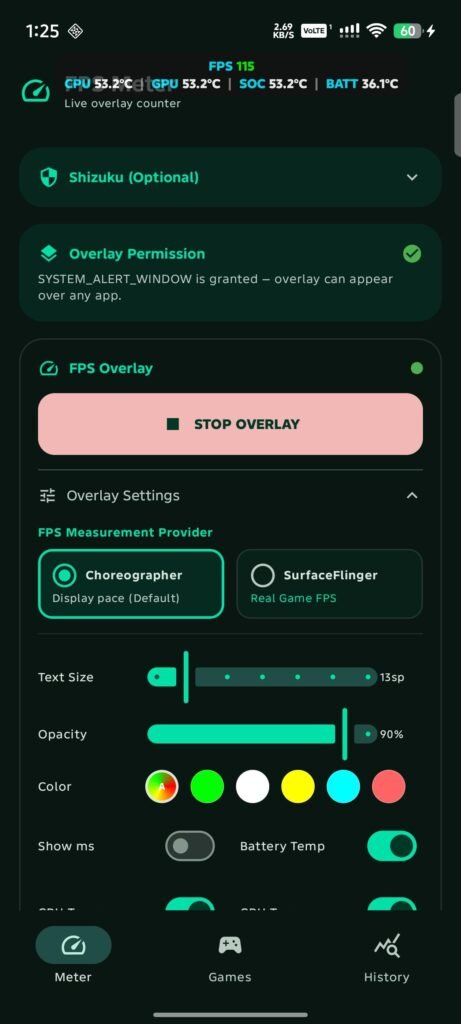
Table of Contents
About FPS Meter APK
FPS Meter is an innovative application that acts as a real-time FPS monitor and performance overlay for Android devices. It was created to assist gamers and developers in analyzing the performance of their games by displaying vital telemetry information. With its sleek design and functionality, this app is perfect for those who wish to optimize their gaming sessions.
The primary function of the app is to monitor frames per second (FPS) while providing real-time updates on rendering performance. This information is invaluable for both gamers and developers, as it helps them identify any potential performance issues. By utilizing dual FPS providers, the application presents an accurate display of performance metrics without significant overhead.
In addition to FPS monitoring, the application also includes features like frame time analysis, automatic graphics API detection, and device temperature readings. This means that users can gain a comprehensive view of their gaming performance and make informed decisions about gameplay settings, ensuring an optimal experience while playing popular titles such as Genshin Impact or Wuthering Waves.
Key Features of FPS Meter APK
- This app includes dual FPS providers, allowing for precise measurements of display refresh rates and true in-game rendering frame rates with minimal performance impact.
- It detects whether games utilize Vulkan or OpenGL ES, automatically tailoring the presented metrics to match the specific graphics API for more accurate performance analysis.
- The real-time interface provides not only FPS but also frame time and battery temperature information, ensuring users are aware of their device's performance under different gaming conditions.
- Dynamic color coding is incorporated into the display, adapting the FPS value colors based on performance thresholds, making it easy to identify performance drops at a glance.
- Users can easily toggle the performance overlay on and off via a quick settings tile, allowing for immediate access without disrupting the gaming experience.
- With auto game detection, the overlay is activated automatically when users launch designated games, providing seamless integration for uninterrupted monitoring.
FPS Meter APK Information
| App Name | FPS Meter |
| Package | com.rdevzph.fpsmeter |
| Version | 3.1 |
| Size | 2 MB |
| Requires | Android 8.0 and up |
| Category | Game Helper |
| Developer | rdevz-ph |
| License | MIT |
| Source | F-Droid |
| Last Updated | November 4, 2026 |
How to Install FPS Meter APK on Android
- Download the FPS Meter APK file from a trusted source like F-Droid.
- Go to your device settings and enable installations from unknown sources to allow the app installation.
- Locate the downloaded file in your device's storage and tap on it to start the installation process.
- Once installed, open the app and configure the settings according to your preferences for optimal use.
Pros and Cons
Pros
- Lightweight and efficient, the app has minimal impact on device performance during its operation.
- Intuitive design allows users to interpret performance metrics quickly and easily.
- Automatic activation for supported games makes it simple to utilize without manual setup every time.
Limitations
- Being an open-source application, it requires manual updates as new versions become available.
- Users need to sideload the app, which may be a disadvantage for those unfamiliar with the process.
Who Is This App For?
This app is ideal for gamers who want to keep track of their game's performance in real time, as well as developers looking to optimize their applications. It suits both casual and serious mobile gamers equally.
Looking for similar apps? Browse more Game Helper apps or see all Android apps on APK2GO.
Frequently Asked Questions
What does FPS Meter do?
FPS Meter allows users to monitor frames per second (FPS) in real-time while playing games, helping them assess performance and optimize settings tailored to their device.
Is FPS Meter free to use?
Yes, FPS Meter is offered for free as an open-source application, making it accessible for anyone looking to enhance their mobile gaming experience.
Is the FPS Meter APK safe to download?
The FPS Meter APK can be considered safe if downloaded from reputable sources such as F-Droid, which are known for hosting trusted applications.
How does FPS Meter detect my game's performance?
The app uses dual measurement techniques to capture frame rates, tracking both display refresh rates and in-game rendering to provide accurate performance insights automatically.
Can I customize the display options in FPS Meter?
Yes, users can customize various aspects of the display including the overlay settings, enabling them to tailor the information shown according to their preferences while gaming.
Official page: FPS Meter official website / source