
Folder Camera APK Download v1.0.5 (Latest Version) for Android
⬇ Download APK v1.0.5If you're looking for an innovative way to capture and organize your pictures, the Folder Camera APK offers a unique solution. This app allows users to take photos directly into designated folders, streamlining the photo management process effortlessly.
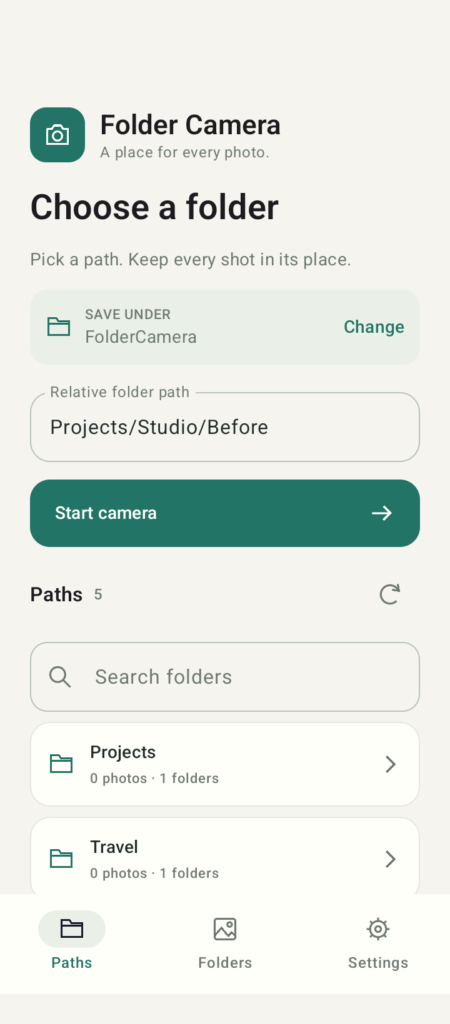
Table of Contents
About Folder Camera APK
Folder Camera is a specialized camera app designed for Android users who want to enhance their photo organization as they take pictures. Unlike traditional camera applications, this one enables users to select a folder and capture images straight into that specified location. It integrates a user-friendly folder picker that allows for easy navigation and selection of base directories and subfolders.
The app is particularly beneficial for those who accumulate numerous images and seek a more systematic approach to photo storage. With features that support nested folders and Unicode names, users can ensure their photos are well-categorized and easily retrievable. This capability not only saves time but also reduces the hassle of post-capture organization.
Furthermore, Folder Camera empowers users by allowing them to capture and manage their photos without requiring an internet connection, account, or PC. The option for optional LAN transfer provides a seamless way to sync photos directly to your computer, ensuring that valuable images remain protected and accessible across devices.
Key Features of Folder Camera APK
- Users can directly capture JPEG photos into their chosen folders, ensuring every image has its designated place immediately after shooting.
- The app includes a searchable folder tree feature, making it easy to locate desired destinations quickly without scrolling through long lists.
- It allows users to switch between folders in different sessions without the risk of overwriting or losing previously saved photos.
- Users can utilize various zoom options, such as pinch and slider zoom, along with different light modes like Off, Auto, Flash, or Always-on.
- The app supports previewing, sharing, and exporting photos using standard Android features, promoting ease of use and accessibility.
- Importantly, saved photos remain available to other applications even after the app has been uninstalled, preventing potential data loss.
Folder Camera APK Information
| App Name | Folder Camera |
| Package | io.github.sigmasd.foldercamera |
| Version | 1.0.5 |
| Size | 3 MB |
| Requires | Android 8.0 and up |
| Category | Camera |
| Developer | sigmasd |
| License | GPL-3.0-or-later |
| Source | F-Droid |
| Last Updated | November 17, 2026 |
Download Folder Camera APK v1.0.5
How to Install Folder Camera APK on Android
- Download the Folder Camera APK file from a reliable source.
- Enable installations from unknown sources in your device's settings to allow the app to be installed.
- Locate and tap on the downloaded APK file to begin the installation process.
- Once installed, open the app to start using it and explore its features.
Pros and Cons
Pros
- Folder Camera offers a highly organized method for capturing images straight into folders, making management straightforward.
- It has a clean and intuitive interface that supports both novice and advanced users.
- The lack of advertising and analytics ensures a smooth and uninterrupted user experience.
Limitations
- The app must be sideloaded, as it may not be available in standard app stores, requiring users to download it from external sites.
- Users may need to manually update the app, as it is not automatically updated through official app markets.
Who Is This App For?
This app is ideal for photographers and individuals who need to maintain a tidy collection of images without clutter. It's especially useful for users who prefer a straightforward photo management system.
Looking for similar apps? Browse more Camera apps or see all Android apps on APK2GO.
Frequently Asked Questions
What does Folder Camera do?
Folder Camera allows users to take photos directly into their selected folders, organizing images as they are captured to simplify photo management.
Is this app free to use?
Yes, Folder Camera is free to download and use. However, users can choose to make optional LAN transfers, which may involve additional setup.
Is it safe to use Folder Camera?
The app does not include ads or analytics, focusing instead on user privacy and control, suggesting a safe experience. Always download from trusted sources to ensure security.
Can I use the app without an internet connection?
Absolutely! Folder Camera functions entirely offline, allowing users to capture and organize photos without needing an active internet connection.
How can I manage my photos effectively with this app?
To effectively manage photos, use the folder picker to select appropriate directories before shooting. This keeps every image organized and easily accessible, significantly enhancing your photo management strategy.
Official page: Folder Camera official website / source