
Min Time – simple talk timer APK Download v2.0.7 (Latest Version) for Android
⬇ Download APK v2.0.7For those looking to streamline their presentations, the Min Time – simple talk timer APK offers a straightforward solution. This minimalist app is designed to help users manage their speaking time effectively, ensuring a well-structured delivery.
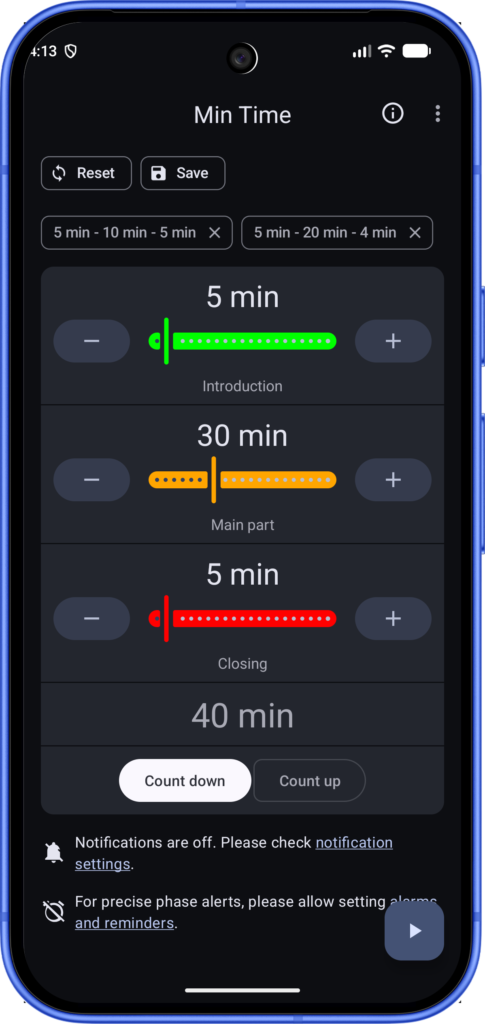
Table of Contents
About Min Time – simple talk timer APK
Min Time serves as a countdown and count-up timer, facilitating a better structure for talks and presentations. Its main advantage lies in its simplicity, allowing users to set precise time limits for different phases of their speech. The app effectively breaks down lengthy presentations into manageable segments, making it easier for speakers to stay on track and engage their audience properly.
The app categorizes talk time into three distinct phases marked by color changes: green for the initial phase, yellow for the warning stage, and red for the final moments. This feature provides users with a clear visual indication of how much time remains at any given moment. Additionally, it can be used while multitasking, as the app keeps participants informed of their time status through live notifications, enhancing overall flexibility.
Ideal for anyone who frequently presents, Min Time is particularly useful in academic and professional settings where time management is critical. By utilizing this app, speakers are better equipped to conclude their presentations within the allocated time, improving their confidence and effectiveness while addressing their audience.
Key Features of Min Time – simple talk timer APK
- The app helps structure your presentations by dividing the total time into three colored phases: green, yellow, and red.
- It allows users to set a countdown timer for their talks, ensuring they remain aware of their speaking time throughout the presentation.
- Users can easily switch to other applications during their talks without losing track of the remaining time, thanks to live notifications.
- Min Time operates in both countdown and count-up modes, catering to different speaking scenarios and preferences.
- Vibrations alert users when they transition from one phase to another, providing a tactile reminder in addition to visual cues.
- With minimal setup required, users can prepare for their presentations quickly, making it an efficient tool for anyone in need of a reliable timer.
Min Time – simple talk timer APK Information
| App Name | Min Time – simple talk timer |
| Package | com.thomaskuenneth.mintime |
| Version | 2.0.7 |
| Size | 2 MB |
| Requires | Android 8.0 and up |
| Category | Timer |
| Developer | Thomas Künneth |
| License | MIT |
| Source | F-Droid |
| Last Updated | November 13, 2026 |
Download Min Time – simple talk timer APK v2.0.7
How to Install Min Time – simple talk timer APK on Android
- Download the Min Time – simple talk timer APK from a trusted source.
- Go to your device settings and allow installs from unknown sources if prompted.
- Locate the downloaded APK file and tap on it to begin the installation process.
- Once the installation is complete, open the app to start using it for your talks.
Pros and Cons
Pros
- The app's minimalist design ensures that it is user-friendly and easy to navigate, especially for time-sensitive situations.
- It offers customizable time segments, allowing users to tailor their presentation timing according to their needs.
- Live notifications help you maintain focus during presentations while keeping you informed of your remaining time.
Limitations
- Min Time requires sideloading as it may not be available in mainstream app stores, which some users might find inconvenient.
- The app features limited customization options beyond the basic time segments, which may not suit every user's preferences.
- Updates must be managed manually, so staying current with new features and improvements may require extra effort.
Who Is This App For?
This app is ideal for professionals, educators, and students who frequently give presentations and need to manage their time effectively while speaking.
Looking for similar apps? Browse more Timer apps or see all Android apps on APK2GO.
Frequently Asked Questions
What is Min Time used for?
Min Time is used to manage and structure the timing of presentations and talks, helping users stay within allocated time limits.
Is Min Time free to use?
Yes, Min Time is free to download and use, making it accessible for everyone needing a talk timer.
Is Min Time safe to install?
The app is considered safe to install from trusted sources, but users should always be cautious and verify the source of the APK.
Can I use other apps while using Min Time?
Yes, you can use other applications while Min Time is running, as it provides live notifications about your timer status.
How can I customize the timer settings?
To customize timer settings, you can divide the total presentation time into different phases, which the app will visually indicate in color.
Official page: Min Time – simple talk timer official website / source