
Open Android Backup Companion APK Download v1.2.4 (Latest Version) for Android
⬇ Download APK v1.2.4For those in need of a reliable backup solution, the Open Android Backup Companion APK stands out as an accessible tool for safeguarding your Android device's data. It ensures your information stays secure while avoiding vendor lock-ins and proprietary software risks.
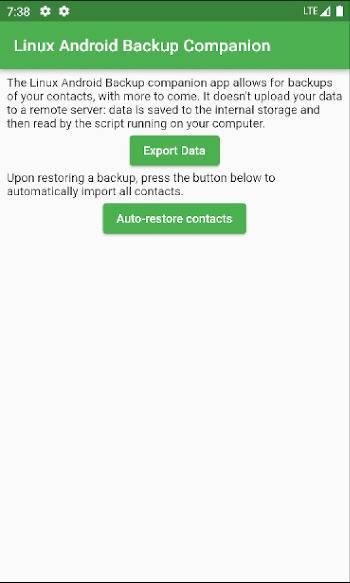
Table of Contents
About Open Android Backup Companion APK
Open Android Backup Companion is designed to facilitate the backup of Android devices in a secure and flexible manner. Unlike traditional methods that may lock you into specific manufacturers or require root access, this app leverages ADB functionality, allowing users to back up data that is typically off-limits through standard Android backup tools.
This app supports cross-platform usage, functioning seamlessly on the three major operating systems. It provides users with a straightforward method of creating backups of essential data including internal storage files, contacts in vCard format, SMS messages, and call logs, making it a versatile choice for managing your device's information.
The app is particularly appealing for users who prioritize data safety and want a straightforward backup solution without relying on closed-source software. Additionally, it promises encryption and compression features right out of the box, adding layers of security to your backups and ensuring that your valuable information remains private.
Key Features of Open Android Backup Companion APK
- The app supports backup of a wide range of device data, including internal storage, contacts, SMS messages, and call logs, ensuring comprehensive coverage for users.
- It utilizes a native companion app, which allows backup access to data that is typically not available through standard ADB commands.
- Automatic restoration of backed-up data is a significant feature, simplifying the process for users looking to retrieve their information quickly and efficiently.
- The app does not rely on proprietary formats, meaning your backup files can be accessed without fear of losing them if the software becomes unavailable.
- With a tiny overall package size of approximately 20 MB, it is lightweight and doesn't consume excessive storage on your device.
- Cross-platform compatibility ensures that users can back up their data using various operating systems without any issues, broadening accessibility.
Open Android Backup Companion APK Information
| App Name | Open Android Backup Companion |
| Package | mrrfv.backup.companion |
| Version | 1.2.4 |
| Size | 16 MB |
| Requires | Android 7.0 and up |
| Category | System |
| Developer | mrrfv |
| License | GPL-3.0-or-later |
| Source | IzzyOnDroid |
| Last Updated | November 13, 2026 |
Download Open Android Backup Companion APK v1.2.4
How to Install Open Android Backup Companion APK on Android
- Download the Open Android Backup Companion APK file from a trusted source like IzzyOnDroid.
- Allow installs from unknown sources in your device settings to ensure smooth installation.
- Locate and tap the downloaded APK file to initiate the installation process.
- Once installed, open the app and follow the prompts to begin backing up your Android device.
Pros and Cons
Pros
- Allows backups without requiring root access, making it safe and user-friendly for a broad audience.
- Supports data formats like vCard for contacts, enhancing compatibility with other services.
- Utilizes encryption and compression, which makes the backups more secure while saving space.
- Cross-platform functionality means users on different operating systems can effectively use the app.
Limitations
- Users may need to manually update the app since it is not available on standard app stores, possibly missing critical improvements.
- The app does not back up app data due to system limitations, which can restrict the level of data recovery for some users.
- It's necessary to sideload the app, which may be daunting for those unfamiliar with non-traditional app installations.
Who Is This App For?
This app is ideal for those looking for a secure and flexible backup solution for their Android devices, particularly users concerned about data privacy and accessibility without vendor lock-ins.
Looking for similar apps? Browse more System apps or see all Android apps on APK2GO.
Frequently Asked Questions
What does Open Android Backup Companion do?
The app allows users to create secure backups of various types of data on their Android devices, including contacts, SMS messages, and internal storage.
Is Open Android Backup Companion free to use?
Yes, the app is available under the GPL-3.0-or-later license, making it open-source and free for users.
Is my data safe when using this app?
The app incorporates encryption and does not use proprietary formats, ensuring that your data remains safe and accessible even if the app is no longer available.
Where can I download Open Android Backup Companion?
You can download the app from trusted repositories like IzzyOnDroid, or its source repository on GitHub for the latest version.
How does the backup process work?
The app uses ADB functionalities to access and back up data that is usually not available, simplifying the backup process for users.
Official page: Open Android Backup Companion official website / source