
ClipHistory APK Download v1.4.7 (Latest Version) for Android
⬇ Download APK v1.4.7The ClipHistory APK is a useful tool for anyone looking to efficiently manage their clipboard history on Android devices. With its robust features, this app helps users keep their copied text organized and easily accessible, enhancing productivity and workflow.
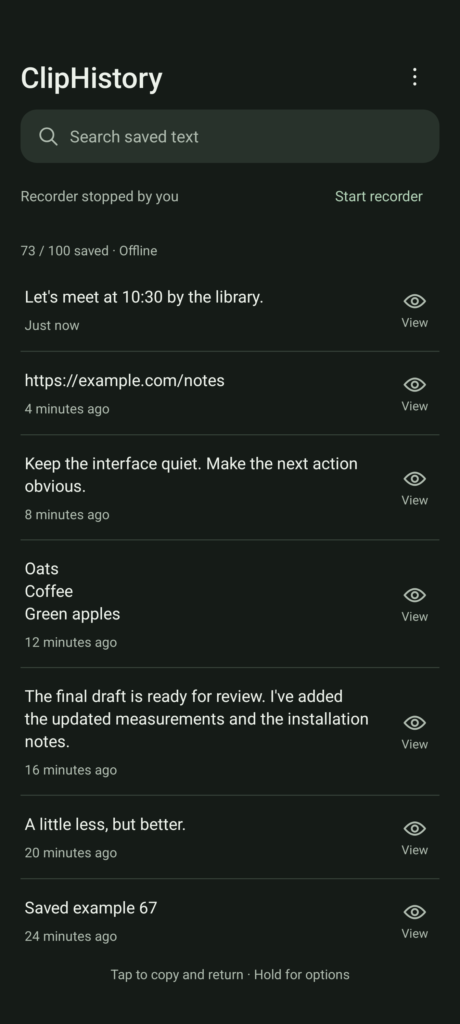
Table of Contents
About ClipHistory APK
ClipHistory is designed to manage and maintain a private history of plain text that users copy on their Android devices. By providing a clear and searchable record, it allows users to easily retrieve important information without hassle, making it particularly helpful for those who frequently share or save text snippets.
The app operates offline when the recorder is stopped, which means users can access their saved clipboard history without needing an active internet connection. Additionally, users can customize how they view their history via different appearance modes, enhancing the app’s usability to fit individual preferences.
Privacy is a core focus of ClipHistory, as it ensures that all saved entries are securely encrypted on the device. Furthermore, it offers users the ability to manage sensitive text with options for automatic deletion, contributing to safer data handling while still providing convenience in retrieving previously copied content.
Key Features of ClipHistory APK
- Users can choose to pause recording and set a limit on the number of stored entries, ranging from 20 to 500, ensuring that they can manage their clipboard history effectively.
- The app allows for a seamless search function across all saved texts, making it easy to locate specific entries, even among lengthy text blocks.
- With options to clear saved text or undo the last deletion while the recorder is connected, users have flexibility and control over their clipboard data.
- It features a temporary floating panel for quick copying, allowing users to access previously copied entries without opening the full history, enhancing productivity.
- Users can select settings for screen privacy and choose between light, dark, or system-themed appearances, personalizing their experience based on preference or environment.
- The app maintains all clipboard history encrypted, and includes a feature for saving sensitive text with an option for automatic deletion after five minutes.
ClipHistory APK Information
| App Name | ClipHistory |
| Package | app.cliphistory |
| Version | 1.4.7 |
| Size | 3 MB |
| Requires | Android 11 and up |
| Category | System |
| Developer | saroo98 |
| License | MIT |
| Source | F-Droid |
| Last Updated | November 11, 2026 |
Download ClipHistory APK v1.4.7
How to Install ClipHistory APK on Android
- Download the ClipHistory APK file from a trusted source like F-Droid.
- Go into your device settings and allow installs from unknown sources to enable the installation.
- Locate the downloaded APK file and tap on it to initiate the installation process.
- Once installed, open the app to configure your clipboard settings and enjoy its features.
Pros and Cons
Pros
- The app provides superior organization for copied text, making it easier for users to manage and retrieve important information quickly.
- Its privacy-focused features ensure that sensitive text remains safe through encryption and automated deletion options.
- The customizable appearance and settings cater to individual user preferences, enhancing overall usability.
Limitations
- Users need to sideload the app since it may not be available on standard app stores, which requires additional steps during installation.
- The app's reliance on Shizuku API means that users with unsupported devices might not access its functionalities fully.
Who Is This App For?
ClipHistory is perfect for individuals who regularly copy and paste text, such as writers, students, or professionals needing efficient text management and retrieval on their Android devices.
Looking for similar apps? Browse more System apps or see all Android apps on APK2GO.
Frequently Asked Questions
What does ClipHistory do?
ClipHistory allows users to maintain a searchable history of copied plain text on their Android devices, enhancing organization and accessibility for previously copied content.
Is ClipHistory free to use?
Yes, ClipHistory is available for free, licensed under MIT, making it accessible to anyone looking for an effective clipboard management solution.
How can I install ClipHistory safely?
To ensure safe installation, download the ClipHistory APK from a reputable source like F-Droid and enable installs from unknown sources in your device settings.
Can I recover deleted entries in ClipHistory?
Yes, as long as the recorder remains connected, users can undo the most recent deletion, which provides a safety net for accidental losses.
What are the benefits of using ClipHistory?
Using ClipHistory significantly improves clipboard management efficiency, allowing users to find and manage copied text quickly while ensuring sensitive information is kept secure.
Official page: ClipHistory official website / source