
Capynib APK Download v0.2.0 (Latest Version) for Android
⬇ Download APK v0.2.0The Capynib APK is an innovative notes application designed for users who prefer streamlined memo organization and accessibility. This app allows you to maintain quick notes and checklists that can seamlessly synchronize with a personal memos server, providing a robust solution for efficient information management.
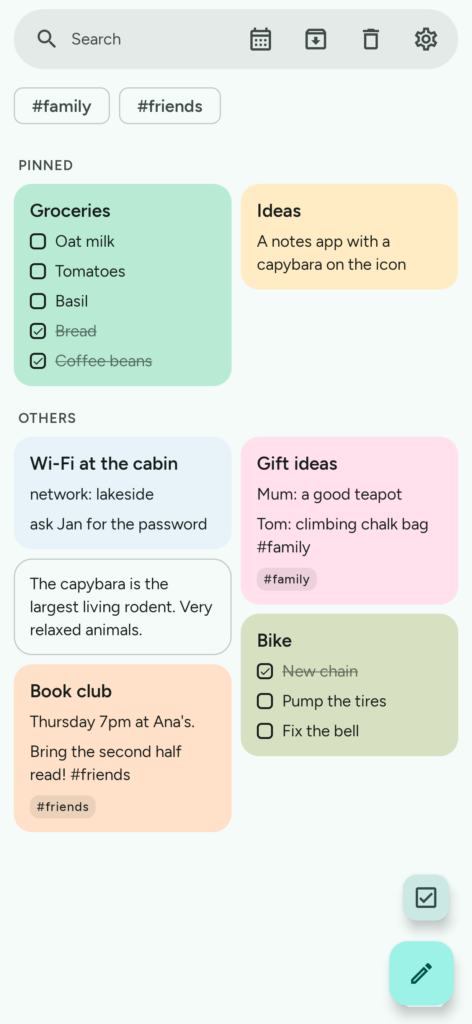
Table of Contents
About Capynib APK
Capynib is a versatile, user-friendly application that focuses on facilitating quick note-taking and checklist creation. It mimics the functionality of Google Keep with its colorful card designs and straightforward layout. The primary goal of the app is to help users capture and organize thoughts at a moment's notice, making it ideal for students, professionals, and anyone who values effective note management.
One of the standout features of Capynib is its offline functionality, which means that users do not need an internet connection to access or create notes. Everything you write is stored locally on your device first. This allows for uninterrupted usage, making it easier for users who may often find themselves in areas with limited connectivity while trying to jot down important ideas or tasks.
Another significant aspect of the app is its ability to sync notes with a user’s own memos server. By signing in with an access token or through a browser, users can have their notes automatically updated across devices. This ensures that changes made on either the app or web platform are reflected in real-time, enhancing productivity and making collaboration simpler.
Key Features of Capynib APK
- The app allows users to create notes that include a title, body text, and a tag represented by a color, making note management visually engaging and intuitive.
- Capynib supports checklists, enabling users to create lists of tasks that can easily be ticked off once completed, which is perfect for staying organized.
- Photos can be incorporated into notes, either captured with the device's camera or selected from the phone's gallery, providing visual context to the written content.
- Voice recordings can also be added to notes, allowing users to capture verbal ideas and reminders that can be played back at any time.
- Users can pin notes for easy access or archive notes they no longer need, while also utilizing a trash feature that temporarily stores deleted notes for easy recovery.
- The app provides an efficient tagging system, where users can write #tag within a note, facilitating organized retrieval of notes that share similar subjects or categories.
Capynib APK Information
| App Name | Capynib |
| Package | io.github.markovcd.capynib |
| Version | 0.2.0 |
| Size | 2 MB |
| Requires | Android 8.0 and up |
| Category | Note |
| Developer | markovcd |
| License | MIT |
| Source | F-Droid |
| Last Updated | November 23, 2026 |
How to Install Capynib APK on Android
- Download the Capynib APK from a trusted source.
- Allow installations from unknown sources in your phone settings.
- Tap on the downloaded file to begin the installation process.
- Follow the on-screen prompts to complete the installation.
- Open the app and start creating your notes right away!
Pros and Cons
Pros
- The offline capabilities ensure that you can access and create notes anytime, regardless of your internet connection.
- The sync feature with personal memos servers provides a seamless way to keep notes updated across multiple devices.
- Its colorful interface and tagging system enhance the overall user experience, making organization simpler and more engaging.
Limitations
- The app requires manual updates, as it may not automatically notify you of new versions or features.
- Users need to sideload the app, which may be less convenient for those unfamiliar with this process.
- Limited integration with existing cloud services means that reliance on a personal memos server is necessary for sync features.
Who Is This App For?
Capynib is ideal for anyone who needs a reliable tool for quick note-taking, such as students, busy professionals, or individuals who prefer to maintain organized lists and tasks directly on their devices.
Looking for similar apps? Browse more Note apps or see all Android apps on APK2GO.
Frequently Asked Questions
What is Capynib used for?
Capynib is primarily used for taking quick notes and creating checklists. It allows users to manage their thoughts and tasks efficiently, offering features that support organization and visual appeal.
Is Capynib a free app?
Yes, the app is free to use. Users can download the Capynib APK without any associated costs, giving them access to all its features.
Is Capynib safe to use?
While the app itself is safe to use, it is essential to download the Capynib APK from trusted sources to avoid tampered files. Since it doesn't require an account, privacy is maintained.
How do I sync my notes?
To sync your notes, sign in to your memos server using an access token or your browser. The app will automatically sync changes made on both your device and the web.
Can I recover deleted notes?
Yes, the app features a trash function that keeps deleted notes for a week or for a duration you set, allowing you to recover important information easily.
Official page: Capynib official website / source