
App Manager APK Download v4.1.1 (Latest Version) for Android
⬇ Download APK v4.1.1For users seeking a comprehensive tool to manage their applications, the App Manager APK offers a robust package management solution tailored for Android devices. With its modern design and extensive features, it simplifies app management tasks while providing valuable insights into installed apps.
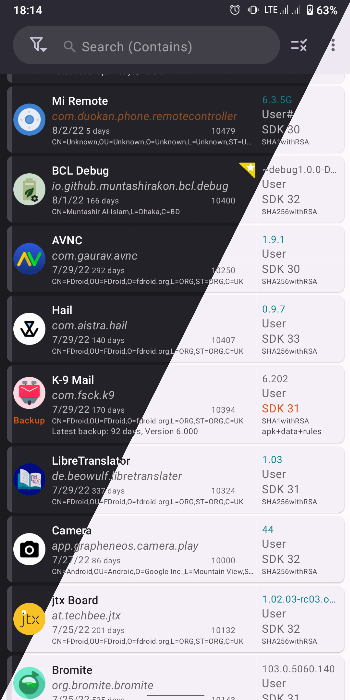
Table of Contents
About App Manager APK
App Manager is a well-crafted tool for Android users that consolidates several essential features into one application. It combines functionalities of various tools, creating an all-in-one resource for managing applications effectively. From installation options to detailed app insights, it caters to tech-savvy users and casual device owners alike.
This app serves as a package manager that helps users explore their applications in-depth. It not only allows the installation and uninstallation of APK files, but also provides detailed information about activities, services, permissions, and even tracks libraries found within apps. This feature-rich environment enhances the overall user experience when managing apps.
Designed with a focus on user-friendliness, App Manager features a material design that supports dynamic colors and dark mode. Users can enjoy a modern interface while efficiently accessing information such as app usage and system resources. Its repository on IzzyOnDroid assures that the app is developed and maintained with transparency.
Key Features of App Manager APK
- The app provides a comprehensive display of application details, including activities, broadcast receivers, services, permissions, and shared libraries, making it easier to understand each app's functionality.
- Users can batch perform operations, which streamlines tasks such as installation and uninstallation, allowing for greater efficiency when managing multiple apps at once.
- One key feature is the ability to scan for trackers and libraries within apps, helping users identify potential privacy concerns and monitor how their apps interact with external components.
- App Manager allows users to create shortcuts for actions, significantly enhancing accessibility and navigation when launching specific activities or services of an application.
- The app includes a logcat viewer, manager, and exporter, which is invaluable for developers and advanced users looking to troubleshoot issues or analyze app behavior.
- With options for backing up and restoring APK files, users can ensure their valuable applications remain safe during device changes or resets.
App Manager APK Information
| App Name | App Manager |
| Package | io.github.muntashirakon.AppManager |
| Version | 4.1.1 |
| Size | 27 MB |
| Requires | Android 5.0 and up |
| Category | System |
| Developer | Muntashir Al-Islam |
| License | GPL-3.0-only |
| Source | IzzyOnDroid |
| Last Updated | September 4, 2026 |
Download App Manager APK v4.1.1
How to Install App Manager APK on Android
- Download the App Manager APK file from a trusted source, such as its official GitHub repository.
- Before installation, ensure to allow installs from unknown sources in your device settings.
- Once downloaded, tap on the APK file to begin the installation process.
- After the installation completes, open the app to start exploring its features.
Pros and Cons
Pros
- The app is open-source, which means it is freely available and can be modified by anyone, ensuring transparency in its development.
- Its user-friendly interface combines simplicity with powerful features, making it accessible for both novice and experienced users.
- With the inclusion of a terminal emulator and code editor, advanced users can manipulate applications and conduct deeper analyses.
Limitations
- Users must sideload the app, which might be intimidating for those unfamiliar with installing APK files.
- As it is manually updated, users may have to check for new versions periodically to ensure they have the latest features.
Who Is This App For?
App Manager is ideal for tech enthusiasts and developers who require detailed information about their applications, as well as everyday users looking for a streamlined way to manage installed apps.
Looking for similar apps? Browse more System apps or see all Android apps on APK2GO.
Frequently Asked Questions
What does App Manager do?
App Manager is a comprehensive package management tool for Android that allows users to view important information about their apps, manage installations, and identify potential privacy concerns.
Is App Manager free?
Yes, App Manager is free to download and use as it operates under an open-source license, making it accessible to everyone.
Is the App Manager safe to use?
As an open-source app, it is regularly updated and actively maintained by its developer, ensuring safety and security for users. Always download from official sources to minimize risks.
Can I use App Manager to uninstall applications?
Absolutely! The app provides options for both installing and uninstalling APK files, making it easy to manage your app collection.
What can I do if I encounter issues?
In case you run into issues, App Manager has a logcat viewer that can help diagnose problems. Additionally, you can check online forums or the app's GitHub page for support and guidance.
Official page: App Manager official website / source