
aShell APK Download vv0.30 (Latest Version) for Android
⬇ Download APK vv0.30The aShell APK is a powerful tool designed for users who want to utilize an ADB shell specifically tailored for Shizuku powered Android devices. This app is intended for those with a basic understanding of ADB commands and Linux command-line operations.
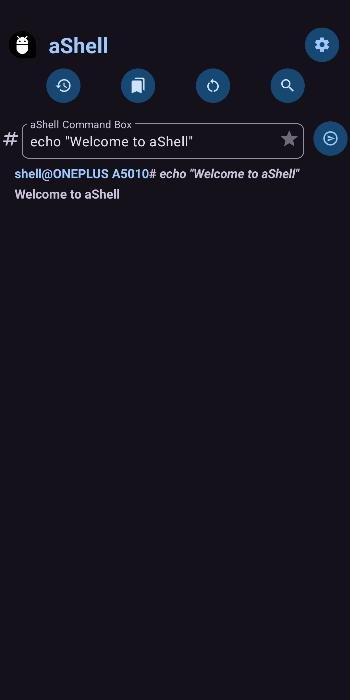
About aShell APK
aShell is an application that provides a local ADB shell environment for Android devices using Shizuku, an open-source project aimed at enhancing device functionality. If you are not familiar with Shizuku, this app may not meet your needs, as it requires this fundamental setup to operate effectively. It’s primarily designed for tech-savvy individuals looking to optimize their Android experience through command-line interface features.
Users interact with aShell to execute various ADB commands for system management and diagnostics. The app simplifies access to the device’s privileged file system, allowing users to perform advanced tasks that typically require more technical knowledge. By providing an interface to common commands and allowing for continuous output monitoring, it caters to both novice and experienced users.
The app supports those who want to dive deeper into their Android device’s capabilities without rooting it. With its elegant interface and included command examples, users can quickly learn how to navigate the command line. aShell also allows the saving and bookmarking of frequently used commands for easier access, enhancing workflow efficiency.
Key Features of aShell APK
- The app offers a well-designed user interface that makes navigating the command line more accessible and user-friendly for its users.
- Included within aShell are examples of common ADB commands, designed to assist new users in getting started with command-line operations quickly.
- It features an integrated file manager that allows users to access and navigate the privileged file system directly from within the app.
- The app can handle continuously running commands, such as logcat and top, providing real-time system diagnostics.
- Users can search for specific text from previous command outputs, making it easier to locate relevant information without scrolling through large amounts of text.
- An automatic toggle for dark and light themes is available, allowing users to customize their visual experience based on their preferences.
aShell APK Information
| App Name | aShell |
| Package | in.sunilpaulmathew.ashell |
| Version | v0.30 |
| Size | 2 MB |
| Requires | Android 7.0 and up |
| Category | System |
| Developer | sunilpaulmathew |
| License | GPL-3.0-or-later |
| Source | IzzyOnDroid |
| Last Updated | October 28, 2026 |
How to Install aShell APK on Android
- Download the aShell APK file from a trusted source or its GitHub repository.
- Go to your device settings and enable installations from unknown sources to allow the app to install.
- Locate the downloaded APK file and tap on it to initiate the installation process.
- Once installed, open the app to start using its features and functionalities.
Pros and Cons
Pros
- The app’s elegant design enhances usability, especially for those familiar with command-line operations.
- With the inclusion of common ADB command examples, users can quickly learn and execute necessary commands.
- The in-built file manager provides straightforward access to the device’s privileged areas, streamlining advanced tasks.
Limitations
- Users need a working Shizuku environment for aShell to function correctly, which may limit its audience.
- The app requires manual sideloading, as it may not be available on traditional app stores, complicating access.
- There may be limited documentation for advanced features, making it challenging for some users to fully utilize its capabilities.
Who Is This App For?
aShell is ideal for Android enthusiasts, developers, and tech-savvy users who are comfortable using command-line interfaces for device management.
Frequently Asked Questions
What is aShell?
aShell is a local ADB shell application designed for Shizuku powered Android devices, allowing users to execute various commands for system management.
Is aShell free?
Yes, aShell is open-source and free to use, provided you have the necessary Shizuku environment set up on your device.
Is aShell safe to use?
The app is developed under an open-source license, making it generally safe to use. However, users should always source the APK from reputable sites.
How do I use aShell?
To use aShell, install it alongside a functional Shizuku setup, and begin executing commands using the app’s user-friendly interface.
Can I save command outputs?
Yes, aShell allows users to save the outputs of commands as text files, making it easier to review logs and outputs.
Official page: aShell official website / source