
Dhwani – Volume Control APK Download v1.4.0 (Latest Version) for Android
⬇ Download APK v1.4.0Dhwani – Volume Control APK is an innovative solution for those facing issues with their device's physical volume buttons. This app provides an effortless way to manage sound levels without the need for hardware keys, ensuring a seamless user experience.
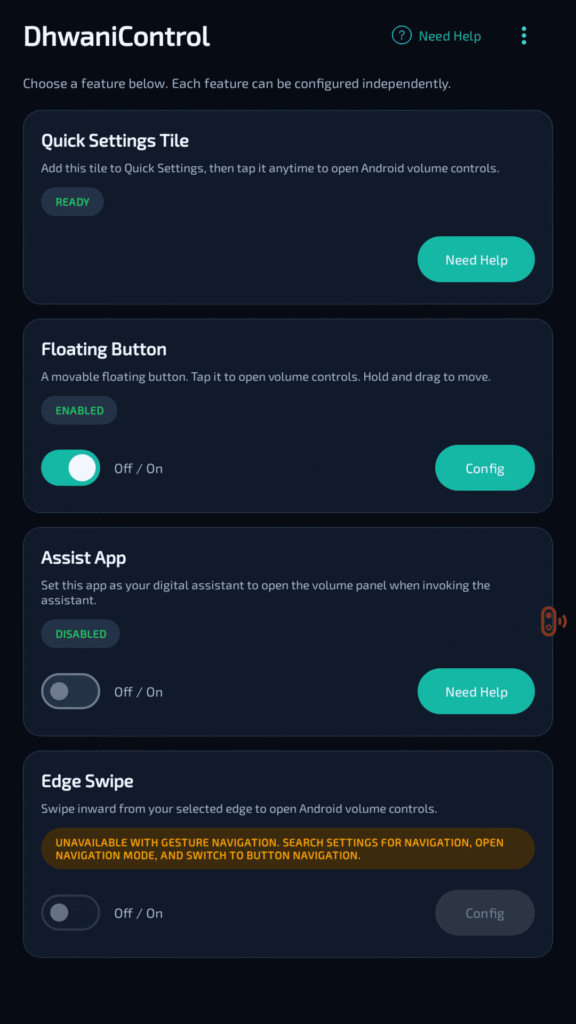
Table of Contents
About Dhwani – Volume Control APK
Dhwani – Volume Control is designed specifically for individuals whose physical volume buttons are malfunctioning. By utilizing this app, users can still manage and adjust their device’s volume effectively through various software-based options. This convenience makes it an essential tool for anyone experiencing hardware-related issues.
The app works by offering quick access to the native volume control panel in Android, allowing adjustments through different, intuitive methods. Whether users prefer tapping a customizable on-screen button or utilizing edge swipe gestures, the app caters to personal preferences and enhances accessibility in managing volume settings.
In addition to facilitating volume control, the app stands out for its customization options. Users can personalize their experience by altering the appearance and functionality of on-screen buttons, ensuring that their volume control method meets their unique needs and integrates smoothly into their daily device usage.
Key Features of Dhwani – Volume Control APK
- The application provides a Quick Settings Tile, enabling users to launch the volume panel instantly from the Android Quick Settings menu with a simple tap.
- Users can customize a floating button that remains accessible anywhere on the screen, allowing for effortless volume adjustments without navigating through menus.
- Edge swipe gestures are available to open volume controls swiftly from either side of the display, making the app user-friendly and suitable for multitasking.
- Dhwani – Volume Control can integrate with the native Assist App, setting it as the default digital assistant to facilitate convenient volume access upon invoking the system assistant.
- Lightweight and battery-efficient, the app ensures that users can manage volume levels without significantly impacting their device's overall performance.
- With minimal permissions required, users can enjoy an ad-free experience, knowing that their information remains private and their device's functionality is not compromised.
Dhwani – Volume Control APK Information
| App Name | Dhwani – Volume Control |
| Package | io.github.rajnishkmehta.dhwanicontrol |
| Version | 1.4.0 |
| Size | 5 MB |
| Requires | Android 10 and up |
| Category | Volume |
| Developer | RajnishKMehta |
| License | Apache-2.0 |
| Source | F-Droid |
| Last Updated | November 13, 2026 |
Download Dhwani – Volume Control APK v1.4.0
How to Install Dhwani – Volume Control APK on Android
- Download the Dhwani – Volume Control APK from a trusted source like F-Droid or GitHub.
- Go to your device settings and enable installations from unknown sources to permit the installation of the APK file.
- Locate the downloaded APK file in your file manager and tap on it to begin the installation process.
- Once installed, open the app and configure your volume settings as desired.
Pros and Cons
Pros
- Provides a practical solution for users with broken volume buttons, enhancing device usability.
- Offers various customization features, allowing users to tailor the experience to their preferences.
- Light on system resources and battery, ensuring it can run efficiently on most devices.
Limitations
- Some features may require additional permissions, which could be a concern for privacy-minded users.
- Users might need to manually update the app, as it is not available on mainstream app stores.
- Being an open-source app may imply a slower update cycle compared to commercial applications.
Who Is This App For?
This app is ideal for users with devices that have malfunctioning volume controls, as well as anyone looking for greater convenience in managing their audio settings efficiently.
Looking for similar apps? Browse more Volume apps or see all Android apps on APK2GO.
Frequently Asked Questions
What does Dhwani – Volume Control do?
Dhwani – Volume Control enables users to adjust their device's volume without relying on physical buttons. It offers touch-based controls and various customization options, allowing for a convenient volume management experience.
Is Dhwani – Volume Control free to use?
Yes, the app is free to use. As an open-source project, it is accessible to anyone who needs a solution for managing device volume without the need for hardware buttons.
Where can I download the Dhwani – Volume Control APK?
You can download the Dhwani – Volume Control APK from reliable sources like F-Droid or GitHub. Always ensure you are obtaining files from trusted platforms to avoid security risks.
Does the app have ads or trackers?
No, the app is designed to be ad-free and does not include trackers, ensuring user privacy while providing an efficient volume control solution.
How do I use Dhwani – Volume Control effectively?
To use the app effectively, customize the on-screen button and gestures to suit your habits. This customization allows for quick volume adjustments regardless of where you are in the operating system.
Official page: Dhwani – Volume Control official website / source