FTPS Server APK Download v2026.11.03 (Latest Version) for Android
⬇ Download APK v2026.11.03The FTPS Server APK allows users to transform their Android device into a secure FTP server for efficient file sharing. This application facilitates easy transfer of files within a local network, eliminating the need for cloud services, thus providing a straightforward solution for maintaining privacy and security.
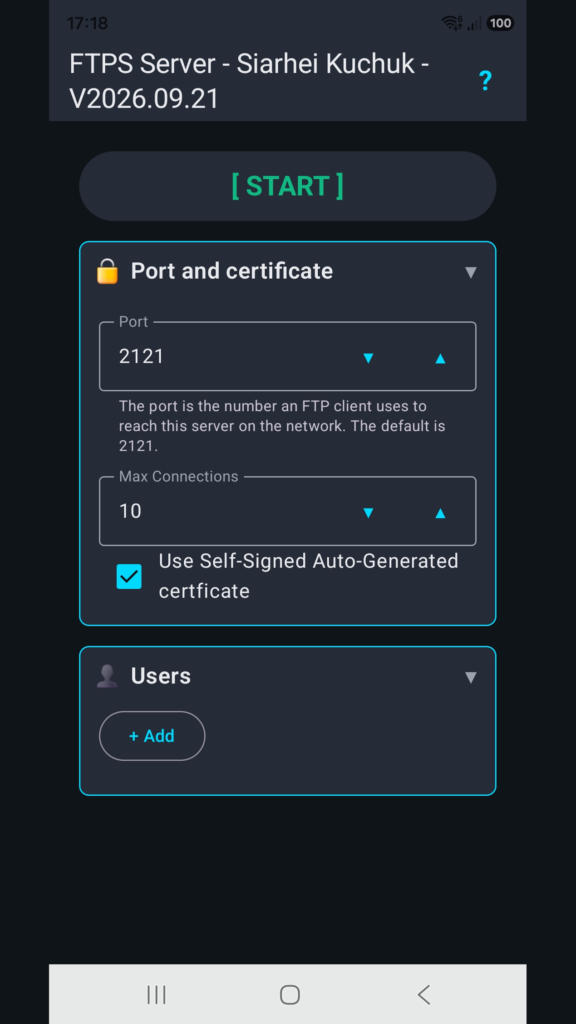
Table of Contents
About FTPS Server APK
FTPS Server is designed to convert your smartphone or tablet into a secure FTP server, enabling personal file sharing directly over your local network. The app allows users to share various forms of files such as photos, videos, and documents without resorting to cloud storage, thereby retaining control over their data.
By using this application, users can seamlessly transfer files between their Android devices and computers that are connected to the same Wi-Fi network. It keeps sensitive files from being stored on external servers, thus enhancing privacy and security for personal or professional use, whether at home, in the office, or over a secured hotspot.
One of the standout features of the app is the ability to manage access to files effectively. Each user can be assigned their own login credentials, and the app provides options to specify which folders can be accessed and the level of interaction allowed, whether it’s just downloading or also modifying files.
Key Features of FTPS Server APK
- The app allows users to establish a secure FTP server using their Android device for direct file sharing over a local network, making it a practical choice for personal and business applications.
- Users can decide exactly who is permitted to connect to the server, providing complete control over shared information and enhancing data security through individual access permissions.
- Each connection can have its own username and password, ensuring that different users or devices have tailored access rights and can only view or modify specific folders.
- The app enables file transfers while the device screen is turned off, as a notification keeps the server running and ensures uninterrupted data flow during transfers.
- By keeping files stored only on the Android device, users avoid the risks associated with third-party cloud storage, such as data leaks or loss of privacy.
- Simplicity is key, as users can easily move files from their device to a PC or vice versa without the need for any elaborate set-up or complex procedures.
FTPS Server APK Information
| App Name | FTPS Server |
| Package | com.siarheikuchuk.ftpsserver |
| Version | 2026.11.03 |
| Size | 4 MB |
| Requires | Android 6.0 and up |
| Category | File Transfer |
| Developer | Siarhei Kuchuk |
| License | CC0-1.0 |
| Source | F-Droid |
| Last Updated | November 4, 2026 |
Download FTPS Server APK v2026.11.03
How to Install FTPS Server APK on Android
- First, download the FTPS Server APK from a trusted source like F-Droid.
- Before installing, ensure that your device is set to allow installations from unknown sources in the device settings.
- Locate the downloaded APK file and tap on it to initiate the installation process.
- Once installed, open the app, and you can start configuring your FTP server settings.
Pros and Cons
Pros
- FTPS Server does not display any ads, ensuring a seamless and uninterrupted user experience.
- The capacity to manage user access provides enhanced security, allowing for individual folder permissions.
- By operating entirely over your own network, it maintains file privacy effectively as no data is uploaded to external servers.
- The app’s functionality supports both personal and business environments, making it versatile for various file-sharing needs.
Limitations
- Users will need to sideload the app, as it may not be available through standard app stores, requiring manual updates.
- The necessity for both devices to be on the same network can limit its use in more diverse or distant file-sharing scenarios.
Who Is This App For?
FTPS Server is ideal for users who prioritize privacy and security when sharing files. It suits both casual users wanting to share personal data and professionals needing to maintain confidentiality while transferring sensitive files.
Looking for similar apps? Browse more File Transfer apps or see all Android apps on APK2GO.
Frequently Asked Questions
What is FTPS Server used for?
FTPS Server is used to turn your Android device into a secure FTP server, allowing for the easy sharing of files such as photos, videos, and documents over your local network without relying on cloud services.
Is the app free?
Yes, FTPS Server is available for free, providing a cost-effective solution for secure file sharing between devices on the same network without any hidden charges or subscriptions.
How does FTPS Server ensure the safety of my files?
The app keeps your files stored on your own device and allows you to control access by creating unique login credentials for each user, thus enhancing data safety by avoiding external storage options.
Can I use FTPS Server for work purposes?
Absolutely! The app is designed to be flexible for both personal and professional use, making it a perfect tool for transferring sensitive work files securely within a designated network.
How do I share files using FTPS Server?
To share files, simply configure the app to set up your FTP server on the device, create access permissions for users, and connect other devices on the same network to transfer the desired files securely.
Official page: FTPS Server official website / source