
Gitling APK Download v1.0.65 (Latest Version) for Android
⬇ Download APK v1.0.65The Gitling APK is an innovative Git client tailored for Android devices, designed with modern user interfaces using Jetpack Compose and Material 3 Expressive. This application offers a seamless experience for developers and code enthusiasts seeking an efficient way to manage their repositories on the go.
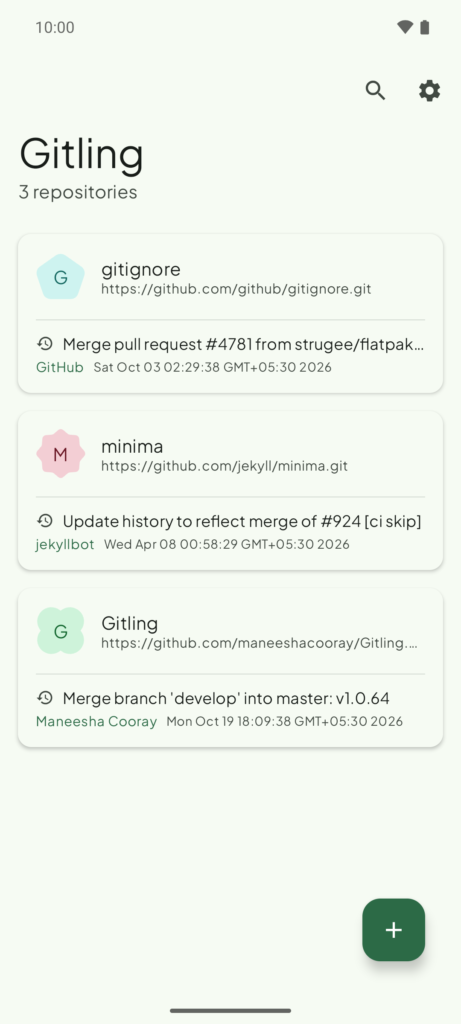
Table of Contents
About Gitling APK
Gitling is a user-friendly Git client that allows developers to clone, create, and manage local repositories directly from their Android devices. Built with a focus on contemporary design principles, the app makes use of Jetpack Compose, providing a sleek and modern interface that benefits from Material 3's expressive design. This accessibility enables developers to engage with their projects effortlessly, whether in a casual or more professional setting.
One of the standout features is the capability for one-tap GitHub sign-in, which eliminates the need for manual token or password entry. This streamlines the authentication process, especially for those who frequently work with GitHub repositories. Gitling supports multiple authentication methods, ensuring compatibility with various Git hosts for ease of access and operation.
In addition to its intuitive design and robust authentication options, the app facilitates thorough repository management. Users can browse commit histories, review file changes, and carry out complex operations such as merging branches or cherry-picking commits. While it does not replace an internal text editor, it allows users to integrate with existing editor apps, enhancing their coding workflow.
Key Features of Gitling APK
- Users can clone, create, and delete local repositories, making it simple to manage their projects in one place.
- The app offers a one-tap connection to GitHub using OAuth Device Flow, streamlining the login process without handling tokens manually.
- Support for various authentication methods—including SSH with private-key passphrase—ensures compatibility with all Git hosting services.
- Gitling enables users to browse files and their commit histories, allowing for easy revisions and tracking of project changes.
- Users can manage local and remote branches seamlessly, with capabilities to checkout, create, and merge branches and tags conveniently.
- With an option for light and dark modes that align with the overall system settings, users can also choose a fixed brand color or dynamic wallpaper-based themes.
Gitling APK Information
| App Name | Gitling |
| Package | com.maneeshacooray.gitling |
| Version | 1.0.65 |
| Size | 36 MB |
| Requires | Android 6.0 and up |
| Category | Code & Forge |
| Developer | Maneesha Cooray |
| License | GPL-3.0-or-later |
| Source | F-Droid |
| Last Updated | October 25, 2026 |
How to Install Gitling APK on Android
- Visit the source repository to download the Gitling APK.
- Allow installations from unknown sources in your device settings.
- Tap the downloaded file to initiate the installation process.
- Once installed, open the app and start managing your Git repositories smoothly.
Pros and Cons
Pros
- The app offers an intuitive interface that enhances user experience while managing Git repositories.
- One-tap authentication simplifies the login process, making it convenient for users to connect with GitHub.
- Support for modern Android design principles ensures the app is visually appealing and user-friendly.
Limitations
- Gitling requires sideloading as it is not available through mainstream app stores, which can deter some users.
- The lack of an integrated text editor means users need to have a separate app for file editing, adding an extra step to the process.
- Being a relatively new app, it may not have extensive community support or documentation.
Who Is This App For?
Gitling is best suited for Android users who are developers and need a reliable tool to manage Git repositories while on the move. It caters to both casual users and professionals looking for efficient repository management on their mobile devices.
Looking for similar apps? Browse more Code & Forge apps or see all Android apps on APK2GO.
Frequently Asked Questions
What is Gitling used for?
Gitling is used as a Git client for Android, allowing users to manage their code repositories effectively and perform various Git operations directly from their mobile devices.
Is Gitling free?
Yes, Gitling is free to use under the GPL-3.0-or-later license, making it accessible for anyone looking to manage their Git projects.
Is Gitling safe to use?
While Gitling allows direct management of repositories, always ensure to download the APK from trusted sources like F-Droid, to mitigate security concerns.
How do I edit files with Gitling?
Since Gitling does not include a built-in text editor, users need to have a separate code or text editor app that can open files via Android's File Provider.
What programming needs does Gitling meet?
Gitling is particularly useful for developers needing to work on the go, enabling them to perform Git operations and manage repositories without a full desktop environment.
Official page: Gitling official website / source