
Gridlink Mail APK Download v2.1.2 (Latest Version) for Android
⬇ Download APK v2.1.2The Gridlink Mail APK provides a private and efficient solution for managing emails without the presence of ads or tracking. Designed for modern devices, this email client supports both JMAP and IMAP protocols, ensuring a seamless experience for users looking for a no-frills email option.
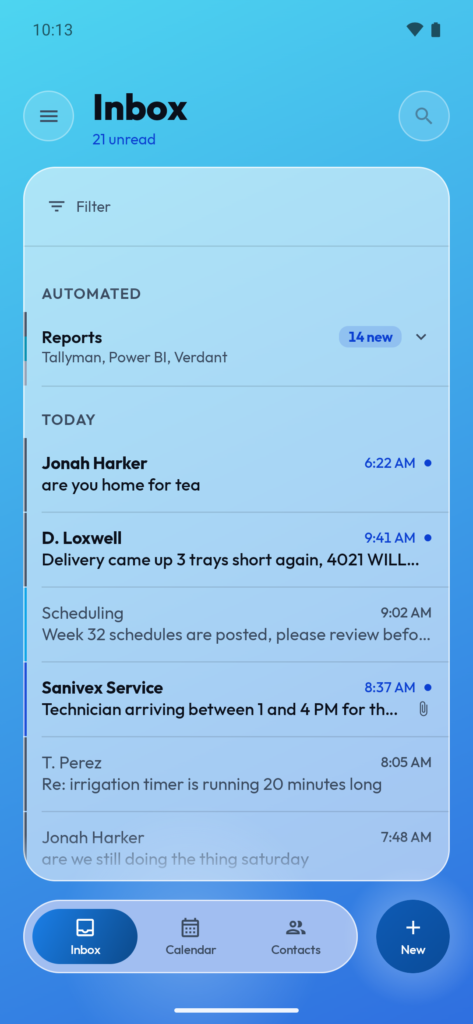
Table of Contents
About Gridlink Mail APK
Gridlink Mail is an advanced email client that emphasizes speed and privacy. It utilizes JMAP, which is known for its quicker sync capabilities and reduced data usage. Unlike many conventional apps, it is specially designed for mobile devices rather than simply being adjusted from desktop versions, making it an ideal choice for users who prioritize a seamless experience across their devices.
The app functions without the need for a proprietary account, instead connecting directly to the mail servers configured by the user. This means that no personal data is collected or stored, allowing users to have full control over their email interactions. Additionally, it provides traditional support for IMAP and SMTP methods, ensuring compatibility with various email providers.
Gridlink Mail stands out in the crowded field of email clients by offering robust features aimed at enhancing security, such as blocked remote images and OpenPGP support for encrypted communications. This functionality caters to both casual users and those with more advanced email management needs, making it versatile for different usage scenarios.
Key Features of Gridlink Mail APK
- The app supports JMAP mail while also providing full compatibility with IMAP and SMTP, offering flexibility in accessing various email services.
- It includes contact and calendar integration through JMAP, with a fallback to CardDAV and CalDAV, ensuring comprehensive functionality for users managing schedules alongside emails.
- Gridlink Mail comes equipped with autodiscovery, allowing users to simply input their email address to find servers automatically or manually select the protocol based on their preference.
- To enhance privacy, remote images are blocked by default so that no external content can contact the server unless explicitly permitted by the user.
- The app is designed with a two-pane layout that optimizes the display for larger screens, such as tablets, improving usability during email management.
- It features various user-friendly actions, including swipe gestures, scheduled sending, undo send options, and support for threaded conversations, ensuring an efficient email experience.
Gridlink Mail APK Information
| App Name | Gridlink Mail |
| Package | app.gridlink |
| Version | 2.1.2 |
| Size | 6 MB |
| Requires | Android 8.0 and up |
| Category | |
| Developer | tatelink |
| License | GPL-3.0-only |
| Source | F-Droid |
| Last Updated | November 9, 2026 |
Download Gridlink Mail APK v2.1.2
How to Install Gridlink Mail APK on Android
- Visit the F-Droid repository to find the Gridlink Mail APK.
- Enable installations from unknown sources in your device settings for smooth installation.
- Once downloaded, tap the APK file to initiate the installation process.
- Open the app after the installation is complete to begin configuring your email accounts.
- Follow the prompts to set up your email preferences and connect to your desired mail server.
Pros and Cons
Pros
- The app prioritizes user privacy, with no ads or tracking mechanisms in place, allowing for a more secure email experience.
- Its design is tailored specifically for mobile platforms, enhancing usability and syncing speed compared to traditional email clients.
- Gridlink Mail supports multiple email protocols, offering flexibility and compatibility with a wide range of email services.
Limitations
- Users may need to manually configure their email server settings, which could be daunting for those unfamiliar with email protocols.
- Since the app is not available on the Google Play Store, it requires sideloading, which may be a barrier for some users.
- The lack of a dedicated support channel means users may have to rely on community help for troubleshooting or inquiries.
Who Is This App For?
This app is best suited for privacy-conscious individuals and tech-savvy users looking for a fast email client that offers robust features without the compromise of ads or tracking.
Looking for similar apps? Browse more Email apps or see all Android apps on APK2GO.
Frequently Asked Questions
What is Gridlink Mail used for?
Gridlink Mail is an email client designed for modern email protocols, offering a quick and private way to manage emails without ads or user tracking.
Is it free to use?
Yes, Gridlink Mail is a free software application, allowing users to fully utilize its features without any financial cost.
Is my data safe with this app?
Absolutely, Gridlink Mail collects no personal information, prioritizing user privacy with no ads, tracking, or integration with Google libraries.
Where does the installation file come from?
The Gridlink Mail APK is sourced from F-Droid, a reputable platform known for providing open-source applications for Android.
How easy is it to configure my email account in the app?
Configuring your email account is straightforward; you can either use the autodiscovery feature by entering your email address or manually choose your preferred protocols.
Official page: Gridlink Mail official website / source