
Materializr APK Download v1.7.5 (Latest Version) for Android
⬇ Download APK v1.7.5The Materializr APK is a versatile open-source application designed for 3D CAD modeling, striking a balance between user-friendly designs like Tinkercad and more complex software such as FreeCAD. This app is ideal for makers who need solid modeling capabilities without the steep learning curves associated with more advanced tools.
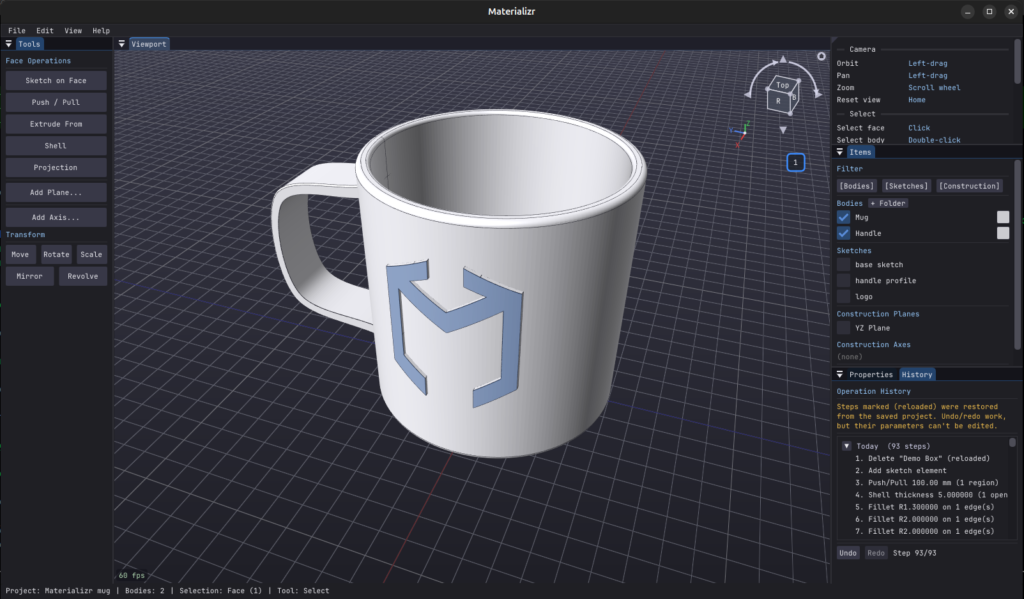
Table of Contents
About Materializr APK
Materializr stands out as an accessible option in the realm of 3D CAD modeling, catering to both novices and experienced users alike. It offers essential modeling features that allow users to create genuine parts without the requirement for subscriptions or user accounts. By focusing on a straightforward user interface, the app ensures that even those with minimal experience can navigate its functionalities effectively.
This application enables users to sketch designs on a plane that can then be transformed into solid objects through various methods such as extrusion, revolution, and lofting. Users can also apply fillet and chamfer techniques, perform boolean operations, and edit their designs at any stage. The flexibility of altering design history, even after a session has ended, enhances productivity and creativity.
Materializr facilitates comprehensive file compatibility, allowing for easy integration with other tools and services. Users can export sketches to SVG format, perfectly tailored for laser cutting and 2.5D CNC machining. Additionally, the ability to import and export formats like STEP, IGES, and STL makes it a practical choice for various projects, especially for those who work within an ecosystem of different software solutions.
Key Features of Materializr APK
- The app uses OpenCASCADE as its geometry kernel, providing users with genuine B-rep solids rather than mere mesh representations.
- Materializr allows for direct sketching on a plane, which can then be transformed into a solid through multiple operations such as extrusion or revolving.
- Users can perform advanced operations like filleting and chamfering, as well as managing boolean operations to combine or subtract shapes.
- The app supports file imports and exports in key formats, including STEP, STL, IGES, and glTF, ensuring compatibility with various engineering and design tools.
- Materializr prioritizes user experience by enabling editing of design history, allowing adjustments even after closing and reopening projects.
- The touch-capable interface is optimized for larger devices, making it suitable for tablet users who prefer detailed design work.
Materializr APK Information
| App Name | Materializr |
| Package | com.materializr.app |
| Version | 1.7.5 |
| Size | 29 MB |
| Requires | Android 7.0 and up |
| Category | Graphics |
| Developer | Steve Bushwa |
| License | GPL-3.0-or-later |
| Source | F-Droid |
| Last Updated | October 29, 2026 |
Download Materializr APK v1.7.5
How to Install Materializr APK on Android
- Download the Materializr APK from its source repository on F-Droid.
- Go to your device settings and enable installations from unknown sources.
- Once the download is complete, tap the APK file to initiate the installation process.
- Follow the prompts to finish installation and subsequently open the app to begin your 3D modeling experience.
Pros and Cons
Pros
- As an open-source application, it is free to use and provides ongoing community support.
- The balance of simplicity and functionality makes it suitable for both hobbyists and semi-professional makers.
- Materializr's robust geometry capabilities enable the creation of detailed and accurate 3D models without overwhelming complexity.
Limitations
- Being relatively new software, it may exhibit some rough edges and stability issues as it continues to develop.
- Users should remember to save frequently, as operations validate results and might lead to undetected problems.
- Sideloading the app requires enabling installations from unknown sources, which can present potential security concerns for some users.
Who Is This App For?
Materializr is an excellent choice for makers, hobbyists, and engineers who are looking for a straightforward yet powerful 3D CAD tool. It appeals to those who need functionality without the burdensome learning curves of more complex software.
Looking for similar apps? Browse more Graphics apps or see all Android apps on APK2GO.
Frequently Asked Questions
What is Materializr used for?
Materializr is used for 3D CAD modeling, allowing users to create solid models for various applications, including laser cutting and CNC machining.
Is Materializr free to use?
Yes, Materializr is an open-source application, which makes it free to download and utilize without any subscription or fees.
Where can I download the Materializr APK?
You can download the Materializr APK from its F-Droid repository, a platform known for hosting open-source Android applications.
Is the app safe to use?
As an open-source project, Materializr allows community scrutiny, making it relatively safe. However, always ensure you're downloading from reputable sources.
Can I edit my designs later?
Yes, Materializr allows users to edit their designs at any stage, even after closing and reopening the project, providing flexibility in the design process.
Official page: Materializr official website / source