
Next Player APK Download v0.19.0 (Latest Version) for Android
⬇ Download APK v0.19.0Next Player APK offers a straightforward solution for video playback on Android devices, crafted with a focus on simplicity and user experience. This app harnesses the power of Kotlin and Jetpack Compose, aiming to deliver a native video playing experience with essential features.
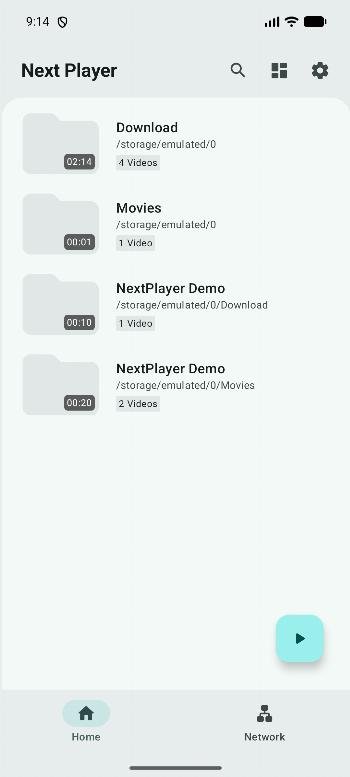
Table of Contents
About Next Player APK
Next Player is a multimedia application designed specifically for video playback on Android smartphones and tablets. Built as a native Android app, it allows users to play various video and audio formats seamlessly. Its intuitive interface ensures that even beginners can navigate the app effortlessly, enhancing the overall viewing experience on mobile devices.
This app provides support for a broad range of audio and video formats including H.263, H.264, and countless others, making it highly versatile for users with diverse media needs. Users can also enjoy streaming capabilities with support for formats like DASH and HLS. This flexibility allows individuals to enjoy their favorite content without worrying about format compatibility.
Next Player is designed to be completely free and open source, promoting an ad-free experience without necessitating excessive permissions. This dedication to user freedom allows for a cleaner interaction with the application, ensuring that users can focus solely on enjoying their media without interruptions or distractions.
Key Features of Next Player APK
- The app boasts a clean and user-friendly interface, making it accessible for all, regardless of their technical knowledge.
- With complete support for Material 3, the application delivers a modern aesthetic that complements the latest Android design principles.
- Users can select specific audio and subtitle tracks during playback, ensuring a customizable viewing experience tailored to individual preferences.
- Vertical swipes enable easy adjustment of brightness and volume, while horizontal swipes allow for effortless seeking through videos.
- Next Player includes the capability for picture-in-picture mode, allowing users to multitask or continue watching videos while using other applications.
- The app also features a media picker with multiple viewing modes for better organization and accessibility of files.
Next Player APK Information
| App Name | Next Player |
| Package | dev.anilbeesetti.nextplayer |
| Version | 0.19.0 |
| Size | 18 MB |
| Requires | Android 7.0 and up |
| Category | Multimedia |
| Developer | Anil Kumar Beesetti |
| License | GPL-3.0-only |
| Source | IzzyOnDroid |
| Last Updated | October 9, 2026 |
Download Next Player APK v0.19.0
How to Install Next Player APK on Android
- Download the Next Player APK from a trusted source like IzzyOnDroid.
- Go to your device's Settings and allow installations from unknown sources.
- Locate the downloaded file in your device's file manager and tap on it to initiate the installation.
- Once installed, open the app and enjoy your video watching experience.
Pros and Cons
Pros
- The app is free to use, providing a cost-effective solution for video playback.
- With its open-source nature, users can access the code, contributing to ongoing improvements and adjustments.
- The lack of ads ensures a smooth and uninterrupted media experience.
Limitations
- Current development stages may result in occasional bugs or stability issues that users might encounter.
- As the app is in a continuous state of development, users may need to manually check for updates and downloads, as it doesn’t provide automatic updating.
Who Is This App For?
This app is ideal for users seeking a simple yet powerful video player that supports a multitude of formats, tailored for anyone looking for effortless playback on their Android devices.
Looking for similar apps? Browse more Multimedia apps or see all Android apps on APK2GO.
Frequently Asked Questions
What types of formats does the app support?
Next Player supports a wide array of video and audio formats including H.264, H.265, MP3, AAC, and more, making it versatile for any media library.
Is the app really free to use?
Yes, Next Player is completely free and open source, allowing users to enjoy its full features without any cost and without the distractions of advertisements.
Can I install the app safely?
You can safely install the app from trusted sources like IzzyOnDroid. Just ensure you allow installations from unknown sources in your device's settings.
How do I customize playback options?
Users can customize playback by selecting specific audio and subtitle tracks during video playback, adapting the viewing experience to their personal preferences.
What should I do if I encounter bugs?
Since the app is still under development, occasional bugs may occur. Users should check the project's GitHub repository for updates and possible fixes.
Official page: Next Player official website / source