
OBS Blade APK Download v4.2.0 (Latest Version) for Android
⬇ Download APK v4.2.0The OBS Blade APK serves as a powerful tool for streamers, allowing them to manage their broadcasts directly from their mobile devices. This unofficial application provides extensive controls for OBS, giving users the convenience of operating their streams without being tethered to a computer.
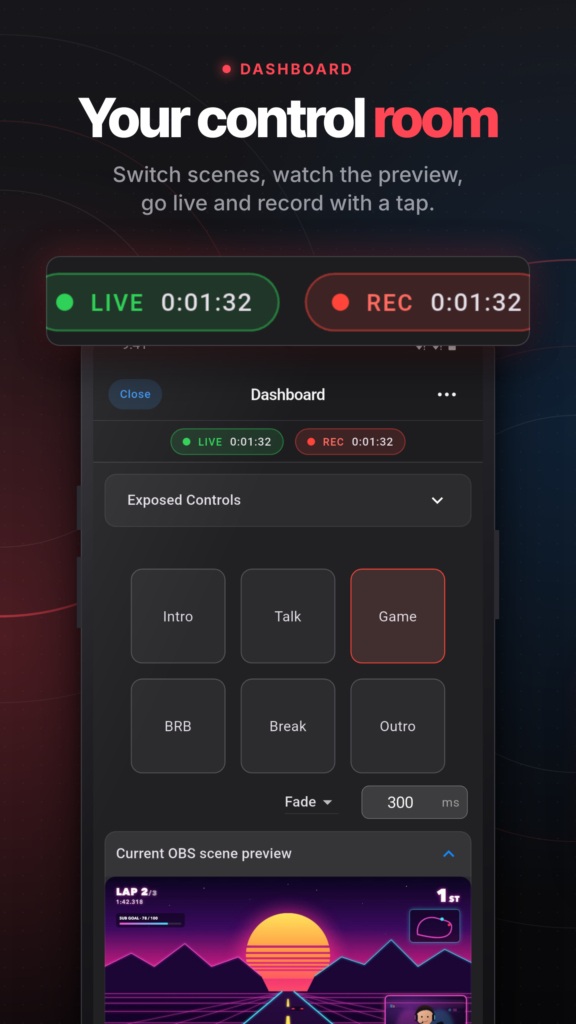
Table of Contents
About OBS Blade APK
OBS Blade is an unofficial open-source app created to enhance the streaming experience by enabling remote control over OBS (Open Broadcaster Software). This allows users to monitor and adjust their live streams, access chat features, manage scenes and audio, and keep tabs on important stream statistics from their smartphones or tablets.
With this app, you can effortlessly start and stop streams, record videos, and even utilize virtual cameras without needing to return to your computer. It is designed to work seamlessly with the latest versions of OBS Studio and can be a game changer for streamers looking to elevate their production quality.
Incorporating features like scene switching, source management, and live audio mixing, the app significantly streamlines the content creation process. It also supports multiple platforms like Twitch and YouTube, making it an ideal companion for vloggers and gamers alike, ultimately leading to a more polished and engaging viewer experience.
Key Features of OBS Blade APK
- The app allows you to start and pause your stream, recording, replay buffer, and virtual camera with just a touch, bringing all the essential controls to your fingertips.
- You can easily switch between multiple scenes while enjoying studio mode and various transitions for a professional touch during live broadcasts.
- The audio mixing functionality features live volume meters, enabling you to control audio levels or mute sources with a single tap for instant adjustments.
- A live scene preview is available, allowing you to monitor your content before going live and ensuring everything looks perfect for your audience.
- With the ability to check stream health metrics like FPS, CPU usage, bitrate, and dropped frames, you can maintain high production quality during your broadcasts.
- The app contains a dedicated chat section for platforms such as Twitch and YouTube, allowing you to interact with your audience directly from the dashboard while you're streaming.
OBS Blade APK Information
| App Name | OBS Blade |
| Package | com.kounex.obsBlade |
| Version | 4.2.0 |
| Size | 73 MB |
| Requires | Android 7.0 and up |
| Category | Connectivity |
| Developer | Kounex |
| License | GPL-3.0-only |
| Source | F-Droid |
| Last Updated | October 27, 2026 |
How to Install OBS Blade APK on Android
- Download the OBS Blade APK file from a trusted source.
- Go to your Android device settings and allow installations from unknown sources.
- Locate the downloaded file in your file manager and tap on it to begin the installation.
- Once installed, open the app and follow the on-screen setup instructions to connect with OBS.
Pros and Cons
Pros
- Offers extensive control for streaming directly from your mobile device, providing convenience and flexibility.
- The ability to manage multiple aspects of the stream seamlessly enhances the overall production quality.
- Supports a variety of chat platforms, allowing direct interaction with viewers while streaming.
Limitations
- Since it is an unofficial app, it may lack customer support or updates compared to official software.
- Users must manually update the app, as it doesn't receive automatic updates from a standard app store.
- The app needs to be sideloaded, which could be a barrier for less tech-savvy users.
Who Is This App For?
This app is well-suited for streamers and content creators who want to manage their broadcasts more efficiently without being tied to a computer, particularly gamers and vloggers.
Looking for similar apps? Browse more Connectivity apps or see all Android apps on APK2GO.
Frequently Asked Questions
What does the app do?
OBS Blade allows users to remotely control their OBS streams from mobile devices, enabling them to manage scenes, audio, and chat functionalities seamlessly.
Is OBS Blade free to use?
Yes, the app is completely free and open-source, making it accessible for all users without any subscription fees.
Is OBS Blade safe to install?
While the app is widely used and is open-source, always download from trusted sources to ensure that your device remains safe.
How do I connect the app to OBS?
You will need the latest version of OBS Studio with WebSocket support. The app has a quick connect feature that allows you to scan a QR code from OBS to link them.
Can I view my stream statistics with this app?
Absolutely! The app provides a dashboard where you can monitor stream health metrics like FPS, CPU usage, and bitrate in real time.
Official page: OBS Blade official website / source