
Open Notes APK Download v1.4.2 (Latest Version) for Android
⬇ Download APK v1.4.2If you’re seeking a simple and effective way to jot down your thoughts, the Open Notes APK offers a minimalist and secure solution for offline note-taking. This app prioritizes your privacy while providing an efficient platform to organize your notes.
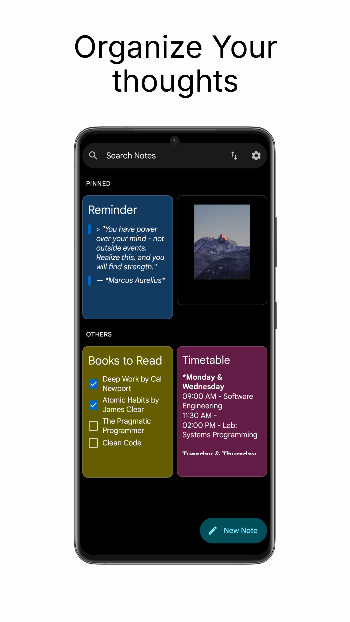
Table of Contents
About Open Notes APK
Open Notes is a privacy-centric application designed for users who wish to maintain their notes offline without the worries of data leaks or tracking. Its clean interface supports a variety of formatting options, making note-taking enjoyable and efficient. By focusing on user data security, the app ensures that all your notes remain local, eliminating the risk associated with cloud storage.
The app has swiftly gained the attention of those who value simplicity in their note-taking experience. With robust organization features, you can easily sort, pin, and color-code your notes to enhance productivity. The native Markdown rendering adds depth to your notes, enabling headers, checklists, and other formatting tools at your fingertips.
As a fully open-source solution, Open Notes encourages community engagement while ensuring transparency for users who are cautious about their privacy. The app’s lack of intrusive permissions and analytics means you can focus on writing without distractions. It’s perfect for students, professionals, or anyone looking to keep their thoughts structured and secure.
Key Features of Open Notes APK
- The application excels in native Markdown rendering, allowing users to apply rich text formatting such as headers, lists, and quotes for better note organization.
- With seamless image support, you can easily embed photos alongside your text, providing a richer context to your notes.
- Its built-in organization tools let you color-code, pin, and sort notes, enabling efficient and personalized management of your documentation.
- Home screen widgets offer quick access to your most critical notes, ensuring you have everything you need at your fingertips without navigating through the app.
- The app includes privacy options that allow you to lock the interface using biometric authentication, enhancing security for sensitive information.
- Users can back up their entire note library offline, effortlessly exporting and importing it as a single ZIP file for convenient data management.
Open Notes APK Information
| App Name | Open Notes |
| Package | com.opennotes |
| Version | 1.4.2 |
| Size | 4 MB |
| Requires | Android 8.0 and up |
| Category | Writing |
| Developer | Dhanush Sugganahalli |
| License | GPL-3.0-or-later |
| Source | IzzyOnDroid |
| Last Updated | October 1, 2026 |
Download Open Notes APK v1.4.2
How to Install Open Notes APK on Android
- Download the Open Notes APK file from a trusted source.
- Allow your device to install applications from unknown sources in the security settings.
- Tap the downloaded APK file to begin the installation process.
- Once installed, open the app and start creating your notes.
Pros and Cons
Pros
- Offers a clean and minimalist interface that enhances focus during note-taking.
- All notes are stored locally on your device, ensuring data privacy and security.
- It’s completely free and open-source, providing transparency and freedom from invasive permissions.
Limitations
- The app needs to be sideloaded, which may be less convenient for some users compared to traditional app installations.
- Manual updates may be necessary, as the application does not have an automated update feature.
Who Is This App For?
Open Notes is ideal for anyone who prioritizes security and prefers a straightforward note-taking experience without internet connectivity. It's particularly suited for students, writers, and professionals managing sensitive information.
Looking for similar apps? Browse more Writing apps or see all Android apps on APK2GO.
Frequently Asked Questions
What does Open Notes do?
Open Notes is an offline note-taking application that allows users to create, organize, and manage notes securely without internet access. It offers various formatting tools for a richer note-taking experience.
Is Open Notes free to use?
Yes, Open Notes is completely free and operates as an open-source application, ensuring users can utilize it without any financial burden or hidden costs.
Is it safe to use Open Notes?
Absolutely, Open Notes prioritizes user privacy by storing all information locally and avoiding internet access. There are no trackers or analytics, ensuring a secure note-taking experience.
Where can I find the Open Notes APK file?
You can download the Open Notes APK file from reputable sources, including its official GitHub repository to ensure you are getting a secure and legitimate version of the app.
Can I customize the appearance of Open Notes?
Yes, Open Notes offers personalization options, allowing users to choose between light and dark themes and select their favorite color for the home screen icon.
Official page: Open Notes official website / source