
PairFree APK Download v0.12.0 (Latest Version) for Android
⬇ Download APK v0.12.0The PairFree APK is designed to simplify your audio experience by serving as a unified application for managing various brands of earbuds. It enables seamless audio control without the need for multiple, bulky brand-specific apps, optimizing user convenience and performance.
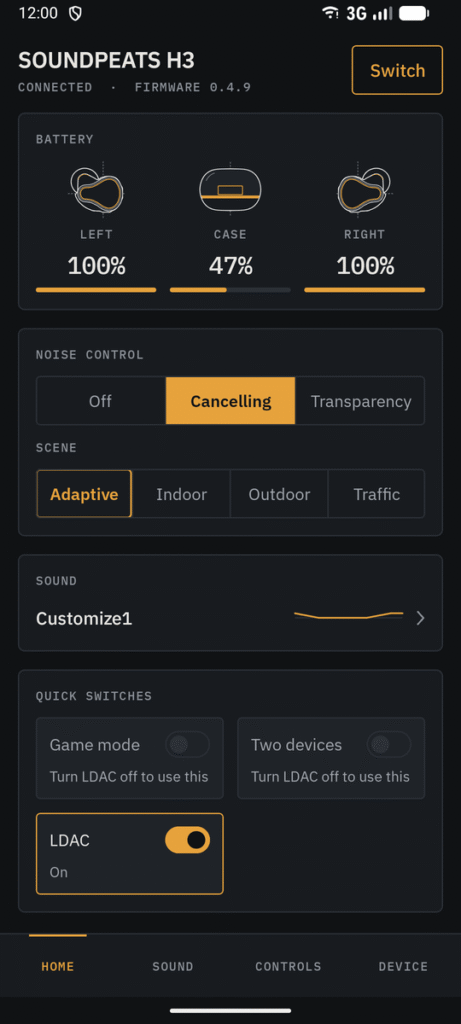
Table of Contents
About PairFree APK
PairFree is a streamlined application aimed at consolidating the management of headphones and earbuds across many brands. By replacing cumbersome, brand-specific software, the app allows users to efficiently handle audio settings in one place. This initiative is especially beneficial for those who own different audio devices from multiple brands, eliminating the need to switch between various applications.
The app offers a unique advantage by requiring no account creation or internet connectivity, ensuring that users can keep their audio experiences private and offline. This means that none of your data is transmitted elsewhere unless you choose to share it, which adds a layer of simplicity and security. Having an application that isn’t bogged down by ads or analytics enhances the overall user experience.
With a focus on accessibility, PairFree is open-source and designed to be lightweight. Its small size allows for quick installations and usability across devices without draining resources. This approach caters to users who appreciate efficiency and prefer to customize their sound settings without the technical obstructions found in other applications.
Key Features of PairFree APK
- PairFree allows users to manage their earbuds and headphones directly over Bluetooth without the need for additional internet permissions, safeguarding privacy and simplicity.
- The app does not require account setups, meaning users can engage with its features immediately without the hassle of signing up or logging in.
- As an open-source application, PairFree's protocols are well-documented, which fosters transparency and trust within its user community.
- Users can customize their audio experience further by saving and exporting unique equalizer settings, enabling a personalized listening experience.
- With a typical installation footprint of approximately 3 MB, the app ensures swift operations and minimal impact on device storage.
- It features minimal permissions, primarily focusing on Bluetooth connectivity for previously paired devices and optional notifications for status updates.
PairFree APK Information
| App Name | PairFree |
| Package | io.github.omegadestroyer.pairfree |
| Version | 0.12.0 |
| Size | 5 MB |
| Requires | Android 12 and up |
| Category | Remote Controller |
| Developer | Omega-Destroyer |
| License | GPL-3.0-or-later |
| Source | F-Droid |
| Last Updated | November 17, 2026 |
How to Install PairFree APK on Android
- Visit the official repository to download the PairFree APK file.
- Before installing, navigate to your device settings and allow installations from unknown sources.
- Once the download completes, tap on the APK file to initiate the installation process.
- Open the app after installation to start managing your earbuds and headphones.
Pros and Cons
Pros
- Efficiently combines settings for multiple brands into one application, reducing clutter.
- No internet access is required, enhancing user privacy and ensuring settings remain local to the device.
- Lightweight application that operates smoothly without taking up significant storage or resources.
Limitations
- Sideloading the app may pose challenges for some users unfamiliar with installing APKs.
- Being an open-source application, it may not have extensive support or updates like commercial counterparts.
Who Is This App For?
This app is ideal for audiophiles and everyday users who own multiple brands of audio devices and want a centralized control solution.
Frequently Asked Questions
What does PairFree do?
PairFree serves as a unified application that allows users to manage various brand earbuds and headphones directly through Bluetooth, simplifying the audio control experience.
Is PairFree free to use?
Yes, PairFree is completely free to use as it is an open-source application, allowing users to enjoy its features without any cost.
Is my data safe with PairFree?
Absolutely, PairFree does not require an account or internet access, meaning your data remains on your device unless explicitly shared by you.
How do I customize sound settings in PairFree?
Within the app, users can save and manage their own equalizer profiles, allowing for a tailored audio experience that matches personal preferences.
Can I use PairFree with any brand of earbuds?
PairFree supports a variety of brands, making it a versatile choice for users with different earbuds, enhancing the convenience of audio management.
Official page: PairFree official website / source