
Pocket2FA APK Download v0.11.0 (Latest Version) for Android
⬇ Download APK v0.11.0The Pocket2FA APK is an innovative solution for anyone seeking enhanced security through two-factor authentication. This mobile companion app works seamlessly with the 2FAuth platform, making it easier for users to generate secure codes while maintaining complete control over their data offline.
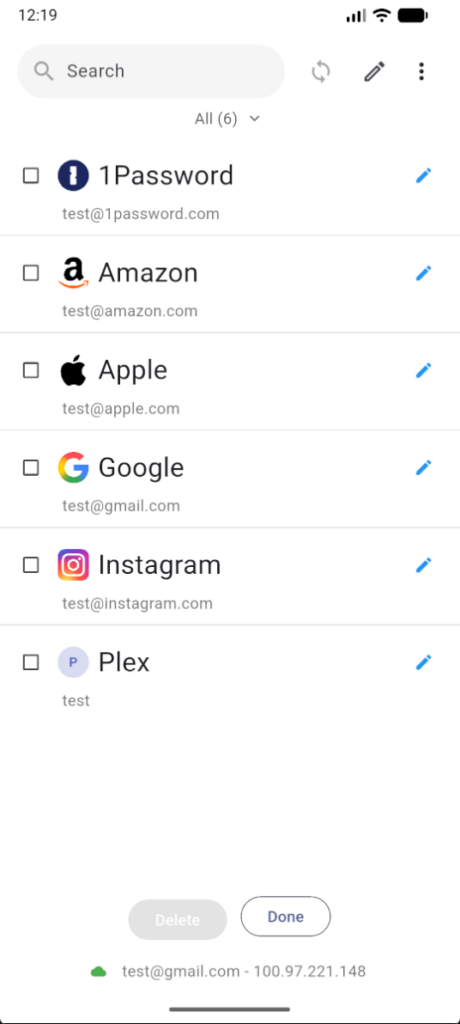
Table of Contents
About Pocket2FA APK
Pocket2FA serves as a dedicated client for the 2FAuth two-factor authentication solution, allowing users to generate time-based OTP codes directly on their devices. By functioning offline, it elevates security by ensuring that sensitive secrets never leave the user’s environment. Without relying on third-party servers for code generation, this app offers peace of mind in an increasingly security-conscious world.
To use the app, one must have a self-hosted instance of the 2FAuth server set up since it extends the functionality of this existing web application instead of acting as a standalone two-factor authentication manager. It is a versatile tool favored by those who appreciate having robust security measures at their fingertips without compromising on privacy. Users benefit from real-time code updates with an intuitive interface that promotes efficiency.
Equipped with encryption for secure data storage, Pocket2FA offers various built-in features for user ease. Noteworthy functionalities such as biometric authentication and PIN locks enhance access control. Additionally, the organization of codes into groups simplifies the user experience, making it a practical choice for those managing multiple accounts. This app is designed for efficiency, privacy, and reliability in today’s digital landscape.
Key Features of Pocket2FA APK
- It generates TOTP and Steam OTP codes locally on your device without the need to transmit secrets, ensuring maximum privacy.
- The app utilizes encrypted storage harnessing platform security tools, like the Android Keystore, to protect sensitive information.
- Users can enable optional biometric authentication, including fingerprint and face recognition, for added layers of security.
- With a customizable PIN lock option ranging from four to eight digits, users can further secure access to their codes.
- Real-time code generation is accompanied by a countdown timer, ensuring that users are always aware of the validity period of each code.
- The app supports QR code scanning, allowing users to quickly add accounts directly from their camera or gallery images.
Pocket2FA APK Information
| App Name | Pocket2FA |
| Package | net.gmartin.pocket2fa |
| Version | 0.11.0 |
| Size | 27 MB |
| Requires | Android 7.0 and up |
| Category | Password & 2FA |
| Developer | Germán Martín |
| License | AGPL-3.0-only |
| Source | F-Droid |
| Last Updated | October 27, 2026 |
Download Pocket2FA APK v0.11.0
How to Install Pocket2FA APK on Android
- Download the Pocket2FA APK file from a trusted source like F-Droid.
- Before installation, ensure you allow installations from unknown sources in your device settings.
- Once the download is complete, tap on the APK file to begin the installation process.
- After installation, open the app and configure it to connect with your 2FAuth server.
Pros and Cons
Pros
- Offers offline functionality, significantly enhancing user privacy by keeping sensitive data on-device.
- Incorporates robust security features, including biometric authentication and PIN locks, for peace of mind.
- Enables real-time code updates, ensuring users have the most accurate and up-to-date OTPs.
- Provides an organized structure for managing multiple 2FAuth accounts with ease and clarity.
Limitations
- Requires a self-hosted 2FAuth server, limiting its usability for those who do not have this setup.
- Might need manual updates since it is not available through traditional app stores.
- As an independent app, it relies on users for configuration and management, which might be a barrier for some.
Who Is This App For?
Pocket2FA is ideal for tech-savvy users and privacy-conscious individuals who appreciate self-hosted solutions and enhanced security for their digital accounts.
Looking for similar apps? Browse more Password & 2FA apps or see all Android apps on APK2GO.
Frequently Asked Questions
What does Pocket2FA do?
Pocket2FA is designed to generate secure time-based one-time codes for two-factor authentication, enhancing security for online accounts through offline capability.
Is Pocket2FA free to use?
Yes, the app is free to use, but it requires a self-hosted instance of the 2FAuth server for functionality.
Why should I trust Pocket2FA?
The app leverages your device’s security features and keeps sensitive information offline, minimizing the risk of data breaches. Its use of encryption further safeguards your codes.
How do I set up Pocket2FA?
To set up the app, you'll need to first establish a self-hosted 2FAuth server and then connect it within the app to start generating your authentication codes.
Can I use Pocket2FA without an Internet connection?
Yes, Pocket2FA operates offline, allowing you to generate OTP codes without needing an Internet connection, which enhances overall security.
Official page: Pocket2FA official website / source