Quedalle APK Download v3.0 (Latest Version) for Android
⬇ Download APK v3.0Quedalle APK is a straightforward app launcher that prioritizes simplicity and ease of use, appealing to those tired of complicated interfaces. It provides a unique take on app organization without the clutter that often accompanies many modern launchers.
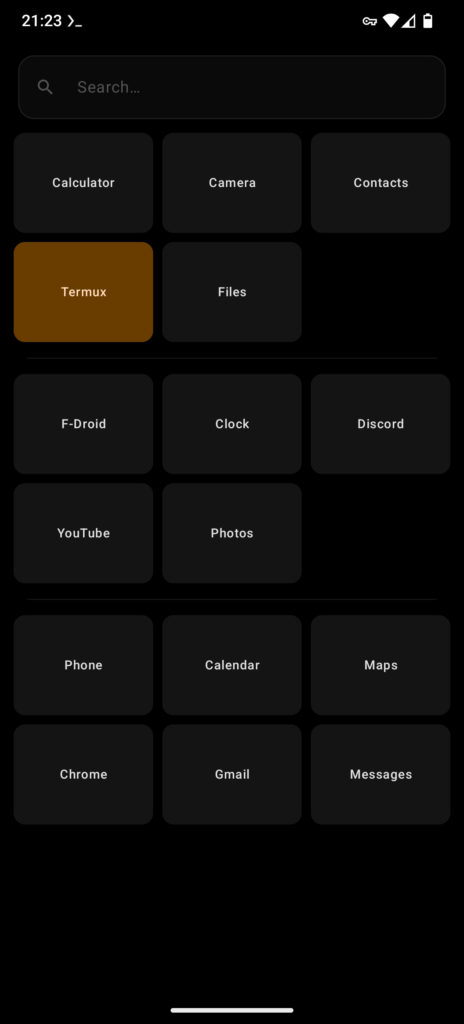
Table of Contents
About Quedalle APK
Quedalle serves as a minimalist tile launcher designed for Android users, focusing exclusively on app organization. Unlike traditional launchers that may overwhelm users with excessive features and animations, Quedalle strips down functionality to its essentials. It allows users to create a grid of app tiles to quickly access applications without distraction.
Developed for those who prefer a clean and functional layout, Quedalle is particularly beneficial for individuals who wish to avoid the excesses often found in app interfaces. This launcher enables users to easily customize the arrangement and appearance of their app tiles, catering to personal preferences while maintaining a straightforward navigation experience.
The app's simplicity is a refreshing departure from feature-packed alternatives, allowing users to focus solely on launching their favorite apps. With customizable options like color presets and a choice between light or dark themes, it adapts to user needs while ensuring a sleek, unobtrusive interface for app management.
Key Features of Quedalle APK
- Quedalle offers a tile-based interface where users can create app tiles that are text-only and easily renameable for convenience.
- The app includes spacer tiles, which act as colored blanks that help structure the user’s grid layout.
- Divider tiles provide a clear distinction between groups of tiles, making the home screen visually organized.
- Customization options allow for the dragging and dropping of tiles to reorder them quickly, enhancing user control.
- Users can choose from 12 color presets per tile, ensuring that each tile matches individual tastes.
- Quedalle enables users to hide specific apps from search results, providing further customization in app management.
Quedalle APK Information
| App Name | Quedalle |
| Package | dev.mlg.quedalle |
| Version | 3.0 |
| Size | 2 MB |
| Requires | Android 8.0 and up |
| Category | Launcher |
| Developer | Matthieu Georger |
| License | GPL-3.0-only |
| Source | F-Droid |
| Last Updated | November 23, 2026 |
How to Install Quedalle APK on Android
- Download the latest Quedalle APK from a trusted source.
- Make sure to allow installations from unknown sources in your device settings.
- Locate the downloaded APK file in your device's storage and tap on it to initiate the installation.
- Once the app is installed, open it to begin customizing your tile grid layout.
Pros and Cons
Pros
- The app offers a highly customizable experience, allowing users to tailor their launch interface to their specific preferences.
- With its lightweight design, Quedalle runs efficiently on most Android devices without consuming excessive resources.
- Users will appreciate the absence of mandatory logins and unnecessary ads, maintaining a distraction-free environment.
Limitations
- As a third-party application, it requires sideloading, which may be a hurdle for less tech-savvy users.
- The launcher lacks some of the advanced features found in more robust launchers, which might limit flexibility for power users.
Who Is This App For?
This app is ideal for users seeking a no-frills launcher that prioritizes functionality and simplicity over visual effects. It suits individuals who prefer a clean, organized space for their applications without unnecessary distractions.
Looking for similar apps? Browse more Launcher apps or see all Android apps on APK2GO.
Frequently Asked Questions
What does Quedalle do?
Quedalle is a minimalist app launcher that allows users to organize their applications in a simple tile grid format, eliminating clutter and complex menus.
Is Quedalle free to use?
Yes, Quedalle is completely free to download and use, appealing to users looking for budget-friendly solutions without sacrificing functionality.
Is Quedalle APK safe to install?
As long as you download it from a trusted source like F-Droid, Quedalle APK is safe to install on your Android device, although you should always exercise caution with third-party apps.
How can I customize my tile layout in Quedalle?
Users can easily customize their tile layout by dragging and dropping tiles, selecting color presets for each tile, and creating spacer or divider tiles to organize their apps.
Can I hide apps from the search in Quedalle?
Yes, Quedalle allows users to hide specific apps from search results, enabling a more streamlined and personalized experience while using the launcher.
Official page: Quedalle official website / source