
Renkin APK Download v2026.11.01 (Latest Version) for Android
⬇ Download APK v2026.11.01Renkin APK allows users to create a customized icon pack directly from their mobile devices. This innovative app empowers users to personalize their home screens by selecting favorite icons and modifying them to achieve the perfect look that suits their style.
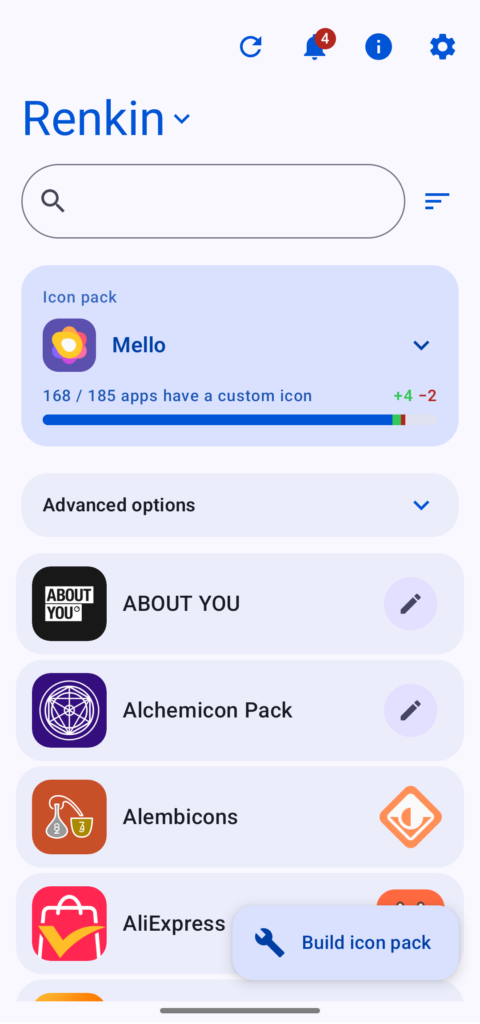
Table of Contents
About Renkin APK
Renkin is an intuitive application designed for users who wish to create and manage custom icon packs right on their smartphones. The app enables individuals to source icons from existing packs installed on their device, giving them a unique opportunity to personify their interface without needing a computer or extensive technical knowledge.
The app's interface is user-friendly, making the process of designing icons simple and straightforward. Users can easily modify various elements of their selected icons, including color schemes, shapes, and even text options, allowing extensive customization right from their device. This functionality enhances the overall look and feel of their Android experience.
With the capability to export themed icon packs that align with Material You design principles, Renkin satisfies both aesthetic and functional needs. It also includes features like profile creation and sharing, letting users keep track of multiple sets of icons and share their designs with others. The app is especially appealing for those looking to express their individuality through technology.
Key Features of Renkin APK
- Users can select icons from any installed icon pack, enabling a vast array of choices for personalizing their designs.
- The app allows for icon modifications through various advanced techniques, such as path tracing, edge detection, and vector editing to refine each icon's appearance.
- Customizing icon shapes is effortless; the app enables users to crop icons into various forms, including circles and pebbles, to fit a preferred aesthetic.
- Users have the option to import their images into the app for each application, enhancing customization with personal graphics that can be rendered sharply.
- The ability to create multiple profiles allows users to maintain distinct icon sets, making it easy to switch between different styles as desired.
- Renkin includes a backup and restore feature ensuring that all profiles and settings can be safely saved and easily recovered if needed.
Renkin APK Information
| App Name | Renkin |
| Package | dev.renkinProject.renkin |
| Version | 2026.11.01 |
| Size | 10 MB |
| Requires | Android 6.0 and up |
| Category | Icon Pack |
| Developer | renkindevbugs |
| License | GPL-3.0-only |
| Source | F-Droid |
| Last Updated | November 6, 2026 |
Download Renkin APK v2026.11.01
How to Install Renkin APK on Android
- Download the Renkin APK file from a reliable source like F-Droid.
- Before installing, go to your phone's settings and allow installations from unknown sources.
- Navigate to your downloads, locate the APK file, and tap on it to initiate the installation process.
- Once the app is installed, open it and begin customizing your icon packs right away.
Pros and Cons
Pros
- The app's user-friendly interface makes it accessible to anyone, regardless of technical expertise, enabling easy customization.
- Renkin offers a vast array of customization options, allowing for detailed personal expression within user interfaces.
- The ability to create and share profiles enhances community engagement, allowing for collaboration and inspiration among users.
Limitations
- Since the app needs to be sideloaded, users may find that updating it manually is necessary as opposed to automatic updates from the Play Store.
- Certain icons from paid packs remain locked until those packs are acquired, which could limit some users' options.
Who Is This App For?
Renkin is ideal for Android users who enjoy customizing their device's appearance and are looking to create unique icon packs that reflect their personal style. It suits tech enthusiasts as well as casual users wanting to enhance their home screen's aesthetic.
Looking for similar apps? Browse more Icon Pack apps or see all Android apps on APK2GO.
Frequently Asked Questions
What does Renkin do?
Renkin allows you to create personalized icon packs by modifying icons from existing packs installed on your device, and it lets you import your images for customization.
Is Renkin free to use?
Yes, Renkin is free to download and use, making it accessible for anyone interested in customizing their Android device's icons.
Where can I download Renkin APK?
You can find and download Renkin APK from trusted platforms like F-Droid, ensuring you get a safe and reliable installation.
Is Renkin safe to use?
The app is safe as long as you download it from reputable sources like F-Droid. Always check permissions and user reviews to assess security further.
How can I create an icon pack using the app?
To create an icon pack, simply select icons from installed packs, modify them as desired, and then compile and sign your new pack directly within the app.
Official page: Renkin official website / source