ReteClock APK Download v0.58.0 (Latest Version) for Android
⬇ Download APK v0.58.0ReteClock APK is a specialized application designed to transform your old Android devices into stylish digital clocks. This app breathes new life into outdated smartphones by utilizing their screens to display time, date, and day information in a simple yet effective manner.
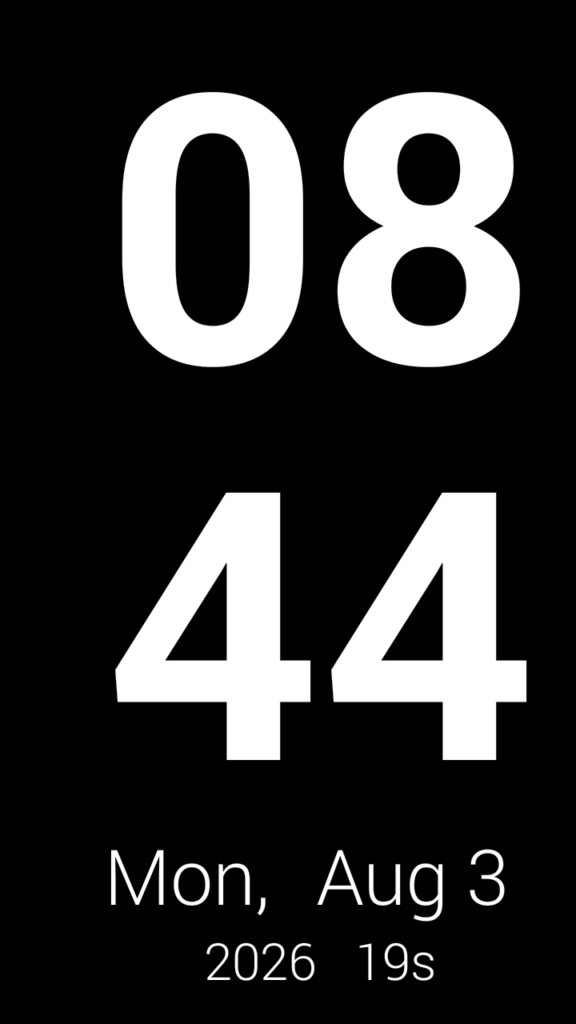
Table of Contents
About ReteClock APK
ReteClock serves as a full-screen digital clock and screensaver, specifically catering to older Android phones that may have limited functionality. By plugging these devices into a charger and placing them on a stand, users can effortlessly showcase the time alongside the day and month on a large display. This utility adds value to devices that are otherwise deemed obsolete.
As many older Android devices face compatibility issues with modern applications and services, ReteClock steps in to fill the gap. For instance, older systems, such as Android 2.3.7, can no longer sign in to Google accounts or access the Google Play Store. Thus, ReteClock offers a straightforward solution, using minimal resources while providing an essential timekeeping function.
This app stands out due to its ease of use, requiring no network connections or user accounts. By simply installing it on a compatible device, users can create a dedicated clock, turning an idle phone into a practical accessory. The minimalistic design and functionality ensure that anyone can effectively utilize it without needing prior technical knowledge.
Key Features of ReteClock APK
- ReteClock displays a large, full-screen clock that shows the time in a 24-hour format, including seconds, along with the day, month, and year.
- It offers two layout options: a wide screen format where the time is prominent on one side, and a tall screen format that stacks the time and date information vertically.
- The app is designed to prioritize space, ensuring the hour and minute display is as large as possible while preserving needed space for the smaller weekday, date, and seconds information.
- ReteClock operates smoothly on older Android versions, specifically from Android 2.3 and above, making it accessible for a vast range of outdated devices.
- It is completely free from any account requirements, meaning users do not need to provide any personal information or connect to the internet to utilize the app.
- ReteClock is built with efficiency in mind, as it requires no runtime permissions or additional configurations to function properly on older smartphones.
ReteClock APK Information
| App Name | ReteClock |
| Package | com.reteclock |
| Version | 0.58.0 |
| Size | 699 KB |
| Requires | Android API level 9 and up |
| Category | Clock |
| Developer | reteclock contributors |
| License | MIT |
| Source | F-Droid |
| Last Updated | October 27, 2026 |
Download ReteClock APK v0.58.0
How to Install ReteClock APK on Android
- Download the ReteClock APK file from a trusted source like F-Droid.
- Before installation, navigate to your device's settings and allow installs from unknown sources.
- Locate the downloaded APK file in your device's file manager and tap on it to start the installation process.
- Once the app is installed, open it to begin configuring your digital clock according to your preferences.
Pros and Cons
Pros
- The app is incredibly easy to set up, transforming an old device into a functional digital clock effortlessly.
- Its minimalist design allows for easy readability, making it perfect for quick glances throughout the day.
- ReteClock requires no internet connection or user accounts, ensuring user privacy and simplicity during use.
Limitations
- Being built for older Android devices, the app may not receive updates, limiting new feature additions or improvements.
- Users may need to manually update the APK when new versions are available since it is not distributed through traditional app stores.
- The app's functionality is limited to displaying time and date, lacking additional features found in more complex clock apps.
Who Is This App For?
ReteClock is ideal for users who have older Android smartphones that are no longer suitable for daily use but can still serve as practical tools for displaying time. It's perfect for anyone looking to repurpose devices creatively.
Looking for similar apps? Browse more Clock apps or see all Android apps on APK2GO.
Frequently Asked Questions
What does ReteClock do?
ReteClock transforms older Android devices into full-screen digital clocks, displaying the time, date, and day clearly and effectively.
Is ReteClock free to use?
Yes, ReteClock is completely free to download and use, as it does not require any payment or subscriptions.
Is ReteClock safe to install?
Yes, provided you download the ReteClock APK from a reputable source like F-Droid, the app is safe and does not request unnecessary permissions.
How can I use ReteClock effectively?
Simply plug in your old device, install ReteClock, and position it on a stand to serve as a convenient and stylish clock.
Can I customize the display?
The app offers two layout options but lacks extensive customization features, focusing instead on functional simplicity.
Official page: ReteClock official website / source