
Reverb APK Download v0.1.3-rc2 (Latest Version) for Android
⬇ Download APK v0.1.3-rc2If you're looking for a versatile audio recording tool, the Reverb APK may be exactly what you need. This innovative app allows users to capture audio seamlessly while retaining a history of recordings for easy access and management.
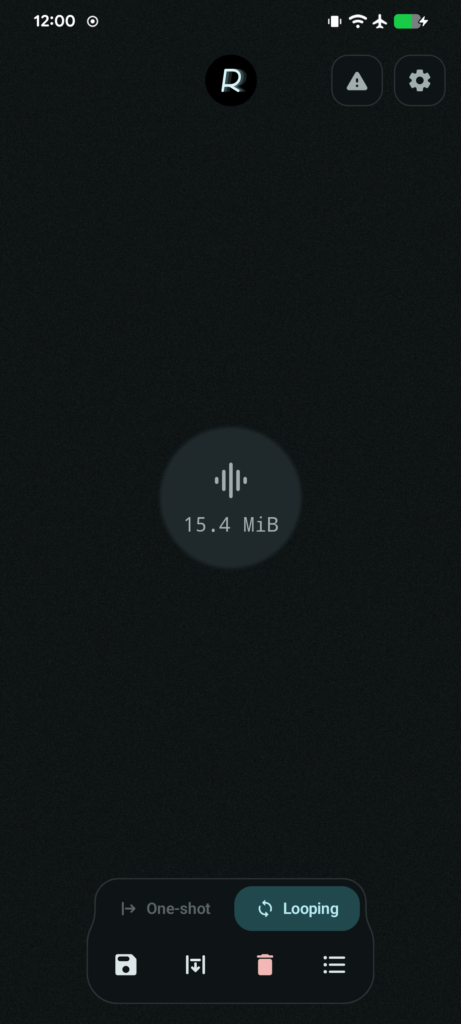
Table of Contents
About Reverb APK
Reverb is an audio recording application designed for Android devices, enabling users to record sound effortlessly. Whether you are a musician, podcaster, or someone simply looking to capture sounds from your environment, this app serves your needs effectively. Its intuitive interface allows for quick audio capture and advanced features to enhance the recording process.
With Reverb, you can utilize both independent one-shot and looping buffers, catering to various recording scenarios. Users can also retrieve recordings across app restarts, thanks to its disk-backed audio history feature. This functionality ensures that you don't lose important audio content when the app is closed, making it reliable for users who depend on consistent performance.
One of the highlights of this app is its ability to export audio selections as WAV files after selecting a range on the waveform. Furthermore, you can fine-tune selections while listening, which is particularly helpful for musicians or sound designers. The app also prioritizes user privacy by not requesting network permissions or including ads, ensuring a smooth and uninterrupted experience.
Key Features of Reverb APK
- Reverb allows for independent one-shot and looping audio buffers, providing flexibility in how recordings are captured and utilized.
- The app boasts a disk-backed audio history that restores recordings even after you restart the application, ensuring you never lose your work.
- Users can set configurable retention limits based on either time or size, helping to manage storage efficiently.
- Recordings can be trimmed, renamed, moved, or deleted with ease, allowing for effective organization within the app's library.
- While the continuous microphone capture feature is active, Reverb is designed to minimize battery consumption, making it suitable for prolonged use.
- You can listen to saved recordings directly within the library, enhancing the app's usability for those reviewing their audio files.
Reverb APK Information
| App Name | Reverb |
| Package | app.smallthingz.reverb |
| Version | 0.1.3-rc2 |
| Size | 2 MB |
| Requires | Android 9 and up |
| Category | Recorder |
| Developer | SmallThingz |
| License | GPL-3.0-only |
| Source | F-Droid |
| Last Updated | November 1, 2026 |
Download Reverb APK v0.1.3-rc2
How to Install Reverb APK on Android
- Download the Reverb APK file from a trusted source, such as F-Droid.
- Before installation, ensure your device allows installs from unknown sources in the settings.
- Tap the downloaded APK file to begin the installation process.
- Once installed, open the app to start capturing audio immediately.
Pros and Cons
Pros
- The app has a user-friendly interface, making it accessible for both beginners and experienced audio professionals.
- With no ads or trackers, users can enjoy a focused experience without interruptions.
- Reverb's ability to manage audio history and settings gives users complete control over their recordings.
Limitations
- Being an open-source solution, users may need to seek updates manually or rely on community support.
- The app's features may be limited compared to some professional-grade recording software that may require a paid subscription.
Who Is This App For?
Reverb is ideal for musicians, podcasters, and sound designers who desire a lightweight and efficient tool for audio recording and management. It also suits hobbyists looking to capture sound without complex setups.
Looking for similar apps? Browse more Recorder apps or see all Android apps on APK2GO.
Frequently Asked Questions
What does the Reverb app do?
Reverb is designed for audio recording, allowing users to capture sound, manage recordings, and export selected audio segments as WAV files. Its features cater to various audio recording needs effectively.
Is Reverb free to use?
Yes, Reverb is free of charge, as it is distributed under the GPL-3.0 license. You can access its features without any subscription or payment requirements.
Is my information safe with Reverb?
Reverb does not request any network permissions, ensuring that user data remains private. The app operates entirely offline, which adds an extra layer of security regarding your recorded audio.
Where can I download Reverb?
You can download Reverb from F-Droid or its official GitHub repository. Ensure that you download from trusted sources for the best experience and security.
How do I use Reverb for recording audio?
To record audio, open the app and use the microphone input feature to capture sound. You can then fine-tune the segments you'd like to keep, ensuring that your final recordings meet your expectations.
Official page: Reverb official website / source