
SayWhen APK Download v3.2.0 (Latest Version) for Android
⬇ Download APK v3.2.0SayWhen APK simplifies event management by allowing users to schedule appointments and reminders using natural language prompts. This innovative app eliminates the need for cumbersome forms and fields, making it effortless to add events directly to your calendar. It is designed for anyone seeking a more intuitive way to organize their daily tasks and commitments.
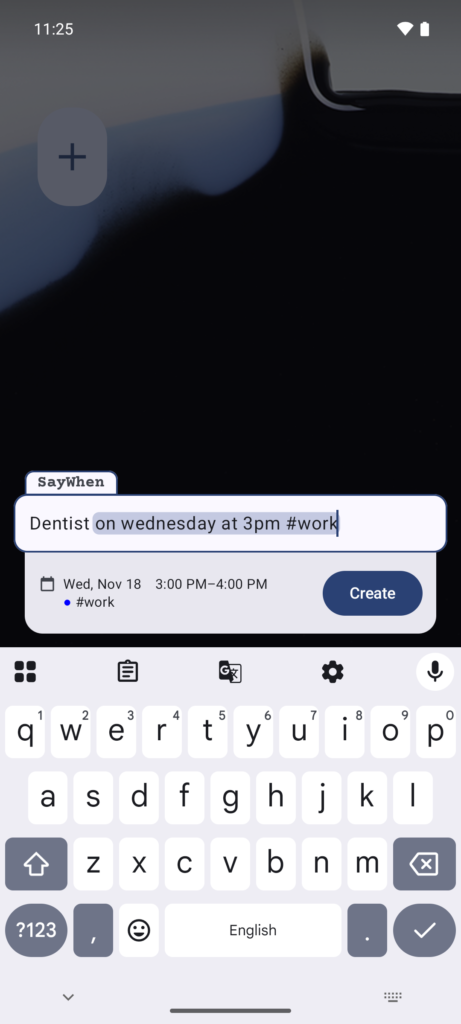
Table of Contents
About SayWhen APK
SayWhen is a unique app that allows users to add events and tasks to their calendars using simple phrases. By just typing what you want in natural language, the app converts it into a structured calendar entry without requiring forms or multiple fields. This functionality proves helpful for anyone who often juggles various activities and needs a quick method to stay organized.
The app supports multiple languages including English, Russian, Italian, Spanish, German, and French, allowing a broader audience to utilize its features comfortably. With its straightforward interface, SayWhen caters to individuals who might find traditional calendar apps cumbersome. The ability to customize entries simply by typing in relatable language makes this app particularly user-friendly.
Moreover, SayWhen integrates with Tasks.org, enabling users to create to-do lists alongside their calendar events. This means you can manage your tasks and appointments all in one place. With its focus on privacy and no network access required, users can enjoy a secure experience handling their scheduling needs.
Key Features of SayWhen APK
- Users can effortlessly input events in the app by typing them in natural phrases like 'Gym every Tuesday and Friday at 9,' and it will accurately parse that information into calendar entries.
- SayWhen provides a live preview of your input, ensuring you see what it understood before finalizing the event, reducing the likelihood of errors in scheduling.
- The application recognizes aliases, allowing users to type customized tags such as #work to categorize events seamlessly across different calendars.
- With the integration of Tasks.org, users can convert phrases into tasks which helps in managing everyday responsibilities without switching between different applications.
- No sign-up process is required, meaning users can begin using the app immediately, making it a go-to option for those who dislike lengthy registration processes.
- SayWhen is constructed to be private, featuring no analytics, identifiers, or network access, ensuring your data remains secure and untracked.
SayWhen APK Information
| App Name | SayWhen |
| Package | com.dmi3dmi3.saywhen |
| Version | 3.2.0 |
| Size | 2 MB |
| Requires | Android 8.0 and up |
| Category | Calendar & Agenda |
| Developer | dmi3dmi3 |
| License | GPL-3.0-only |
| Source | F-Droid |
| Last Updated | November 17, 2026 |
How to Install SayWhen APK on Android
- Download the SayWhen APK from a trusted source like F-Droid.
- Before installation, enable the option to install from unknown sources in your device's settings.
- Once downloaded, tap the APK file to initiate the installation process.
- Follow the prompts to complete the installation and grant any necessary permissions.
- After installation, open the app to start scheduling your events seamlessly.
Pros and Cons
Pros
- The app’s natural language processing allows for quick and intuitive event creation, which is ideal for busy individuals.
- High levels of privacy are maintained through the app's architecture, as it does not require any internet connection.
- Multiple language support broadens accessibility, catering to users from diverse linguistic backgrounds.
- The integration with Tasks.org provides additional functionality, making it a comprehensive tool for both scheduling and task management.
Limitations
- Since the app requires sideloading, users need to be cautious about the sources from which they download the APK.
- The lack of a user account system might limit features such as cloud backup for event data.
- Users may have to manually update the app since it does not connect to an app store for automatic updates.
Who Is This App For?
SayWhen is ideal for individuals who prefer a straightforward approach to managing their calendars without the hassle of complex forms. It's especially suitable for busy professionals, students, or anyone looking to simplify event scheduling.
Looking for similar apps? Browse more Calendar & Agenda apps or see all Android apps on APK2GO.
Frequently Asked Questions
What does SayWhen do?
SayWhen is an app that allows you to add events to your calendar using natural language. Just type what you want, and the app converts it into a structured calendar entry.
Is SayWhen free to use?
Yes, SayWhen is available for free. Users can download it without any costs involved, making it accessible for everyone looking to streamline their scheduling.
Is SayWhen safe and where does the file come from?
The app is considered safe, as it doesn't track user data and doesn't require network access. The file can be obtained from reputable sources like F-Droid to ensure its reliability.
How do I use SayWhen effectively?
To use SayWhen effectively, simply type your event as you would normally say it, ensuring to include relevant details like time and recurrence. The app will handle the formatting for you.
Can I use SayWhen in different languages?
Absolutely! SayWhen supports multiple languages including English, Russian, Spanish, French, Italian, and German, allowing a diverse range of users to interact with the app comfortably.
Official page: SayWhen official website / source