
Scrib APK Download v0.25 (Latest Version) for Android
⬇ Download APK v0.25Scrib APK offers users an impressive way to transcribe voice into text directly on their devices. This means that your audio recordings stay private, never being sent to the cloud. By utilizing advanced open speech models, the app ensures efficient and accurate transcription completely offline.
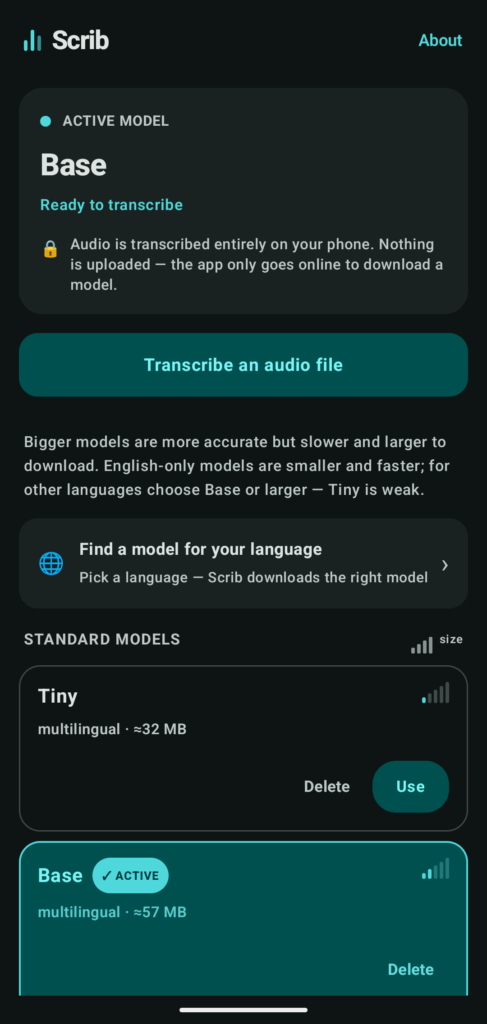
Table of Contents
About Scrib APK
The app is designed for on-device voice transcription, allowing users to convert their audio files into text without needing an internet connection. By processing everything locally, it not only protects user privacy but also guarantees faster results since no data needs to be uploaded or processed remotely.
One of the primary uses of Scrib is to transcribe personal audio recordings. Users can simply select audio files stored on their phones, and the app will generate the corresponding text within moments. This functionality is particularly beneficial for students, journalists, and anyone who processes spoken content into written format regularly.
Additionally, Scrib serves as a transcription engine for compatible applications. By running in the background, it can convert voice messages into text for other apps, like Forkgram. Users can select Scrib as an offline transcriber within those apps, blending convenience with functionality seamlessly.
Key Features of Scrib APK
- The app processes transcription entirely on the device, ensuring a high level of user privacy by keeping audio files stored locally.
- Users can choose from a variety of open speech models for transcription, enhancing the accuracy and speed of the process based on their requirements.
- Scrib allows users to transcribe their audio files by simply picking any file from their device, offering a straightforward interface for ease of use.
- It can function as a background transcription service for other applications, enabling easy conversion of voice messages in compatible apps like Forkgram.
- The app supports multiple transcription models, which users can download based on their preferred language and accuracy needs, facilitating a customized experience.
- Moreover, advanced models can be added through direct links or file imports, expanding the app's functionality for those with specific transcription needs.
Scrib APK Information
| App Name | Scrib |
| Package | org.scrib.transcriber |
| Version | 0.25 |
| Size | 13 MB |
| Requires | Android 8.0 and up |
| Category | Speech Recognizer |
| Developer | 23rd |
| License | GPL-3.0-or-later |
| Source | F-Droid |
| Last Updated | October 31, 2026 |
How to Install Scrib APK on Android
- Download the Scrib APK from a trusted source such as F-Droid or GitHub.
- Before installation, enable 'Allow installs from unknown sources' in your device's settings.
- Tap on the downloaded Scrib APK file to begin the installation process.
- Once installed, open the app to start transcribing your audio files effortlessly.
Pros and Cons
Pros
- Offers complete privacy by ensuring that all processing is done on-device, with no data being uploaded externally.
- Supports a variety of open speech models for accurate transcriptions tailored to different audio types and languages.
- Runs seamlessly in the background, allowing integration with other applications for enhanced usability.
Limitations
- Users must manually update the app by downloading new versions from external sources as it does not have an automated update process.
- Some might find the need to choose and download additional models a bit cumbersome, especially if they're unfamiliar with audio processing.
- The app relies on sideloading, which may feel less convenient for users accustomed to obtaining software directly from the Play Store.
Who Is This App For?
Scrib is ideal for individuals who frequently work with audio content, such as students, journalists, or professionals needing transcription services while ensuring their data remains secure.
Frequently Asked Questions
What does Scrib do?
Scrib is an on-device voice transcription app that transforms audio recordings into text without needing internet access, enhancing privacy and speed.
Is Scrib free to use?
Yes, Scrib is available for free under the GPL-3.0-or-later license, allowing users to take full advantage of its features without any cost.
Where can I download Scrib APK?
The app can be downloaded from trusted repositories like F-Droid or GitHub, ensuring that users receive safe and verified versions.
Is Scrib secure?
Absolutely, all audio processing occurs on-device, meaning that your recordings and any transcription remains private and secure.
How do I use Scrib effectively?
To use Scrib, simply select an audio file from your device within the app, or integrate it with other supported applications, selecting it as your preferred transcription engine.
Official page: Scrib official website / source