
ServerBox APK Download v1.0.1844 (Latest Version) for Android
⬇ Download APK v1.0.1844The ServerBox APK is an essential tool for monitoring and managing various servers, bringing together functionality and convenience in a single app. Designed primarily for system administrators and tech enthusiasts, it supports Linux, BSD, and Windows servers alike, all accessible with ease.
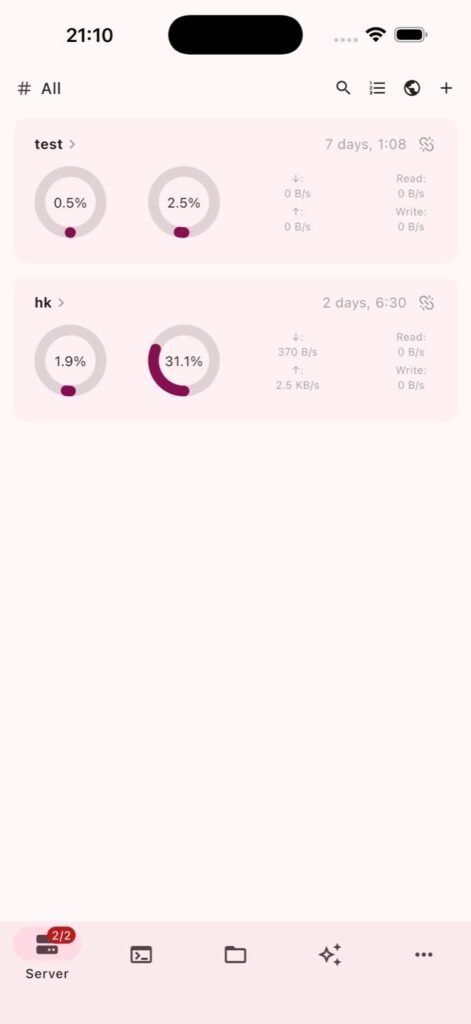
Table of Contents
About ServerBox APK
ServerBox is a versatile application that enables users to oversee and control their servers from various platforms, including Linux, BSD, and Windows. Utilizing both SSH and an HTTP API via the ServerBox Monitor agent, it offers a comprehensive monitoring system for all types of servers. This makes it a great tool for network professionals, developers, and those managing multiple servers in different environments.
With ServerBox, users can visualize their server status through detailed charts monitoring CPU, memory, disk usage, and various other metrics. The application streamlines server management with features like SSH terminal access, file transfers via SFTP or SCP, and even Docker container management. This flexibility helps users maintain optimal server performance while providing a user-friendly interface for easy navigation.
Furthermore, the app includes advanced features such as port forwarding and jump hosts functionality, allowing for secure server access. Users can also benefit from biometric authentication and push notifications, enhancing security while keeping up with important server updates. This app is easily adaptable, supporting multiple languages, which makes it accessible for a wider audience.
Key Features of ServerBox APK
- Users can monitor a wide range of server metrics, including CPU usage, memory consumption, disk capacity, network activity, and temperature, all displayed through intuitive status charts.
- The app offers an SSH terminal equipped with a virtual keyboard, allowing for seamless server management through the terminal while enabling multitasking with a floating window.
- File management is simplified with functionalities for transferring files over SFTP and SCP, even accommodating servers lacking an SFTP subsystem, ensuring flexibility in file handling.
- ServerBox facilitates the management of Docker containers, processes, and systemd services, as well as the ability to execute snippets and custom commands directly on your servers.
- Its benchmarking features allow users to test and compare disk, network, and CPU performance, storing results for later comparison to assess server efficiency over time.
- The app visually represents users' servers on a globe interface, integrating geographical awareness into server management while maintaining user privacy, as no server address leaves the device.
ServerBox APK Information
| App Name | ServerBox |
| Package | tech.lolli.toolbox |
| Version | 1.0.1844 |
| Size | 42 MB |
| Requires | Android 7.0 and up |
| Category | Cloud Storage & File Sync |
| Developer | lollipopkit |
| License | GPL-3.0-only |
| Source | F-Droid |
| Last Updated | November 1, 2026 |
Download ServerBox APK v1.0.1844
How to Install ServerBox APK on Android
- Download the ServerBox APK file from a reputable source.
- Before installation, enable the option to install apps from unknown sources in your device settings.
- Locate the downloaded APK file in your file manager and tap on it to begin the installation process.
- Once installed, open the app and follow the setup prompts to start managing your servers.
Pros and Cons
Pros
- The app's user-friendly interface makes it easy for both novice and experienced users to navigate server management tasks efficiently.
- It supports multiple server platforms, offering a unified experience for users managing diverse environments.
- Advanced security features, such as biometric authentication, add an extra layer of protection for sensitive server access.
Limitations
- Users may need to manually update the app since it typically requires sideloading, which can be a limitation for some.
- Limited documentation might make it challenging for users who are less familiar with server management concepts to fully utilize the app's capabilities.
Who Is This App For?
ServerBox is ideal for system administrators, developers, and tech-savvy individuals looking to efficiently manage and monitor multiple servers across different platforms. It is particularly suited for those who require a powerful toolbox for remote access and control.
Looking for similar apps? Browse more Cloud Storage & File Sync apps or see all Android apps on APK2GO.
Frequently Asked Questions
What does ServerBox do?
ServerBox is an application designed to allow users to monitor and manage servers across various operating systems, including Linux, BSD, and Windows, all from a single interface.
Is ServerBox free?
Yes, ServerBox is available for free under the GPL-3.0 license, making it accessible for users looking for a comprehensive server management tool.
Is ServerBox safe to use?
The app is generally considered safe when downloaded from reputable sources. As it utilizes SSH and other secure methods for server connections, it prioritizes secure interactions.
Where can I download the ServerBox APK?
You can download the ServerBox APK from trusted repositories like F-Droid or the project's GitHub page, ensuring that you're accessing the latest and most secure version.
How do I use ServerBox for server management?
To use ServerBox effectively, connect to your servers via SSH or the app's Monitor agent, and explore its features like status charts, terminal access, and file management tools to monitor and manage your servers efficiently.
Official page: ServerBox official website / source