
Sleep Timer APK Download v1.6.3 (Latest Version) for Android
⬇ Download APK v1.6.3The Sleep Timer APK is designed for those who enjoy falling asleep to music or podcasts. This innovative app allows users to set a timer that gradually reduces audio playback, ensuring a soothing and uninterrupted experience as they drift off into slumber.
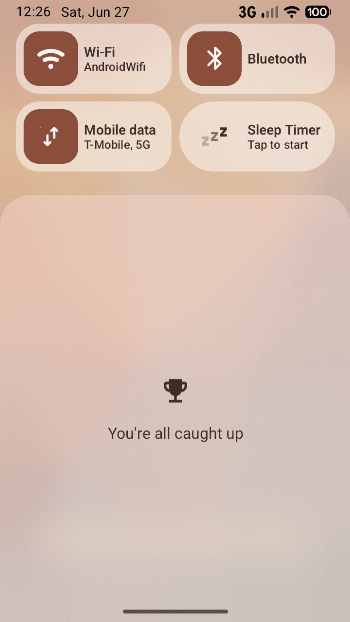
Table of Contents
About Sleep Timer APK
Sleep Timer is a useful tool for individuals seeking to unwind at the end of the day with their favorite tunes or engaging podcasts. It provides a seamless experience by allowing users to listen to audio content until they are ready to sleep. By setting a timer, users can enjoy their listening experience without worrying about it playing all night, making it ideal for creating a restful atmosphere.
The app operates without the need for a traditional launcher icon, which can be a pleasant surprise for users accustomed to looking for app icons on their home screens. Instead, Sleep Timer offers an innovative approach by providing a Quick Settings Tile. This unique feature allows for quick access to the app's functionality, making it easy to set or modify the timer seamlessly whenever needed.
For those who prefer open-source applications, Sleep Timer is hosted on GitHub, ensuring transparency and fostering a community around its development. Users can feel confident in the app’s reliability and may even contribute to its enhancements by checking out the project online. This is a great option for tech enthusiasts who want a customizable and user-driven innovation.
Key Features of Sleep Timer APK
- With Sleep Timer, users can gradually lower the audio playback volume as the timer counts down, creating a gentle transition that eases them into sleep.
- The app allows for quick adjustments to the timer through notification actions, making it easy to extend or cancel the timer without having to reopen the application.
- By integrating directly into the Quick Settings panel, the app offers convenient access without cluttering the home screen, making it a streamlined addition to any Android device.
- Sleep Timer is developed as an open-source project, allowing anyone interested to view its code on GitHub and contributing to its ongoing development if they wish.
- The absence of a standalone launcher icon means that users experience a more simplistic interface, reducing the need for additional navigation within the device.
- The application is compatible with Android 8.0 and above, ensuring that users with relatively newer devices can enjoy its features without complications.
Sleep Timer APK Information
| App Name | Sleep Timer |
| Package | fr.smarquis.sleeptimer |
| Version | 1.6.3 |
| Size | 18 KB |
| Requires | Android 8.0 and up |
| Category | Time |
| Developer | Simon Marquis |
| License | Apache-2.0 |
| Source | IzzyOnDroid |
| Last Updated | July 4, 2026 |
Download Sleep Timer APK v1.6.3
How to Install Sleep Timer APK on Android
- Download the Sleep Timer APK from a trusted source.
- Allow installations from unknown sources in your device settings.
- Locate the downloaded file and tap on it to initiate the installation.
- Follow the on-screen prompts to complete the installation process.
- Open the app from the Quick Settings panel to start using it.
Pros and Cons
Pros
- The app is straightforward and user-friendly, making it perfect for those who may not be tech-savvy.
- Its integration with the Quick Settings panel allows for easy access and functionality without clutter.
- The gradual volume reduction feature enhances the listening experience and aids in better sleep.
- As an open-source project, it provides transparency and the potential for community-driven improvements.
Limitations
- The app requires sideloading since it may not be available on all app stores, which can be tricky for some users.
- There are no additional detailed features mentioned, which may limit options for advanced users looking for extensive functionality.
- Since there is no launcher icon, some users might forget about it or find it hard to locate after installation.
Who Is This App For?
Sleep Timer is well-suited for anyone who enjoys listening to music or podcasts before sleep. It particularly benefits night owls who want to create a calming auditory environment as they wind down for the night.
Looking for similar apps? Browse more Time apps or see all Android apps on APK2GO.
Frequently Asked Questions
What does Sleep Timer do?
Sleep Timer allows users to set a timer that gradually lowers the volume of audio playback, perfect for falling asleep while listening to music or podcasts.
Is it free to use?
Yes, the app is free to download and use, providing a cost-effective solution for anyone looking for a sleep-aid application.
Is Sleep Timer safe to use?
This app is safe to use and is developed as an open-source project, which means users can review its code and contribute to its ongoing development on GitHub.
Where can I download the Sleep Timer APK?
You can download the Sleep Timer APK from reputable sites that host open-source software or directly from its GitHub page.
How do I use Sleep Timer effectively?
To maximize your experience with Sleep Timer, simply set the desired timer length through the Quick Settings Tile and relax while it gradually pauses audio playback.
Official page: Sleep Timer official website / source