
Vulcan APK Download v0.26 (Latest Version) for Android
⬇ Download APK v0.26The Vulcan APK offers users a unique home screen experience that prioritizes privacy and simplicity. Designed for those who want a minimalist interface without reliance on the internet, this launcher is a breath of fresh air for Android users seeking a distraction-free environment.
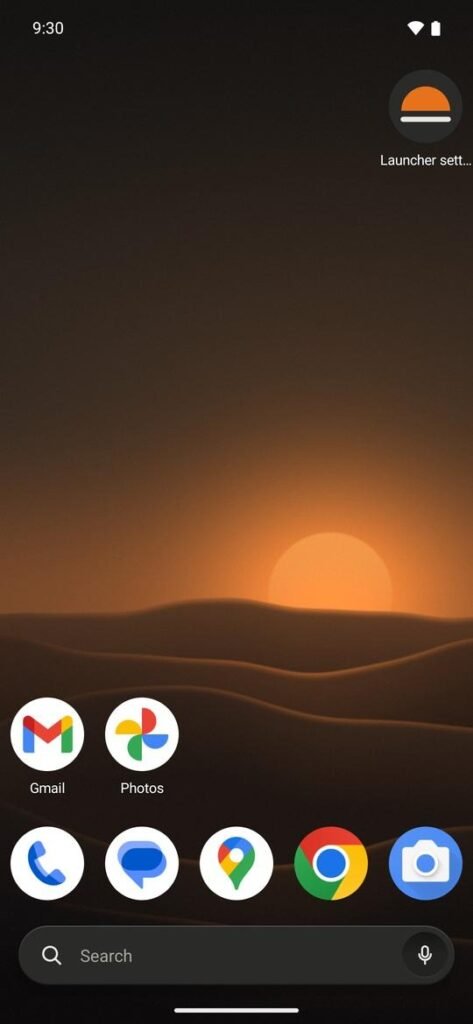
Table of Contents
About Vulcan APK
Vulcan is an innovative launcher for Android devices that brings a plethora of features typically found in popular launchers like Nova. It operates entirely offline, ensuring that your personal information remains private and secure. Users can enjoy a home screen that doesn't depend on internet access, effectively shielding their data from potential trackers and ads.
This app transforms your home screen into a well-crafted interface that resembles a modern appliance. With a no-frills design, it incorporates warm-grey panels, subtle labels, and an easy-to-navigate layout. You have the freedom to customize the interface without modifying your wallpaper or app icons, maintaining a clean look tailored to your taste.
Vulcan empowers users to organize their apps efficiently and access them quickly. With options for arranging home screen grids, interactive widgets, and customizable app drawers, you can personalize your experience. Furthermore, it allows for gestures to streamline interactions, providing a seamless way to navigate through notifications and applications.
Key Features of Vulcan APK
- The app allows users to arrange their home screen in various ways, with grids up to 12 by 12 and the ability to utilize up to 9 pages for better organization.
- It features a comprehensive app drawer complete with an A to Z search bar, letter indexing, and the option to group apps into tabs or folders for easy retrieval.
- Customizability is extensive, letting users change icon packs, explore 15 unique shapes for icons, create their own labels, and select among various folder styles.
- Vulcan supports a variety of gestures, allowing actions such as swiping, double-tapping, or even pinching to open notifications, access apps, or lock the screen effortlessly.
- The home screen can be given a unique appearance with 13 different page transition effects and the option to enable a night mode that adapts to user preferences.
- Long-pressing on any app provides access to shortcuts, notifications, detailed app info, and even an option to uninstall the app directly from the home screen.
Vulcan APK Information
| App Name | Vulcan |
| Package | dev.vulcanlauncher |
| Version | 0.26 |
| Size | 312 KB |
| Requires | Android 8.0 and up |
| Category | Launcher |
| Developer | Krishnanunni R |
| License | MIT |
| Source | F-Droid |
| Last Updated | November 6, 2026 |
How to Install Vulcan APK on Android
- Download the Vulcan APK file from a trusted source like F-Droid.
- Allow installs from unknown sources in your Android settings to enable the installation.
- Tap on the downloaded file and follow the on-screen instructions to install the app.
- Once completed, open the app from your home screen to start customizing your launcher.
Pros and Cons
Pros
- Provides a completely offline experience free from ads and tracking, ensuring user privacy.
- Intuitive design that resembles a modern appliance, offering simplicity without unnecessary distractions.
- Highly customizable with numerous options for layout, gestures, and icon appearances, making it adaptable to individual preferences.
Limitations
- As a sideloaded app, it may require manual updates to access the latest features or fixes.
- The lack of a direct app store presence means it may be less known or supported compared to popular launchers.
Who Is This App For?
Vulcan is ideal for users who prioritize privacy and simplicity while seeking a customizable home screen experience on their Android devices. It suits anyone looking to reduce clutter and enhance their productivity.
Looking for similar apps? Browse more Launcher apps or see all Android apps on APK2GO.
Frequently Asked Questions
What does Vulcan APK do?
Vulcan is a launcher for Android that creates a customizable home screen experience. It eliminates internet reliance, providing users with a streamlined interface free from ads and trackers.
Is Vulcan free to use?
Yes, Vulcan is offered as a free app under an MIT license, allowing users to download and install it without any costs.
Is Vulcan APK safe?
The Vulcan APK can be downloaded from trusted sources like F-Droid, ensuring that users can enjoy a safe installation without concerns over malware or privacy issues.
Can I customize the look of Vulcan?
Absolutely! Vulcan offers numerous options for customization, including different icon packs, shapes, various folder styles, and page transitions to suit your unique taste.
How can I hide apps in Vulcan?
You can easily hide unwanted apps from the app drawer, allowing you to maintain a clutter-free home screen and focus on the applications you use most.
Official page: Vulcan official website / source