WLED APK Download v8.0.0 (Latest Version) for Android
⬇ Download APK v8.0.0The WLED APK is an essential tool for anyone looking to manage various WLED light devices effortlessly from their Android device. This app streamlines the control of your smart lighting setup, enabling a tailored lighting experience to fit your needs.
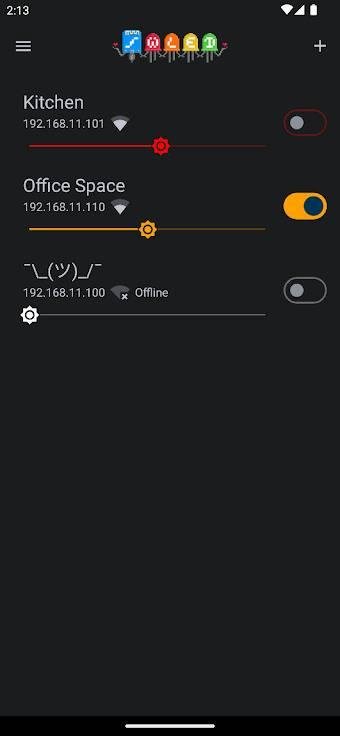
Table of Contents
About WLED APK
WLED is a sophisticated application designed to interface seamlessly with your WLED devices. Users can easily manage and control multiple smart lights through their Android devices, providing greater convenience for everyday use. The app's capability to detect and list devices automatically means users can quickly connect and start customizing their lighting settings.
The application is not only compatible with smartphones but also extends its functionality to tablets, allowing for a broader range of usage scenarios. This makes it perfect for users who want to control their lighting systems from larger screens. The intuitive interface caters to both novice and experienced users, ensuring that everyone can enjoy the benefits of smart lighting.
With its user-friendly features, WLED enhances the lighting control experience by offering customizable names for devices and options to hide or delete unnecessary items from the list. Whether you're adjusting the ambience for a cozy evening at home or creating a vibrant atmosphere for a party, this app can significantly improve your lighting experience.
Key Features of WLED APK
- The app is designed for compatibility with both smartphones and tablets, ensuring that you can manage your WLED devices on larger displays if desired.
- Automatic device detection via mDNS streamlines the setup process, allowing users to quickly and conveniently identify their WLED devices without manual entry.
- Users can organize their lights effectively by assigning custom names to each device, making identification quicker and easier.
- If connected to WLED in Access Point mode, the app instantly opens the control user interface, enabling immediate customization after connection.
- The option to hide or delete devices from the list adds a layer of personalization, allowing for a tailor-fit experience according to your preferences.
- WLED supports both light and dark modes, providing an aesthetically pleasing and comfortable interface for different lighting environments and personal preferences.
WLED APK Information
| App Name | WLED |
| Package | ca.cgagnier.wlednativeandroid |
| Version | 8.0.0 |
| Size | 9 MB |
| Requires | Android 7.0 and up |
| Category | Connectivity |
| Developer | Christophe Gagnier |
| License | Apache-2.0 |
| Source | IzzyOnDroid |
| Last Updated | November 5, 2026 |
How to Install WLED APK on Android
- Download the WLED APK file from a trusted source, such as GitHub.
- Before installation, enable installs from unknown sources in your Android device settings.
- Tap the downloaded APK file to begin the installation process.
- Once installed, open the app to start managing your WLED devices.
- Follow any setup prompts to configure your device connections and controls.
Pros and Cons
Pros
- User-friendly interface suitable for both newcomers and seasoned users, making device management simple.
- Automatic detection of devices saves time and eliminates manual entry errors, enhancing user experience.
- The ability to customize device names and manage visibility adds to personal user preferences.
Limitations
- Users may need to sideload the app, which involves additional steps compared to direct installation from the Play Store.
- The app relies on manual updates, which might require users to periodically check for the latest version.
Who Is This App For?
This application is ideal for smart home enthusiasts and anyone seeking efficient management of their WLED lighting systems. It caters to both individual users and those who manage multiple devices.
Looking for similar apps? Browse more Connectivity apps or see all Android apps on APK2GO.
Frequently Asked Questions
What is the primary use of WLED?
WLED is primarily designed to help users manage and control various WLED light devices effortlessly from Android devices. It allows for easy customizations and adjustments to create the desired ambiance.
Is WLED free to use?
Yes, WLED is offered as a free application, making it accessible for anyone interested in smart lighting solutions without any financial commitment.
Is it safe to download WLED?
WLED can be safely downloaded from trusted sources like GitHub, ensuring users receive a legitimate and secure version of the app for their devices.
How do I connect my WLED lights using the app?
Simply ensure your WLED devices are powered on and connect to the same network as your Android device. The app will automatically detect and display all reachable devices for easy connection.
Can I use WLED on my tablet?
Absolutely! WLED supports tablets, allowing users to enjoy a larger interface while managing their WLED lighting setups.
Official page: WLED official website / source