
WM Keyboard APK Download v0.6.4 (Latest Version) for Android
⬇ Download APK v0.6.4WM Keyboard APK offers users a reliable and secure offline typing solution supporting an impressive array of 955 languages. Designed for Android devices, this keyboard emphasizes privacy and efficiency while providing various customizable features to enhance the typing experience.
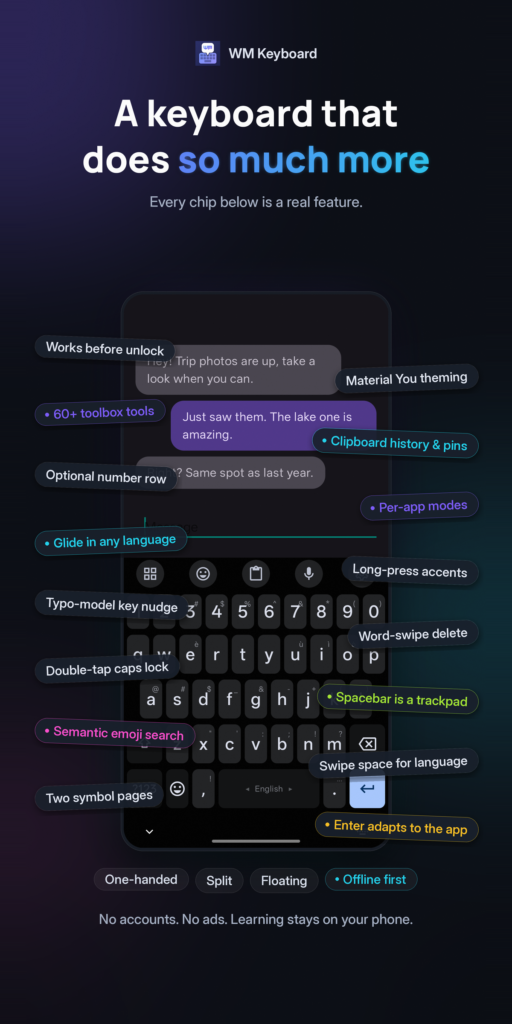
Table of Contents
About WM Keyboard APK
WM Keyboard is a specialized Android app that serves as a private, offline keyboard with extensive language capabilities. With the ability to support 955 languages and over 2,000 layouts, it caters to diverse linguistic needs. Users can enjoy smart typing functionalities while ensuring their data remains on their device, making it a secure choice for communication across different languages without compromising privacy.
One of the remarkable aspects of WM Keyboard is its focus on local processing. The app includes features such as autocorrect, predictive text, and glide typing, which all operate without external servers or analytics. This means that users can type efficiently without worrying about data privacy. Additionally, the app avoids integration with Google libraries, enhancing its independence and safeguarding user information.
The app has distinct functionality that addresses users looking for tailored typing experiences. For example, the app supports phonetic typing for Bengali, allowing users to type in their native script intuitively. It also suggests language options based on the user’s existing phone settings, creating a user-friendly experience from the very first use.
Key Features of WM Keyboard APK
- The app supports an extensive range of native scripts, InScript variants, and romanized entries, allowing users to type in their preferred language easily.
- Smart typing features include autocorrect, glide typing, and intelligent text predictions that help users to compose messages swiftly and accurately.
- With no reliance on external servers and analytics, users can enjoy a safe typing experience knowing that their data remains private on their device.
- WM Keyboard provides a diverse selection of themes and tools, allowing users to customize their keyboard experience to fit their personal preferences.
- The offline capabilities of this keyboard enable seamless usage without requiring an internet connection, making it suitable for those who prioritize privacy.
- Users can utilize emoji search and transliteration to express themselves better, making communication more vibrant and engaging.
WM Keyboard APK Information
| App Name | WM Keyboard |
| Package | com.wasimaster.wmkeyboard |
| Version | 0.6.4 |
| Size | 100 MB |
| Requires | Android 7.0 and up |
| Category | Keyboard & IME |
| Developer | Wasi Master |
| License | MIT |
| Source | F-Droid |
| Last Updated | October 31, 2026 |
Download WM Keyboard APK v0.6.4
How to Install WM Keyboard APK on Android
- Download the WM Keyboard APK from a trusted repository, such as F-Droid.
- Enable installations from unknown sources in your Android device settings to allow the installation of apps outside the Google Play Store.
- Once downloaded, tap on the APK file to start the installation process.
- Follow the on-screen prompts to complete the installation, then open the app to configure your settings.
Pros and Cons
Pros
- Supports an extensive range of languages and keyboards, making it a great choice for multilingual users.
- Emphasizes privacy with its offline capabilities and absence of external analytics or advertising.
- Provides a customizable keyboard experience through various themes and typing tools.
Limitations
- Users might need to sideload the app, as it is not available on the Google Play Store.
- Manual updates may be necessary to ensure the keyboard has the latest features and improvements.
Who Is This App For?
This app is ideal for individuals who value privacy while typing and those who need a versatile keyboard to accommodate multiple languages. It particularly suits users wanting a secure offline typing option without sacrificing functionality.
Looking for similar apps? Browse more Keyboard & IME apps or see all Android apps on APK2GO.
Frequently Asked Questions
What does WM Keyboard do?
WM Keyboard is an offline keyboard app designed to provide a private and efficient typing experience in over 955 languages. It supports various features such as autocorrect, predictive text, and customizable themes for an enhanced user experience.
Is WM Keyboard free to use?
Yes, WM Keyboard is available for free. Users can download and install it without any cost, making it an accessible choice for anyone looking for a secure typing solution.
Is WM Keyboard safe for my device?
The app is designed with privacy in mind, as it performs all computations locally without relying on external servers or analytics. This focus on local data handling enhances the safety of using WM Keyboard on your device.
Where does the WM Keyboard APK come from?
You can download the WM Keyboard APK from reputable sources like F-Droid. Ensure you are obtaining the file from a trusted repository to maintain the integrity and safety of your device.
How does the app enhance typing in Bengali?
WM Keyboard includes phonetic typing support for Bengali, making it easier to type in native script accurately. By allowing variations in spelling, users can input words that match their phonetic pronunciation effortlessly.
Official page: WM Keyboard official website / source