
Ramblr APK Download v1.0.48 (Latest Version) for Android
⬇ Download APK v1.0.48For those seeking an innovative way to dictate texts smoothly, Ramblr APK provides a seamless experience. This app allows users to effortlessly insert dictated text into various applications directly, enhancing productivity and simplifying communication.
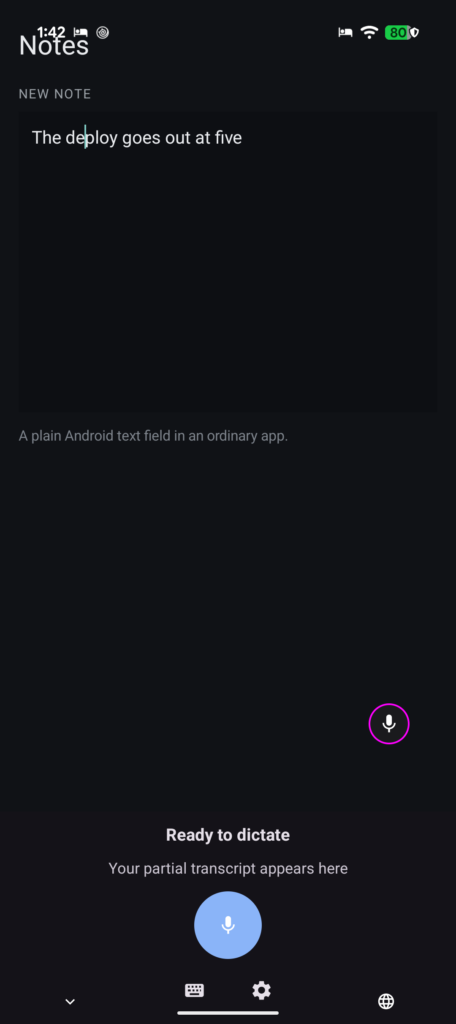
Table of Contents
About Ramblr APK
Ramblr is a unique dictation tool designed for Android devices, making text entry simpler and more efficient. Instead of switching between different apps or modes, users can dictate directly into any field they’re working in, such as messaging platforms or email clients. This app targets those who prefer voice input over typing, providing a cutting-edge solution for hands-free text generation.
One of the most impressive features of Ramblr is its ability to operate offline, allowing users to enjoy uninterrupted dictation whenever necessary. The app offers on-device transcription capabilities, meaning that personal data remains secure and private as it is processed locally. This feature is particularly useful for those who need to work in areas with limited internet connectivity or who are concerned about privacy.
Users can customize the cleanup styles to match their speaking mannerisms, whether they're writing formal emails or casual notes. The flexibility to choose between styles or create personalized formats ensures that the dictated text reads naturally. Ramblr is perfect for professionals, students, or anyone looking to enhance their productivity through efficient voice input.
Key Features of Ramblr APK
- Ramblr floats a single button over other applications, providing easy access to dictate text without needing to switch contexts.
- It allows for instant on-device transcription and cleanup, so users experience quick and natural dictation without delaying.
- The app employs advanced models like OpenAI and Gemini for transcription and cleanup, ensuring high-quality text generation.
- Users can utilize various cleanup styles to format their dictated text to match their intended tone, including Casual, Concise, and Formal.
- It operates offline, delivering full functionality even without an internet connection, reinforcing user privacy and data security.
- Ramblr ensures a seamless dictation experience by eliminating the need for copy-pasting text between different applications.
Ramblr APK Information
| App Name | Ramblr |
| Package | com.trevornk.ramblr |
| Version | 1.0.48 |
| Size | 44 MB |
| Requires | Android 11 and up |
| Category | Keyboard & IME |
| Developer | Trevor NK |
| License | GPL-3.0-only |
| Source | F-Droid |
| Last Updated | October 27, 2026 |
How to Install Ramblr APK on Android
- Download the Ramblr APK file from a trusted source like F-Droid.
- Before installation, allow your Android device to install applications from unknown sources in the settings.
- After the download finishes, locate the APK file in your device’s file manager and tap on it.
- Open the app from your app drawer to start using it for dictation.
Pros and Cons
Pros
- Seamless integration with multiple applications allows for more efficient dictation without interrupting your workflow.
- The offline functionality enhances privacy and enables usability in locations without internet access.
- Customizable cleanup styles ensure that the dictated text retains a natural tone and aligns with user preferences.
Limitations
- Users may need to manually update the app, as it does not provide automatic update features.
- Because the app must be sideloaded, users should be cautious about where they download the APK from to avoid security risks.
Who Is This App For?
Ramblr is ideal for anyone who frequently dictates text, including professionals, students, or individuals who manage multiple communication platforms. It caters especially well to those seeking efficiency in text entry without the constraints of traditional typing.
Looking for similar apps? Browse more Keyboard & IME apps or see all Android apps on APK2GO.
Frequently Asked Questions
What does Ramblr do?
Ramblr is a dictation app that allows users to dictate text directly into various applications without needing to switch between keyboards or modes, streamlining the messaging and writing process.
Is Ramblr free to use?
Yes, Ramblr is available for free as an APK, allowing users to download and utilize its features without any cost involved.
Is Ramblr safe to install?
The app can be safely installed from reputable sources like F-Droid, but users should always ensure to enable security settings for unknown sources with caution.
Can I customize how Ramblr processes my dictation?
Absolutely! The app allows you to select various cleanup styles or create your own, ensuring your dictated text matches your personal communication style.
How can I improve my dictation accuracy with Ramblr?
To enhance dictation accuracy, try to speak clearly and choose a quiet environment. Customizing your cleanup styles can also help in aligning the output with your speaking mannerisms.
Official page: Ramblr official website / source