
Coffee APK Download v1.6.1 (Latest Version) for Android
⬇ Download APK v1.6.1The Coffee APK is a lightweight tool designed to keep your screen awake during crucial moments. If you often find your device's display dimming while reading, navigating, or following recipes, this app may be the perfect solution for you.
About Coffee APK
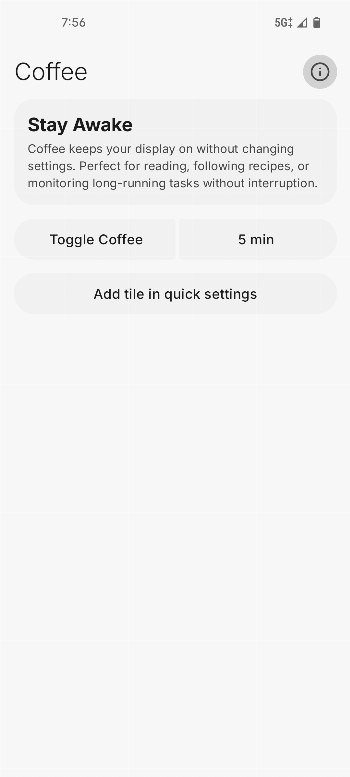
Coffee functions as a practical utility that prevents your screen from dimming or locking. It addresses the common annoyance experienced by users when their devices automatically reduce brightness to conserve battery life at inopportune moments. With this app, you can ensure that your screen stays on when you need it the most.
Many users turn to applications like Coffee for activities such as reading articles, following along with cooking instructions, or using GPS navigation. The app is designed to make these experiences smoother, allowing for uninterrupted visibility without constant screen interaction. This can enhance productivity and make various tasks more manageable.
The simplicity of Coffee lies in its user-friendly interface and functionality. A one-tap toggle allows easy activation of the screen awake feature, eliminating the need to rummage through device settings. It's a straightforward application that serves a specific need without unnecessary complexity.
Key Features of Coffee APK
- The app provides a one-tap Quick Settings tile toggle, enabling users to quickly activate or deactivate the screen awake feature effortlessly without navigating through multiple menus.
- Users can force their screen to stay on for a specific duration with customizable timers, granting flexibility for varied situations according to their preferences.
- Coffee is entirely lightweight and devoid of any advertisements, ensuring a seamless user experience without interruptions or distractions.
- The application employs a foreground service and WAKE_LOCK permission, which are necessary for maintaining screen activity, though this may have implications on battery consumption.
- Its intuitive design ensures that even individuals with minimal technical knowledge can utilize it without a steep learning curve, making it accessible to broader audiences.
- The absence of complex settings makes it ideal for users who value simplicity and direct functionality without unnecessary features.
Coffee APK Information
| App Name | Coffee |
| Package | com.openappslabs.coffee |
| Version | 1.6.1 |
| Size | 4 MB |
| Requires | Android 10 and up |
| Category | System |
| Developer | OpenAppsLabs |
| License | GPL-3.0-only |
| Source | IzzyOnDroid |
| Last Updated | October 28, 2026 |
How to Install Coffee APK on Android
- Visit the app's source repository to download the Coffee APK.
- Before installation, ensure you allow installations from unknown sources in your Android settings.
- After the download completes, tap the Coffee APK file to begin the installation process.
- Once installed, open the app and enable the screen awake feature as needed.
Pros and Cons
Pros
- Offers a straightforward solution to prevent screen dimming during critical tasks without complicated configurations.
- The one-tap toggle feature allows for quick adjustments, enhancing user experience and convenience.
- Being ad-free, it maintains a clean interface that allows users to focus on their tasks without distractions.
Limitations
- The need for a foreground service and WAKE_LOCK may lead to increased battery usage, so users should toggle it off when not required.
- As it is not available through standard app stores, users must sideload the app, which might be a concern for some.
- Limited documentation about the app's intricacies could leave some users with questions about advanced functionalities.
Who Is This App For?
This app is suitable for anyone who frequently engages in activities that require a constant screen display, like reading or navigation enthusiasts, and those who prefer to keep their devices awake for prolonged periods.
Frequently Asked Questions
What does Coffee do?
Coffee is a utility app that prevents your screen from dimming or locking, allowing you to keep your display awake during activities like reading and navigation.
Is Coffee free to use?
Yes, Coffee is available for free, though it may require sideloading as it is not hosted on standard app platforms.
Is Coffee safe to install?
The app comes from a reputable source, being developed by OpenAppsLabs, but it's always wise to review your device's security settings when installing from unknown sources.
How do I use Coffee?
After installing the app, simply toggle the Quick Settings tile to keep your screen awake when needed. Adjust the custom timers if you prefer specific durations.
What are the battery implications of using Coffee?
Since the app uses a foreground service that requires constant power to keep the screen awake, it may cause increased battery consumption. Be sure to disable it when it's no longer necessary.
Official page: Coffee official website / source