App Lock APK Download v2.5.0 (Latest Version) for Android
⬇ Download APK v2.5.0If you are looking to secure your sensitive apps, the App Lock APK is a must-have tool. This application offers high-level biometric protection, ensuring that your personal data remains safe and accessible only to you.
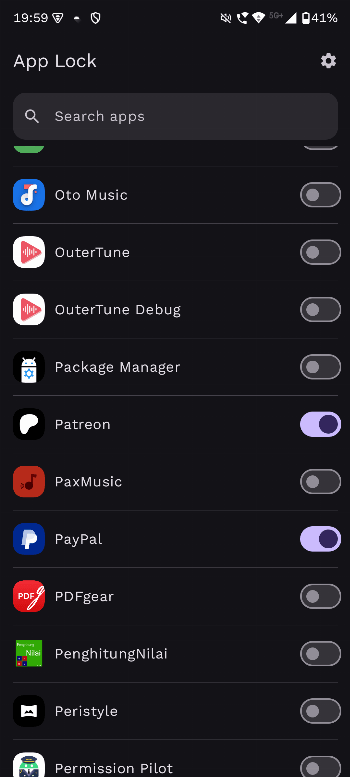
Table of Contents
About App Lock APK
App Lock is a privacy-focused tool designed to protect your apps from unauthorized access. Its powerful biometric security features allow users to lock sensitive applications such as banking, messaging, and social media. By ensuring that only authorized users can access these apps, it helps maintain your privacy and security in an increasingly digital world.
This app is particularly useful for parents who want to limit their children's access to certain applications on their devices. With its easy-to-use interface, users can quickly lock any app, whether it's for gaming or social networking. App Lock empowers users to take control of their device's privacy, offering a simple yet effective way to safeguard personal information.
Designed with a lightweight architecture and efficient performance, App Lock works effectively without draining your device's battery. It does not require rooting your device, making it compatible with a wide range of Android systems. You can enjoy the peace of mind that comes with knowing your sensitive information is protected, all while using an offline application that collects no user data.
Key Features of App Lock APK
- The app boasts a Material You design that adapts seamlessly to your device's system theme, providing a visually appealing user experience.
- It offers biometric unlock capabilities, allowing users to access their apps quickly and securely through methods such as facial recognition or fingerprint scanning.
- An anti-uninstall feature helps prevent unauthorized removal of the app, ensuring that your security settings remain intact even if others attempt to tamper with it.
- Users can set an unlock timer, which allows them to keep selected apps open for a predefined period after they have been unlocked.
- The app works on all devices without requiring root access, broadening its accessibility for a wider range of users.
- With real-time monitoring, App Lock will automatically protect apps as they launch, providing robust security against unauthorized access.
App Lock APK Information
| App Name | App Lock |
| Package | dev.pranav.applock |
| Version | 2.5.0 |
| Size | 2 MB |
| Requires | Android 8.0 and up |
| Category | System |
| Developer | PranavPurwar |
| License | MIT |
| Source | IzzyOnDroid |
| Last Updated | July 7, 2026 |
How to Install App Lock APK on Android
- Download the App Lock APK file from a trusted source.
- Go to your device settings and allow installs from unknown sources.
- Locate the downloaded APK file and tap on it to begin the installation process.
- Once installed, open the app and follow the setup instructions to secure your apps.
Pros and Cons
Pros
- Offers multiple biometric security options, such as fingerprint and face unlock, ensuring fast and convenient access.
- Completely offline operation preserves user privacy and ensures no data is collected or shared.
- Lightweight design gives it minimal impact on device performance and battery life.
- Simple to use interface makes it accessible for a wide variety of users, regardless of technical skill.
Limitations
- It may require manual updates since it is sourced from an external repository.
- Users need to sideload the app, which may not appeal to those unfamiliar with this process.
Who Is This App For?
This app is perfect for privacy-conscious individuals looking to secure their sensitive applications, including parents wanting to restrict children's access and professionals safeguarding work-related data.
Looking for similar apps? Browse more System apps or see all Android apps on APK2GO.
Frequently Asked Questions
What does App Lock do?
App Lock secures your sensitive applications such as banking and messaging by requiring biometric authentication for access. This ensures that only authorized users can open those apps.
Is App Lock free to use?
Yes, App Lock is free to download and use. It does not contain ads or hidden charges, making it accessible for all users.
Is App Lock safe to use?
The app is designed with privacy in mind, operating completely offline without tracking or data collection. It utilizes advanced biometric security to safeguard your apps.
Where can I download the App Lock APK?
You can download the App Lock APK from trusted sources such as GitHub or other reputable app repositories. Ensure you are downloading from a reliable site to avoid any security issues.
How do I set up App Lock for new apps?
To set up App Lock for new applications, open the app and select the apps you want to secure. The app will guide you through the process of locking those applications based on your preferences.
Official page: App Lock official website / source