Baby Touch Lock APK Download v1.0.2 (Latest Version) for Android
⬇ Download APK v1.0.2The Baby Touch Lock APK is a valuable tool for parents who want to protect their devices from accidental touches when their children are watching videos. Designed to ensure uninterrupted viewing, this app offers a simple solution to common distractions that can occur during entertainment time.
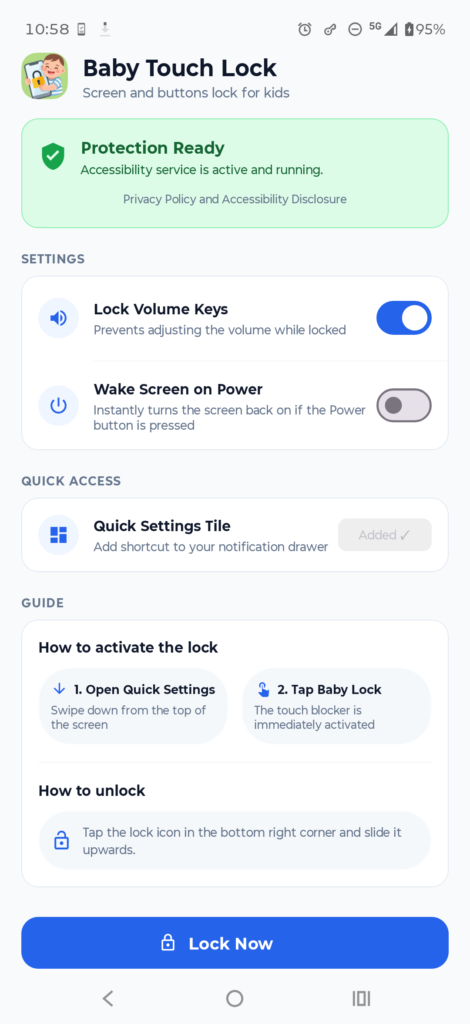
Table of Contents
About Baby Touch Lock APK
Baby Touch Lock serves as an essential parental control application, focused on preventing unintended interactions with mobile devices. By blocking screen touches and navigation gestures, it allows kids to watch videos without interruptions. This app is lightweight and user-friendly, making it ideal for parents who want to safeguard their children’s screen time experience.
The functionality of the app is straightforward yet effective. When activated, it disables access to vital device functions, such as the navigation bar and notification drawer, ensuring that children remain engaged in their content and don’t navigate away inadvertently. This level of control can ease parents' worries while their children enjoy educational or entertaining media.
Designed for offline use, Baby Touch Lock does not require an internet connection, thus eliminating concerns around privacy and data tracking. Parents can rest assured that their child's viewing experience remains private. The intuitive slide-to-unlock functionality is also tailored to be child-friendly, which means even young kids can unlock the screen with ease when it’s time to switch activities.
Key Features of Baby Touch Lock APK
- The app effectively blocks all screen touches and multi-touch inputs, which prevents interruptions while kids enjoy watching videos.
- It safeguards against accidental navigation bar gestures, ensuring that kids cannot inadvertently exit video apps by hitting the Back, Home, or App Switch buttons.
- With Baby Touch Lock, the notification drawer and Quick Settings menu remain off-limits during use, providing a seamless viewing experience.
- An optional feature allows the locking of physical volume keys, providing additional control over device functions when kids are engaged with content.
- Users can take advantage of a convenient Quick Settings tile for activating the lock feature with just one tap, making it easy for parents to put in place.
- The app uses Android's AccessibilityService API exclusively, which means it blocks touch inputs without inspecting or reading any on-screen text or private information.
Baby Touch Lock APK Information
| App Name | Baby Touch Lock |
| Package | com.babytouchlock |
| Version | 1.0.2 |
| Size | 5 MB |
| Requires | Android 8.0 and up |
| Category | Multimedia |
| Developer | dmici |
| License | GPL-3.0-or-later |
| Source | F-Droid |
| Last Updated | November 6, 2026 |
Download Baby Touch Lock APK v1.0.2
How to Install Baby Touch Lock APK on Android
- Download the Baby Touch Lock APK file from a trusted source such as F-Droid.
- Go to your device settings to allow installs from unknown sources for security.
- After downloading, tap the APK file to begin the installation process.
- Once installed, open the app to configure the lock settings according to your preferences.
Pros and Cons
Pros
- The app is lightweight and doesn’t drain device resources, ensuring smooth performance even when active.
- Parents appreciate its offline functionality, eliminating concerns about privacy as no data is collected.
- It features a user-friendly interface designed for quick activation and easy use, even for those unfamiliar with technology.
Limitations
- Manual updates may be required since the app may not automatically update through traditional app stores.
- Being an APK file means it must be sideloaded, which might deter some users who prefer simpler installation methods.
Who Is This App For?
Baby Touch Lock is ideal for parents or guardians seeking to provide a safe and distraction-free environment for their kids while they engage with video content on their devices.
Looking for similar apps? Browse more Multimedia apps or see all Android apps on APK2GO.
Frequently Asked Questions
What is Baby Touch Lock used for?
Baby Touch Lock is designed to prevent accidental touches and gestures on your device, ensuring that children can watch videos without interruptions or unintended exits from their apps.
Is Baby Touch Lock a free app?
Yes, Baby Touch Lock is available for free. It is an open-source app, allowing parents to utilize its features without any cost.
Is it safe to use Baby Touch Lock?
Yes, the app is safe to use as it operates offline and does not require internet permissions, which also means no advertisements or tracking of users.
Where can I download the Baby Touch Lock APK?
You can download the Baby Touch Lock APK from F-Droid, a trusted platform for free and open-source apps.
How do I unlock the app once it's activated?
Unlocking the app is simple; just use the child-friendly slide-to-unlock widget. This intuitive feature allows for easy disengagement after the viewing session.
Official page: Baby Touch Lock official website / source