
SicMu Neo APK Download v2.5.1 (Latest Version) for Android
⬇ Download APK v2.5.1The SicMu Neo APK is a simple yet robust file-based music player that caters to music enthusiasts with extensive libraries. It combines user-friendly features with a lightweight design, making it an excellent choice for managing audio files efficiently. With the ability to support a variety of formats and customizable options, the app enhances the listening experience for all users.
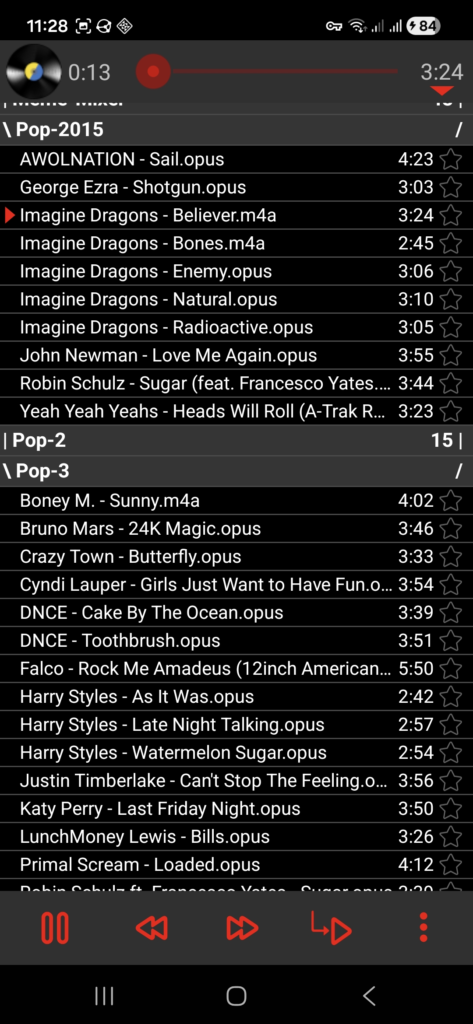
Table of Contents
About SicMu Neo APK
SicMu Neo stands out as a versatile and efficient audio player, designed specifically for users who enjoy organizing music libraries into folders. Its intuitive interface allows for straightforward navigation, making it easy for anyone to access their favorite tracks quickly. This app is an ideal solution for those seeking a reliable way to enjoy their music without the bloat of unnecessary features.
This audio player caters to diverse audio formats, ensuring compatibility with popular files such as MP3, FLAC, and OGG. Its functionality extends beyond basic playback, offering users the ability to group songs by artist, album, or folder structure, allowing for seamless organization of extensive music collections. Additionally, features like audio metadata reading enrich the listening experience with album information.
With various playback options, including shuffle modes and A-B looping, SicMu Neo provides a customizable audio experience. Users can adjust playback speed, set a sleep timer, and even shake their device to skip songs. For music lovers who appreciate visual enhancements, the app allows for advanced album art loading and individual audio output settings, ensuring every session is tailored to the user's preferences.
Key Features of SicMu Neo APK
- The app allows users to group songs either by artist or album, or by the folder structure, enabling efficient access to tracks.
- Multiple shuffle modes and repetition options give listeners control over how they experience their music, including the ability to loop specific sections.
- Users can utilize a shake-to-skip feature, making song transitions exciting with just a simple movement of their device.
- SicMu Neo initiates playback swiftly, even for music libraries that contain over a thousand files, ensuring minimal waiting time.
- Comprehensive audio metadata reading provides users with important details about their music, enhancing the overall listening experience.
- The app supports various color themes, allowing users to customize the interface according to their aesthetic preferences.
SicMu Neo APK Information
| App Name | SicMu Neo |
| Package | xyz.mordorx.sicmu |
| Version | 2.5.1 |
| Size | 2 MB |
| Requires | Android 8.0 and up |
| Category | Local Media Player |
| Developer | Mira Alpmann |
| License | GPL-3.0-only |
| Source | F-Droid |
| Last Updated | November 9, 2026 |
How to Install SicMu Neo APK on Android
- Download the SicMu Neo APK file from a trusted source like F-Droid.
- Before proceeding, enable installs from unknown sources in your device settings.
- Tap on the downloaded APK file to begin the installation process.
- Once installed, open the app and initiate a media scan to make your music library visible.
Pros and Cons
Pros
- Lightweight and user-friendly interface enhances ease of navigation through large music libraries.
- Supports a wide range of audio formats, ensuring versatility in playback options.
- Customizable playback features and visual themes enrich the listening experience.
Limitations
- The app needs to be sideloaded as it is not available on mainstream app stores.
- Manual updates may be required since the app doesn’t support automatic updates directly from the store.
Who Is This App For?
This app is perfect for music enthusiasts who have extensive audio collections and prefer a simple, file-based player that is efficient and customizable.
Looking for similar apps? Browse more Local Media Player apps or see all Android apps on APK2GO.
Frequently Asked Questions
What does SicMu Neo do?
SicMu Neo is a full-featured audio player that manages music files stored on your device, allowing users to play, organize, and customize their listening experience.
Is SicMu Neo free to use?
Yes, SicMu Neo is free to download and use, as it operates under the GPL-3.0-only license, which promotes open-source software.
Where can I download the SicMu Neo APK safely?
You can download the SicMu Neo APK safely from trusted repositories like F-Droid, which specializes in open-source applications for Android.
Is it safe to install SicMu Neo on my device?
Yes, as long as you download the app from authentic sources like F-Droid, it is considered safe. Always ensure your device’s security settings are properly configured.
How do I access my music after installing the app?
After installing SicMu Neo, you may need to perform a media scan within the app's settings to ensure your music appears. This step helps the app to recognize and organize your files correctly.
Official page: SicMu Neo official website / source