
KeepADB APK Download v1.11.0 (Latest Version) for Android
⬇ Download APK v1.11.0The KeepADB APK is a useful tool for Android users who wish to maintain Wireless Debugging functionality even after device reboots or network changes. This app simplifies the process by providing easy access to toggling debugging directly from your device's interface.
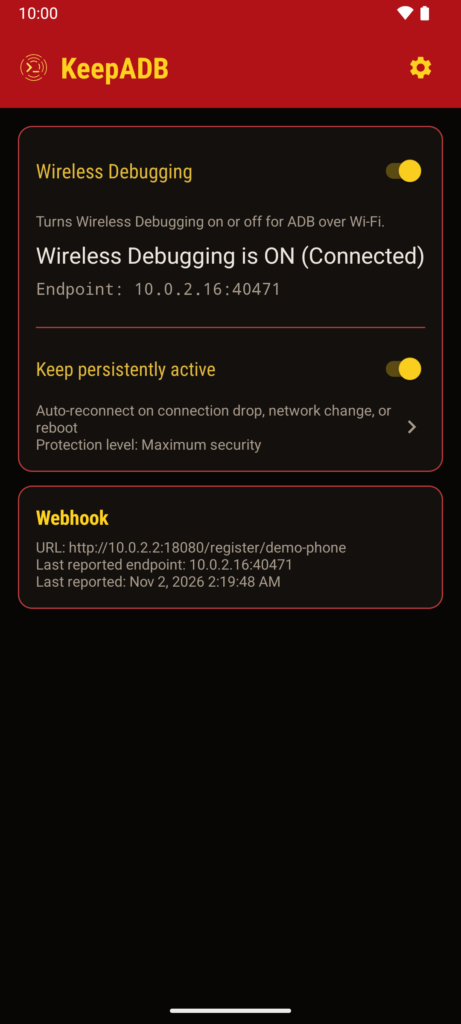
Table of Contents
About KeepADB APK
KeepADB offers a seamless solution for keeping Android's Wireless Debugging feature active across various interruptions. Whether your device undergoes a restart, reconnects to Wi-Fi, or switches access points, this app ensures that the debugging connection remains available during these transitions. Users can enjoy a more straightforward debugging experience without frequent re-enabling.
The app provides an interface that allows toggling Wireless Debugging through Quick Settings tiles or home-screen widgets. By putting control at your fingertips, it becomes much easier to manage device connections. This convenience is particularly beneficial for developers and tech enthusiasts who rely on consistent debugging for their applications.
In addition to enabling Wireless Debugging, KeepADB also features an optional service that monitors connection stability. This service attempts to recover the debugging feature when it is disabled by Android. It offers peace of mind knowing that interruptions won't derail your development work, helping to maintain a productive workflow.
Key Features of KeepADB APK
- The app includes a Quick Settings tile and a home-screen widget, allowing users to toggle Wireless Debugging with ease and convenience.
- A primary interface is provided for straightforward controls, enabling users to manage debugging options from within the app quickly.
- KeepADB can operate an optional foreground service that ensures recovery during restarts and network changes, maintaining continuous connectivity.
- For advanced users, the app supports endpoint discovery through Android NSD/mDNS, with timing dependent on current network conditions to optimize performance.
- An optional HTTP(S) webhook feature is available, letting users specify verified Wifi-ADB endpoints, although this function is disabled by default.
- The app encourages responsible usage by requesting confirmation when enabling Wireless Debugging over Wi-Fi, aiding users in selecting trusted networks.
KeepADB APK Information
| App Name | KeepADB |
| Package | de.hohnepeople.keepadb |
| Version | 1.11.0 |
| Size | 1 MB |
| Requires | Android 11 and up |
| Category | Development |
| Developer | m00sfett |
| License | AGPL-3.0-or-later |
| Source | F-Droid |
| Last Updated | November 6, 2026 |
How to Install KeepADB APK on Android
- Download the KeepADB APK from a trusted source like F-Droid or the project's GitHub page.
- Allow installations from unknown sources in your device settings to enable the app to install properly.
- Open your Downloads folder and tap on the KeepADB APK file to initiate the installation process.
- Follow the on-screen prompts to complete the installation.
- Once installed, open the app to configure and start using its features.
Pros and Cons
Pros
- KeepADB offers a highly convenient way to manage Wireless Debugging without frequent interruptions, enhancing the user experience.
- It provides both user-friendly toggles and advanced features for those who require more control over their debugging environment.
- The monitoring service helps minimize frustration by attempting automatic recovery when the debugging connection is lost.
Limitations
- The app must be sideloaded, which means it isn't available through the Google Play Store, necessitating additional user steps.
- Users may have to deal with manual updates since it is sourced from an open repository rather than a centralized platform like the Play Store.
- Some advanced features, such as the HTTP(S) webhook, are disabled by default and may not be accessible to all users without additional configurations.
Who Is This App For?
KeepADB is particularly suitable for developers, tech-savvy users, and anyone who frequently uses Wireless Debugging on their Android devices. It enhances productivity by simplifying connection management in complicated environments.
Looking for similar apps? Browse more Development apps or see all Android apps on APK2GO.
Frequently Asked Questions
What does KeepADB do?
KeepADB helps maintain Wireless Debugging on your Android device even after restarts or network changes, ensuring continuous functionality for developers and tech enthusiasts.
Is KeepADB free to use?
Yes, the app is available for free and open source under the AGPL-3.0-or-later license, making it accessible to everyone without cost.
Is KeepADB safe to download?
The app is sourced from reputable repositories like F-Droid and GitHub, ensuring safety and authenticity. Always download from trusted sources to avoid potential risks.
How do I use KeepADB?
Upon installation, simply launch the app to enable Wireless Debugging. You can use the Quick Settings tile or home-screen widget to toggle it easily whenever you need.
Can I use KeepADB on public networks?
While you technically can use the app on public networks, it is recommended to only approve Wireless Debugging on private, trusted networks to enhance security and minimize risks.
Official page: KeepADB official website / source